Arturia Beatstep Pro Reviews
Nice sequencer
a great monophonic step sequencer that could be use to control hardware synths,drum machine, vsts or modular.
Very good
Beatstep pro it's an amazing piece of equipment and the fact that it can be used with both daw and hardware it's a big thing. In my case it went like a glove with my workflow, it was really the thing I needed and I was amazed that it offered more than I expected.
A little con to this, you might have a little problem and it took me some time to solve it, you might get an piano sound from the pads, but not from the daw, instead it's from Microsoft Gs Wavetable synth. (Hint for ableton users, if you encounter this, disable all the midi ports for Microsoft Gs Wavetable synth from link midi)
Overall an amazing product, would recommend 100%
Easy to use.
Despite some issues in the beginning with it playing everything in the wrong octave, a quick google set me on the right path. I would advise anyone using something like this for the first time to follow a video on youtube to get an understanding of the features and then go from there. It is relatively easy to use once you know what each of the buttons do and then it is just a case of messing around with it until you can get a handle on what it can do. in terms of the design, I love the look of it and it is a perfectly thin size that is easy to carry while, at the same time, it also feels very sturdy and well built. I also love the lighting scheme they went for with this and the colours make it very easy to distinguish between each separate loop as you go to edit them.
I haven't had any issues with it so far in terms of glitches. The only complaint I have with it is that, in order to plug it in, you need to plug it in to a usb socket and I wish it included the socket and not just the cable.
If someone had told me three years ago that hardware step sequencers were about to become one of the hottest gear trends, I probably would have recommended a good therapist or at least asked what they were drinking. Granted, my crystal ball generally works well when it comes to technology, but the explosion of modern modular rigs is unprecedented by any standard.
Arturia has been ahead of this curve for a while now, and the success of last year?s original BeatStep (reviewed July ?14) has given them some serious insight into what keyboardists and synthesists really want in a performance sequencer. I use the word ?performance? for a specific reason here, because the step sequencer trend doesn?t target composers and producers per se. Instead, it?s targeted at the growing ranks of gigging electronic artists who want to interact with their sequencing tools in real time as they perform or compose. So Arturia has taken their original concept, listened to their users, innovated wildly, and created a live sequencing product that integrates beautifully with almost any rig.
Overview
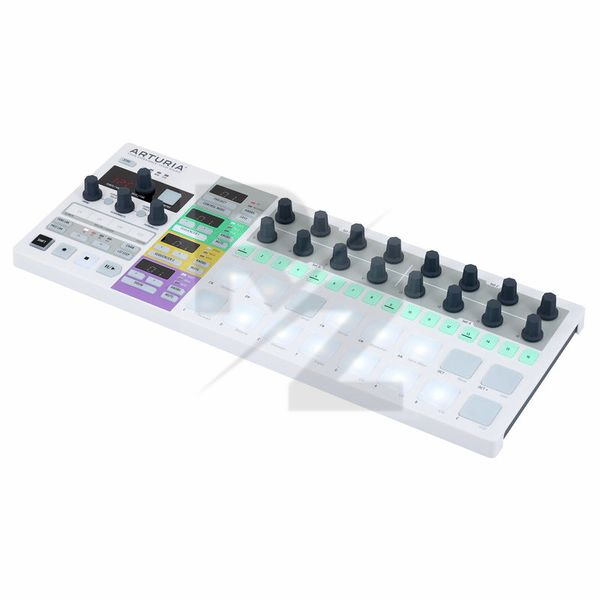
The BeatStep Pro?s design is frankly stunning. The front panel is clearly laid out with multiple LED displays, sixteen backlit pads, a 16-step row for programming, 16 knobs, and an array of parameter buttons that are also backlit, making it easy to see what?s going on even on the dimmest stage or DJ booth. Combined with its metal construction, the whole package inspires confidence in a big way.
In terms of its functionality, the BeatStep Pro is based on three tracks of parallel step sequencers: two for pitch-based sequencing and one tailored for drums. These are organized as 16 projects, with 16 sequences per track, which is ample for most live performance requirements. There are no song construction tools of the sort that would let you chain patterns together into larger memory objects, but that?s not the point of the product, so for most users it won?t be an issue. While the front panel covers all of the essential parameters, including dedicated knobs for tempo and swing, some configuration options?like voltage-per-octave and gate formats?are handled by Arturia?s MIDI Control Center software. While some users may gripe at having to connect the BeatStep Pro to their computer to edit these functions, I greatly prefer it to endless key combinations and cryptic LED indicators.
[BREAK]
Connectivity
The BeatStep Pro?s array of connections covers an astonishing range of interfaces for both drum sequencing and note-based patterns. For the step sequencers, there are voltage outputs for pitch, gate, and velocity. The pitch CVs can operate in either volt-per-octave or Hertz-per-volt mode, allowing them to integrate smoothly with both Moog and Roland gear (and of course, Arturia?s own Brute series of analog synths) as well as Korg?s MS-20, which relies on the less common Hertz-per-volt standard. There are also connections for MIDI and USB, allowing the BeatStep Pro to control MIDI hardware and soft synths, respectively.
Naturally, the drum sequencer also works via MIDI and USB, but in an impressive nod to the growing ranks of modular users, there are also eight voltage gate outputs for direct triggering of analog gear. These can be configured for either the V-trig or S-trig standards via the included software as well. In addition, the BeatStep Pro includes DIN sync compatibility, both in and out, so if you?re a lucky owner of classic Roland gear, you?re covered here.
Step Sequencers
There are two step sequencers for musical riffs, each of which can be configured for different outputs, so you can have one control analog gear via the voltage outputs while the other sends its data to your MIDI hardware. On the voltage side of things, I had no problems using the BeatStep Pro to control my beloved Roland System-1m, Doepfer Dark Energy, and Korg MS-20. In all cases, it performed like a champ.
The sequencing tools are extremely comprehensive, so much so that it required keeping my iPad nearby so I could reference the PDF-based manual as I got up to speed with everything. Once I got the hang of the tools, the sequencer sprang to life. For starters, each sequence can be up to 64 steps in length, with step quantization ranging from quarter-notes to 32nd-notes. There?s also an option for triplets, which many other step sequencers lack.
You can program sequences in real time via the Beatstep Pro?s bank of pads, which illuminate to display a one-octave keyboard. As you enter notes, the X0X-style buttons light up to reflect your sequence, which is a lovely touch. From there, you can keep recording overdubs until you perfect your riff, toggling steps on or off as you go. This approach really invites experimentation, especially in conjunction with the BeatStep Pro?s ability to restrain your note options to specific keys and modes, much like iPad compositional tools or Ableton?s Push controller. What?s more, you can transpose your sequences on the fly, which is great fun, regardless of whether you?re composing or performing.
[BREAK]
Alternately, you can enter your note information directly via the knobs, with the note names mirrored in the LED display, which helps greatly. Here, you can also enter gate duration and velocity info via the knobs to finetune your sequences. The gate duration control is more tailored to voltage-based equipment, since MIDI gear isn?t finicky about trigger length. This is extremely handy for ensuring that the events in your sequence don?t get lost due to gates that are too short. That said, the velocity control is another huge plus when working with modular gear, as it?s essentially a second, parallel set of voltages that can be applied to destinations like filter cutoff or the second oscillator in a hard-sync patch.
Once you?ve got your sequences programmed, the BeatStep Pro?s performance features come into play. In addition to the aforementioned ability to transpose your sequences on the fly, you can change the sequence direction from forward to backward to alternating, all in real time. You can also instantly change the last step of a sequence, allowing you to quickly shift from a half-bar loop to a full measure, or to create interesting polyrhythms with more exotic sequence lengths.
As if that weren?t enough, Arturia also included two unique performance features that really set it apart from the pack. The first is a small ribbon controller that allows you to drop in rolls and stutter effects, with different results based on your finger position and how you slide it along the ribbon. The second is a very cool randomization algorithm that can be fine-tuned via two knobs: one for the degree of randomness and the other for ?Probability,? which determines how often the randomization is applied to your sequence as it cycles. What makes this feature so musical is that fact that the random notes are derived from your sequence, so the effect is always musical and relevant, with no awkward clashes.
Adding to the versatility of these performance options is the ability to apply them to either of the two sequences independently, or linking them, so that they?re tied together as a whole. The only caveat, if you can even call it that, is the fact that it definitely takes some time to get the hang of everything, to ensure that your performances are fluid and seamless.
[BREAK]
Drum Sequencer
The Beatstep Pro?s drum sequencing tools are just as compelling as its dual sequencers and function in a similar manner. Here, you have 16 discrete drum sequences that can be composed in real-time or via the step sequencing row. The output of the sequencer can be assigned to any of the outputs: voltage, MIDI, or USB. Because there are only eight gate outputs for triggering voltage-based gear, you can also use the upper row of pads to control additional drum sources, via either of the other output options.
Eurorack owners will appreciate the copious CV and gate I/O, all on 1/8" jacks along the rear panel.
Image placeholder title
Programming drum sequences is a breezily straightforward process, with no real surprises if you have any previous experience with drum machines. That said, there are several added amenities that allow for really precise control over your grooves. For example, you can use the knobs to dial in exact gates when working with voltage-controlled equipment, an essential for getting accurate triggers.
Specific velocities can also be set via the knobs, which allows for some really detailed hihat and shaker patterns. Finally, the knobs can be used to shift timing offsets for each of the drums on a per-step basis. These shifts deliver some really funky and/or humanizing results, like allowing you to push or pull your snares or claps on the two and four. Kudos to Arturia for their attention to detail on this point, as it really takes the rhythmic feel of the BeatStep Pro up a notch.
As for performance features, you can quickly mute individual drums, with the added bonus that the mute is deactivated on lifting your finger off the button?a huge benefit when it comes to timing. Additionally, the randomization and roll features also apply to the drum grooves, so your patterns can constantly shift and evolve as they cycle. In my tests, this was most effective when set to very small amounts, as the results with more extreme settings can be a little too random.
Performance Control
While the BeatStep Pro?s focus is squarely on sequencing, it also serves double-duty as a flexible control surface, which is a wonderful bonus. In this mode, each of the 16 knobs send out MIDI continuous controller information while the pads send note messages. What?s more, the BeatStep Pro can also perform in accordance to the Mackie HUI protocol. I?m an Ableton Live user, so with my configuration, the two rows of knobs served as level and pan controls, while the step sequencing buttons worked as solo and mute buttons. These can be shifted through your mixer channels in groups of eight, via the left and right buttons on the front panel. Moreover, the BeatStep Pro?s transport controls are also integrated into the system, so you can actually do a lot via this schema without touching your mouse. Good stuff.
[BREAK]
Conclusions
All in all, I was blown away by the value of the Beatstep Pro. For a street price of around $250, you get a trio of incredibly powerful step sequencers that can integrate with pretty much any imaginable rig, real-time performance features that are both impressive and intuitive, and a control surface for your MIDI and DAW needs. As with the best tools, some of these features are easy to learn but tricky to master, but exploring the possibilities is half the fun with a product like this. Whether you?re a live performer looking to add intelligent improvisation to your shows or a modular fanatic in need of additional rhythmic options, Arturia?s BeatStep Pro has you covered.
Snap Judgment
PROS Three performance sequencers with extensive real-time control options. Compatible with a wide variety of interface standards, including CV/gate, MIDI, USB and Roland DIN sync. Also doubles as a control surface with 16 knobs, 16 pads, and Mackie HUI integration. Included software allows for thorough customization. Roadworthy construction.
CONS No printed documentation. No song construction tools.
Bottom Line
A powerful but affordable sequencing nerve center for those who own modular gear.
Inspiring
Having great fun with this, updated to the latest firmware when it arrived. Works perfectly with my ARP, MS20 and System 1m. Looking forward to learning more about what it can do.
Fun and Inspirational
When I bought this controller, my aim was to mainly use the knobs for controlling soft-synths, occasionally using the main features of the step-sequencer.
Playing with it has won me over with the sequencing as the main use. This might be due to the stepped action of the adjustment knobs or just laziness on my part assigning the CC-s to the controls or because it's just so much fun to use.
Build-quality and the design of the instrument is good, all the controls are well laid out. The device is easy to use apart from some secondary functions that take a bit time to figure out, or just check the manual.
The pads work OK for recording a sequence, but for finger drumming I prefer Korg padKontrol. For that I find the pads a bit small, the two row configuration is not as good as the 4x4 of the padkontrol, but this isn't the main purpose of the instrument.
Nice feature is that by touching a knob, the display shows the value of that knob. I also like the various scale and sequence direction options. Only niggle is that "Alternate" playback or forward-reverse repeats the last/first note when changing direction. Would be nice to have the option to not repeat the boundary notes.
Randomization features are also useful to bring some variety to sequences.
Great inspirational tool for live performance or for composing.
Excellent Product
I bought the Arturia Beatstep Pro, as midi controller for my Vermona DRM1.
Since the beginning of the usage, I've felt in love with it. Easy to install efficient, very smart controller.
If you are looking for a midi sequencer, Arturia beatstep it's what you need. You can even use it your analog or even with vst or plugins as midi controller with you daw!
Don't let the bugs put you off to much!
As other reviewers have stated, this unit was released with MANY bugs, with new ones introduced as the fixes came in - however, in the latest firmware it does seems to be much more stable, the CV clock inputs are working now, and the random dropped / triggered notes are a thing of the past (with my unit at least!)
I for one am glad I stuck with it - it is a brilliantly fun unit, very easy to start using and with a lot of powerful options to use. I have recently had this unit powering two CV sources (Dark Energy, and my modular) and a drum machine (MFB-522), in perfect synch with no issues. I have also had the BSP clocked by Pamela's Workout, which was in turn having it's tempo changed by the modular, in part controlled by the outputs of the BSP - so a bit of a controlled feedback loop going on, and it worked brilliantly.
The unit itself is solid feeling, the knobs are nice and firm, the USB connector is a bit weak feeling, but I haven't had any issues with it so far.
So - ignore the nay-sayers and get one, it is well worth putting up with the occasional glitch, which are much less common now anyway.
I am not alone.
I am actually very mad on myself because i didnt checked the forums earlier and i trusted that beatstep hype...
Beatstep pro is VERY buggy!
Fires of randome notes, stops playback, messes with my other gear and plays a synthesizer's sound even if there is not a single note in the sequencer!!
Altough, their general idea is good, they messed this one.
Good controller but to many function and to less button with just one display
To be honest i really like the idea that arturia had with beatstep pro.
It has a lot of functionality, maybe too much for one controller.
It's good but what i really didn't like about it is the fact that you have always to go in submenus to control gate,pitch or velocity and the rotary are endless but u have to follow the number or notes in one little screen.
If u want use more knobs together you can, but u never knows where u are, and the same thing happen with velocity gate and pitch, while u are in some menus u can not move the others and neither know exactly where u are.
U have 2 sequencers for synths and one for drum.
Both works fine for studio session where u can lose yourself endless but not for live jam!
The master clock is also fine and it's easy to set up with everything...
Good stuff but i'd expected at least one little screen each knobs.
Beatstep Pro pro
Great piece of kit, well built and easy to connect up to my modular set up and Logic.
Highly recommended.
great sequencer
Great product with a lot of potential. Controller's quality is very good. The only problem can be a buggy firmware but hope so Arturia will release some improved firmware soon. I didn't test it with CV gear but as midi controller/sequencer it can be a great live performance tool. I experienced some problems with tempo sync and recording latency in Live 9 but as I mentioned it's strictly connected to firmware issue so it should be fine soon:) Definietely recommend.
Great modern sequencer with old school vibe
I had the original Beatstep and used it to trigger my drum machine via midi and to sequence my synth. It was great, especially for such a small price but it has its limitations (no physical MIDI in, no tempo display). Enter the Beatstep Pro and all the things I would wish for are there plus more!
Beatstep Pro is a full featured sequencer with two mono tracks and a drum track, great for synths and drum machines. Recording can be done in real time or in step mode, great stuff!
Additional features like touch sensitive knobs and randomness are really nice. I didn't find the roller/looper to be particularly useful, perhaps certain parts/rhythms will work better than others.
All in all great machine for very reasonable price. If you have hardware synths and drum machines this is almost silly not to get.
Happy with purchase - Using with Moog sub 37, DSI Prophet 08, Reaper and Geist
I've not had my Beatstep pro for long but I can definitely see the potential with it.
So far I have it hooked up to my Moog sub 37 via cv controlling pitch, velocity and gate (NB - needs to 1/4" to 1/8" patch leads for this). CV gate has an option for slides - this can achieve a nice acid glide effect if you're into that sort of thing! I've tested the MIDI out to the Prophet 08 (output from Beatstep Pro sequencer is mono only) and no issues.
I've had some success linking to Reaper DAW via usb though haven't got the tempo sync-ing yet (need to suss the config I guess). I also have the pads and encoders (in control mode) triggering samples and effects in Geist via my Reaper DAW.
The build quality of the item is good. The MIDI software editor (for configuring) seem pretty comprehensive (I managed to accidentally overwrite a sequence early on as I wasn't sure how to utilise it so it takes a bit of time to familiarise with how it operates - still not quite there yet!).
From a sequencing point of view it's very hands on and intuitive. I haven't looked at the manual yet (just a couple of youtube videos) and I have managed to create a couple of sequences without much effort.
I haven't experimented with the drum CV outs much as I don't have a hardware dum machine with CV inputs. I did link one of th drum CV outs to a moogerfooger delay pedal which has CV in and managed to use this to control the delay time.
All in all I can see this being a very useful tool for hands-on idea generation / live work and so far am happy with the purchase.
NB - I chose 4 stars for sound as it was a requirement to fill this in (it produces no sound) so I just went with the average of my other choices!
Technical Data
- Manufactured by Arturia
- Released in 2015
- Average price : $306
You may also like

2023 100%

2023 100%

2023 100%

2023 87%


2023


2023