Behringer UCG102
USB Interface
Latest User Reviews
Good enough
It's a lot tinier than I thought it would be. The software it comes with is outdated, so you might want to look up those drivers online before using it. I use it with the free version of Guitar Rig 6. When I play, it produces some clicking noises, regardless of how loud I play. I tried it with two different guitars. But overall, I think it's worth the price and it does what it promises well enough.
Great value for the price
I had some doubts because so many people reported issues with usage with Windows 10. I founded no issues whatsoever. It runs right out of the box, plug and play. All I had to do is to install newest ASIO4all driver from the official manufacturer's page. Currently in beta but working fine. It's easy to connect to you favorite DAW software like Reaper and to record or monitor from multiple devices. For example I use PC USB headset not output on the device itself and it's great. No latency no nothing. You can set up as many of the output devices as you wish in ASIO, you just need to open advanced settings.
Product is made of plastic but it feels very sturdy. For home usage and hobby players, more than sufficient in my opinion.
There is only one thing that bothers me and that's the background noise from the device. You can hear humming/hissing noise all the time. This is easily fixed in the amp simulation or DAW software by applying noise reduction or noise gate effect at the start of the signal chain.
All in all, I'm more than happy with the purchase and can recommend the product to all amateur, hobby players for home usage.
Good option for beginners
It is an affordable and simple option to connect your guitar to pc via USB.
PROS:
- Easy to connect and to bring to you wherever you want, because it's compact and lightweight.
- It comes with free guitar amp plugins.
CONS:
- Only allows you to connect one instrument at a time.
- Has no XLR input compared to other USB Audio Interfaces.
Good, not great, but not bad.
Used it with Ubuntu 18.04, for which you don't need drivers. Plug and play with JACK and ToneLib.
It's good enough for occasional playing through an amp simulator. ToneLib in this case worked very nicely.
Sometimes (not very often) the sound would cut out and interface would start buzzing loudly, JACK would freeze.
Usually, it was just noisy. Loud hum with static is heard. However that's because of bad quality cable, single coils, and un-shielded strat. Combined with a cheap interface, it has to be noisy! Software noise gate helped a lot with that.
To try and address the problem, I returned it and will try something better, like UMC202HD. Also, I will order a better cable.
More than satisfactory
Always in the pocket, it is the simplest solution and not least efficient to always have the possibility of using audio software.
I would never part with it
Good but really basic
Good for jamming with your pc in a casual situation. I would not buy it everyday use or recording
Outdated drivers, needs some tweaking to let it work properly
I was looking for a way to record directly on my computer and after evaluating some of the solutions I decided to try this one. The UCG102 is almost an external cheap sound card. Def. I'm not quite impressed about it, It's ok if you need a cheap way to record, but I'm disappointed with latency and some weird stuff it happens sometimes.
I will write a sort of how-to-do based on my experience (1 Win 8.1 64bit machine and 1 OSX El Capitan machine).
First of all, wait before installing any of the software inside the cd. Download ASIO4ALL drivers (google will do the job). Then, if you already have a software like GuitarRig you can go with that. and skip this part. If not. You can install (there's a Zip file) the AC BOX Combo (the only one provided with a serial number). After installing AC BOX Combo do not install the Service Center software (go to native instruments website and download an updated version of it, install the Service Center. Now launch AC Box Combo, you will be prompted to register it, use it for 30 minutes in demo version or purchase it. Register it, the service center will let you create an username and you can registered the copy of AC Box with the code provided with the CD. If you want also Audacity software, go and install it from the audacity website. Don't touch the drivers files... they are made when win98 was still used... so...
Now you can connect the USB cable to the PC. It will be probably recognized as "USB device" or similar. Depending on the software you have you'll need to select the drivers to use. Select ASIO. I won't describe the full operation but, in ASIO configuration, you should look at the input and the output. The input should be the USB Behringer you've connected previously select it carefully, connect the guitar and slowly raise the volume. BEFORE playing with amp and volume, gain, distorsion virtual knobs and so on, try to obtain a clean and decent volume sound from the guitar. Try also to record it to see if both the recording part is ok. I suggest this because you can really blow your ears off if something is wrong and you raise the volume.
Very good features for the price
It's not a PRO interface, of course, but when I bought it I wanted a very cheap and portable option for a guitar interface, mainly because since I had a laptop with PodFarm I didn't want to spend in a guitar amp.
It's actually almost perfect for that task!
Pretty good value for the money. Latency is decent, although it doesn't want to go below a certain latency (sound drops completely). But I guess it might be I need more power in the laptop. The drivers could probably be updated a bit, as they might be the biggest bottleneck, rather than the hardware itself. Very good that you can switch between HI and Low Gain.
Brilliant peice of kit
After months and months of struggling using a microphone or a rocksmith cable I decided to try this behringer to record my guitars on my pc. I have to say for the price I was quite doubtful as to the quality and upon opening the box and feeling the cheap plasticy feel of it I wasn't further disheartened.
This soon dissipated after installation was complete. I ran the demo of one of the guitar amp packages and was instantly blown away. The preset was on English Punk and boy it was perfect.
I read one review saying how somebody struggled fitting their headphones and guitar lead in at the same time, I can see that this could be an issue for those with the larger jacks but luckily mine are quite small and fitting with room to spare.
My only downside was I bought this hoping it would be able to record a bass guitar but it really, really can't. All that comes out is squeaks, buzz and hum in varying displeasing levels. Even after 10 minutes of fiddling with every setting you can think of still no joy.
All in all an absolute great piece of kit but don't get it if you want to record your bass guitar.
Behringer UCG102
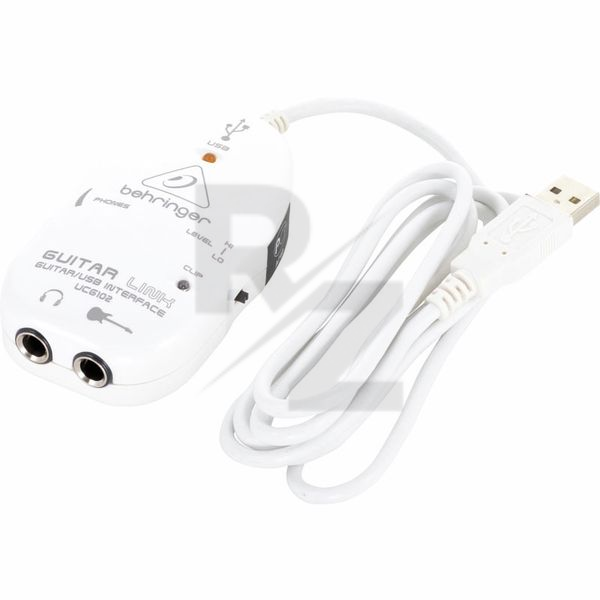
The UCG102 connects a guitar to a computer, PC or Mac (or an iPad) turning it into an amp and recording studio. Its fairly sturdy and you cannot you guitar straight into it with its regular jack (1/4") as well headphones, with the same size jack - so you may need an adaptor. On one side of the Guitar Link there?s a volume level dial which controls volume to the headphones. The other side has a switch to move from Hi to Lo recording levels.
It connects via USB and provides a reasonable sound for home use or amateur recording once you setup the various controls/drivers for sound on the PC. Just watch to minimise the latency to avoid 'delays', that will depend on your computer hardware.
Bundled software comes from Native Instruments thart can mimic effects pedals, amps and records music. Specifically for the amp you can try various modeled sounds from Amp systems that look something like Fender, Vox and Marshall. Included is a licence for one of these, I got the one for 'Vox'. The included recording software is of an introductory level, so you are probbaly better off using the better and popular Audacity. I have to be honest in that so far I have just used it for the amp sounds with headphones for quiet practice anywhere around the house - it beats those cheap little amps that plug into the guitar.
Technical Data
- Manufactured by Behringer
- Released in 2007
- Average price : $35
- Direct connection between an electric guitar and a PC / Mac / iOS device
- Clip LED
- USB LED
- Switch for switching the input sensitivity
- Volume control for headphones
- 1 x Instrument input: 6.3 mm jack
- 1 x Stereo headphone output: 6.3 mm jack
- USB plug
- Power supply via USB
- For PC / Mac as well as iOS devices (optional camera connection kit required, not included in the delivery)
You may also like

2023 100%

2023 100%


2023

2023

2023

2023

2023
