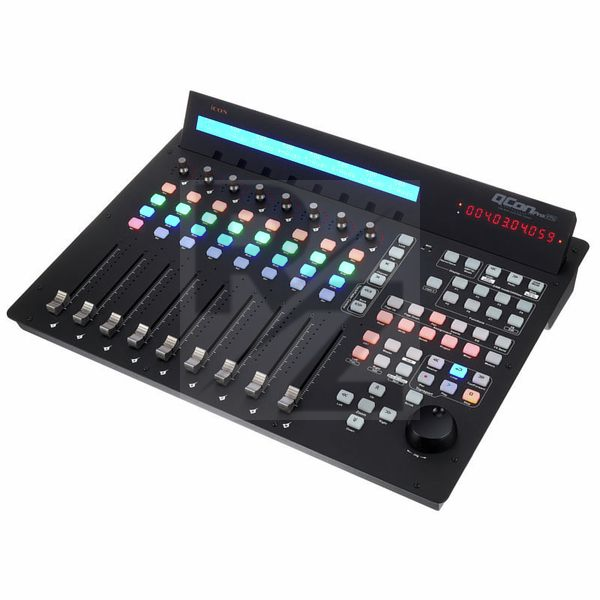
Icon QCon Pro G2
MIDI / Audio User Interface with Motor Faders
Latest User Reviews
Just what I needed make mixing more enjoyable
I bought this control surface to use with Cakewalk by Bandlab in Windows 11.
The unit came with a Sonar button overlay that matches Cakewalk functions. The setup and integration was very fast and very easy. The device was detected by Windows and I was able to add it as a control surface using the Mackie Control template built in to Cakewalk.
The only oddity I have encountered is when using the Pan pots. They sometimes adjust the wrong channels. I was aware that this could happen when I ordered the unit and already knew of a workaround. If you use the "flip" button, the sliders become Pan controls so its easy to set up Pan automation.
Overall this unit is exactly what I needed to make mixing feel more intuitive. I am planning on purchasing the Qcon G2 EX to add 8 more channels of control (even though I can easily shift these 8 channels up or down in each project)
Better Workflow
The quality is okay for the price and it has helped with my workflow in the studio.
Unbeatable
I was advised not to buy Icon products and had really bad experiences from other users (noisy and faulty faders, faulty units, and others).
After spending a long time looking for the "perfect" DAW controller, i was hesitating between SSL UF8 and Mackie MCU. However the UF8 doesn't have any transport section which i needed, and its design is pretty good but not the best. Mackie, on the other hand, has an old design but all the needed transport section, but the LCD screen are famous for going off after 1 or 2 years of use (knowing that i'm working 10 to 14 hours a day in the studio, i couldn't afford that).
I finally went for the Qcon Pro G2, being the only product matching my needs (design + transport section) and estimated that i had nothing to lose trying it even if i expected it to have defaults or issues.
I received it days ago and configured it properly as instructed (faders calibrations, firmware update), and it works perfectly, i never expected that kind of quality for the price : the overall product is really well built and solid, faders are handy and quiet, buttons are also good. The only con would be the plastic panning knobs however it's still not a cheap quality so for that price it's clearly unbeatable and i think that it overcomes its more expansive concurrents.
Result : i ordered an extension unit (EX G2) 2 days after.
Now let's see if these products can stand years without issues, running atleast 10 hours a day but it feel very strong and makes the user confident.
super
nice work and very good product
Icon QCon Pro G2
Icon QCon Pro G2 is an exelent mixer
Amazing Control Surface
This thing is a beast and works amazingly well. controlling both plugins and faders is extremely easy and the functionality works really well.
The overlay doesn't really work with reaper in the mode it is, or i just haven't figured out exactly how to get it working perfectly. with cakewalk and pro tools it works perfectly.
Highly recommended
My only gripe with this machine is that the integration is not as seamless as Icon made it seem. Other wise this is a fantastic control surface
It's good for the price
It's definitely worth the money.
great controller
Had to reinstall a couple of times, but that had more to do with the Logic platform, I think.
Changes your approach to automating things like volume and panning. Not superhandy for changing plugin parameters, but maybe I am missing something...
Still great value for money!
Must Have
This is a must have midi controller for your DAW.
I am using Logic Pro X and everything works as intended.
I have also one extension, but if you are in a budget the main controller is just enough because you can scroll through your tracks with the banks button. This will reaaly enhance and speed up your work flow.
Using it now for a few months and still don't know exactly what to think about it.
It's okay for what I need (mainly using the Transport Section, here and there faders & pans of course and rarely the access to PlugIns/VSTs et cetera).
But it got the same sicknesses as the old Mackie (e.g. faders are way too loud, dangling or stuttering, ...).
Don't know if I'd buy it again.
There are just no real alternatives today, except the old EuCon/AVID Artist Mixes & Artist Transport.
Or a real console.
Technical Data
- Manufactured by Icon
- Released in 2018
- Average price : $587
- 9 Touch-sensitive motor faders for channels and master
- 12-Segment LED level meter per channel
- 8 Encoders with LED ring
- Large, backlit LCD
- Jog wheel with shuttle function for fast navigation and control
- 2x 6.3 mm Jack connections for pedals
- Standard Compliant with Windows XP, Vista (32-bit), Windows 7/8/10 (32 & 64-bit) and Mac OS X (Intel Mac)
- USB 2.0 High-speed port;
- Different DAW Overlays for Cubase / Nuendo, Logic Pro, Digital Performer, FL Studio, Samplitude, Reaper, Studio One, Bitwig, Reason, Pro Tools, Sonar, Audition, Ableton Live and the free assignment by the user
- Can be configured as a user interface with 32 channels by cascading three QCon EX G2s
- Dimensions: 510 x 375 x 136 mm
- Weight : 6365g
- Includes power supply
You may also like

2023 100%


2022 100%

2022 100%

2022 100%

2022 96%

2022 90%

2022 80%

2022