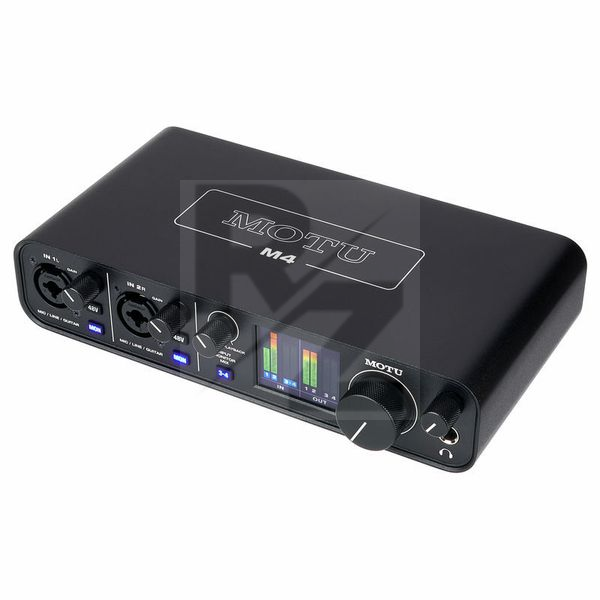
MOTU M4
4-Channel USB C Audio Interface
Latest User Reviews
Good interface, low latency
Very well made interface, good and useful controls from the front panel and the display level indicator is very accurate and responsive. A peak memory indicator would be nice in a future firmware upgrade. The monitor mix potentiometer lacks a very useful center detent. Unfortunately lots of products have gained a 10/15% price increase lately which is now considered normal⦠but this is a no-frill simple audio interface and there is no rocket science inside to justify completely its price against its real value. I appreciate that it works straight away on MacOS and the driver are very fast (starting from 96kHz SR and more) and they donât come with bloatware. MOTU seems to me very serious about respecting artists and they offer bloatware in form of plugins loops and demo software, but if you are already covered, just steer away from it and donât waste time, make music instead!
Flawless sound and build quality, awful screen.
A lot of people complained about issues on Windows, on 11 edition I have encountered no problems whatsoever. Pretty good device, but the screen angles are awful. If you have to rely on interface's meters I do not recommend MOTU. Build and sound quality are flawless.
Great quality for the price!
Great build quality. I like the knobs and the meters looks great. The best in this price range I guess. The sound quality is the main reason I got this one and I am not let down at all. Great sound quality in the output and the headphones preamp also. It worked great plugânâplay straight from the box with my macbook pro, and it seems to be working fine in windows also till now.
Excellent Desktop Interface
The MOTU M4 finds a good balance between portability and durability. Nice solid metal casing with enough ins and outs for location work. The lights on the digital display and on the physical switches allow you to see what functions are enabled at any time. Excellent quality in this price range.
Glitches in Audio
For studio use its amazing, however, in some situations the interface delivers glitchy sound to the computer when other devices are connected via USB (such as a USB microphone or webcam). Seems to be a driver issue. Has ruined a few livestreams and made it difficult to use the device with Discord. So be careful and test for driver issues before hosting anything that matters.
Nothing better in the price range
So much better than my old Steinberg UR22mkII and anything else in this price-range.
I use it for mics and guitars.
I can't recommend it high enough.
Better than some audiophile DACs that cost thousands...
This audio card is a great solution also in case one needs a four channels DAC and its measures are excellent.
unusable drivers for Mac M1
I get crackles and clicks when recording. Tried all possible remedies to no avail.
Very solid , for its price. Thank you
1 year later, Still Amazing
The m4 is definitely worth its price.
Build quality is really good, Encoders feel smooth, buttons clicky and responsive.
The connections aren't wiggly and usb c is perfect.
The outputs are solid too especially have 1/4" jacks for both 1&2 and 3&4 outputs.
Inputs are crisp and low latency, good enough for me to play guitar.
The screens are helpful and the headphone jack drives my headphones very well.
The asio is simple to use as well as the loopback feature.
To use this for music production/podcasts is a no brainer this fits the bill across the board.
My only issue is that loopback, line in (3&4) monitoring, volume knob and headphones all only work through 1&2 output channels. If you use your computer for a multitude of tasks, I imagine gaming or DJing would be under it- I like to route my game audio through my speakers and have voice chat through my headphones and would furthermore like to use my headphone output for cueing when Djing. However you can't have the headphones use 3&4 output channels. I have instead been using 3&4 outputs as my main audio from my computer. This basically means I can't use the volume knob which becomes another unneeded issue to make sure all my software is turned down as, again, I can't control the incoming volume on the m4. It would be good is motu allows users to pick which outputs channels are for monitoring and headphones.
All in all this device is still one of the audio interfaces out there at the moment in its price range and would recommend to anyone.
Technical Data
- Manufactured by MOTU
- Released in 2019
- Average price : $274
- 24-Bit/192 kHz AD/DA converter
- 2 Microphone preamps with individually switchable +48 V phantom power on each
- 2 Line inputs: 6.3 mm XLR/Jack combo (switchable to Hi-Z instrument input)
- 2 Balanced line inputs: 6.3 mm Jack
- 4 Balanced line outputs: 6.3 mm Jack
- 4 Unbalanced outputs: RCA
- Stereo headphone output: 6.3 mm Jack
- MIDI input/output
- Loopback feature
- LCD level meter
- Includes MOTU Performer Lite, Ableton Live Lite, and 6 GB of loops and samples
You may also like

2023 100%

2023 100%


2023

2023

2023

2023

2023
