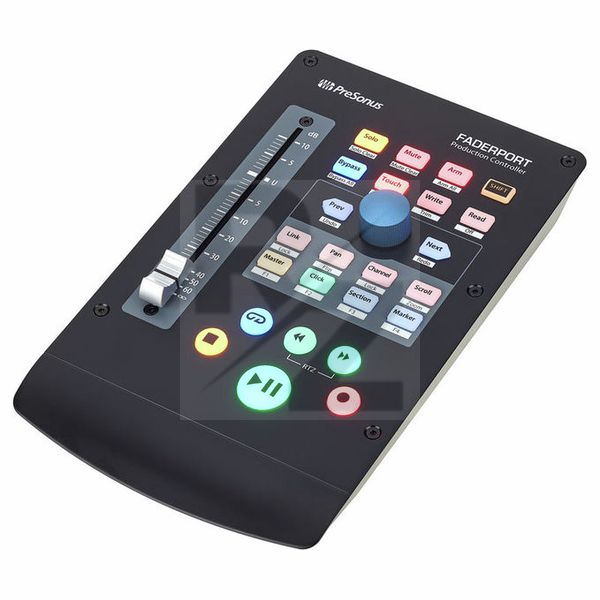
Presonus Faderport V2
DAW Controller with USB 2.0 Port
Latest User Reviews
Great piece of kit
I’m not sure how I managed without this. I’m becoming increasingly wary of just buying gear that I never use but this doesn’t come under that category and it’s worth every penny. The most useful feature is the ability to foot switch the recording mode on while I’m playing/singing. Soooooo useful. If you’re thinking about it, do it, buy one.
It’s good quality and you’ll actually use it.
You won’t be disappointed.
Presonus Faderport V2 with single fader
It was not very straightforward to set it up, I had to do some tricks with it. A motorized fader is cool, but I don't like having an external power supply for this kind of device. The functions are great though and may suit the needs of people who write a lot of automatization.
works fine, good choise
i can say that this controller do the job for a small studio setup!
An awesome gadget
I am really impressed by the build quality and the functionality of the product. Works just perfect with Logic Pro X and speeds up my working process in a beautiful way.
Handy piece of kit
This product speeds up recording multiple takes by not having to keep going back to the mouse every time. The build quality is good, the fader could be a little smoother but for the price it's excellent at what it does
This thing ROCKS literally and figuratively
Just got this thing today and already set it up for my workflow. There is one big problem though that I want to address before I say all the good things: this thing literally rocks. Do you see how the way it tapers down to the bottom part? It also tapers the same way from the bottom up so when I place the ball of my wrist on that seemingly "wrist wrest" area, the whole thing lifts up like how the Titanic would. Acts like some kind of see-saw. This issue is easily solved by NOT putting your wrist on top of the device. Also, by not putting your wrist on top of the device, your fingers now rest perfectly on to the transport controls: thumb on play/pause, index and middle finger on the other buttons.
Also, the shift key would be better placed on the left side rather than on the right side but maybe that's just on me because I use the device on my left side so I have my right hand free to use my mouse. Because of that, my finger does finger yoga all the time.
Anyway, those are the only things negative things that I could say on this device. It's built like a tank, fader feels really nice and smooth, encoder is metal, clicky and tactile. It does a thunk when you press it down which is not satisfying but better than nothing. Buttons all feel very nice too and well illuminated.
I also use Studio One so this thing is not a pain to set up at all. I just attached it to my computer and it's good to go. All the controls working instantly.
Glorified Play and Stop button.
Saying that this is officially compatible with Nuendo/Cubase is a lie.
Fail nr.1:
It doesn't automatically sync with the selected track. This thing works in banks of 8 tracks, switching banks is done manually by pressing the "previous" and "next" buttons, or by rotating the knob, but here's the catch, it doesn't switch groups of 8 tracks, it switches singular tracks... and you can't hold the button so it goes faster... Good luck getting to track 200 of your project.
Funny detail: you can arm or activate writing on any track you click inside or outside of the banked tracks group.
Fail nr.2:
You can't use it for Plugin Parameters, yes, you can't use it for Plugin Parameters. You can use it to change the volume or the panning of one o the banked tracks.
Maybe this thing works great with Studio One, and the build quality is great, but someone needs to get sued over this.
Amazing, but maybe a larger!
I have nothing bad to add on this product, sturdy and besides from the quirk that before first use you need to read the manual to figure out why it's blinking - the documentation says it's preconfigured to run in Studio One mode, but that actually is not the case - you need to select that when it's started the first time. A little confusion and studying the details in the manual solved it really quickly, but I had expected Studio One to be default and run out of the box!
Besides from this tiny detail, it's a really nice controller. I consider getting the Faderport-8 though, to get more of the faders and knobs.
Rocks with Studio One
If you hate using a mouse for everything in your DAW, don’t have the space for a large control surface or need a portable solution, you’re looking at the right device. It’s solidly built, colourful when used in darker environments, its motorised fader great and a must for any serious work, and with the Link button you can even use it for plugins with the rotary knob.
I tried it with Reaper which is doable but finicky. Fortunately it comes with Studio One Artist and it works beautifully with that. The integration is solid: you can control most of the DAW with it.
Must have for Studio One
Must have for Studio One. I use it on a regular basis. No complaints.
Technical Data
- Manufactured by Presonus
- Released in 2018
- Average price : $196
- Touch-sensitive 100 mm motor fader (10-bit resolution, 1024 steps)
- Transport buttons with Start / Pause, Record, Stop, Forwards, Rewind, RTZ and Loop
- Function keys, such as Bypass, Mute, Solo, Automation Touch / Write / Read
- 360 Degree rotary controller
- Buttons for channel, panorama, scroll, click, marker, zoom
- Seamless integration with Studio One
- Footswitch connector
- System requirements: Windows 7 x64 / x86 SP1 or higher, macOS 10.8.5 64-bit or higher, Studio One Support and HUI / Mackie Control Universal Emulation
- Dimensions : 230mm x 45mm x 140mm
- Weight : 0.68kg
- Includes external power supply 12 VDC, 1.2A
- Includes full version Studio One Artist (Download)
You may also like

2023 100%


2022 100%

2022 100%

2022 100%

2022 96%

2022 90%

2022 80%

2022