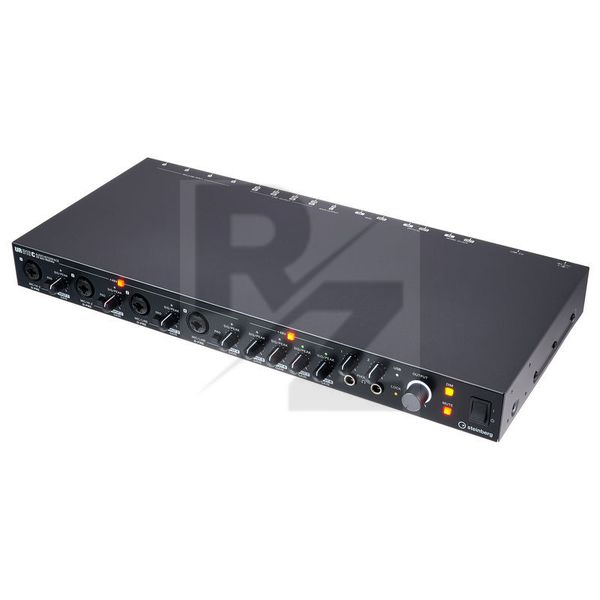
Steinberg UR816C
16 x 16 USB 3.0 Audio Interface with iPad Connectivity
Latest User Reviews
Great soundcard
Great soundcard with low latency, now I connect my triton rack with optical cable as spdif and I have a clicking noise every 5 to 10 seconds I set the internal clock from software to spdif at 48 khz and the noise disappeared.
Almost perfect
It’s a great sound card. My only complaint is that the optical in doesn’t work properly. There’s a clicking noise every 6-7 seconds. Not very happy about it. However at this price tag, there is nothing better.
Steinberg have another great entry to the UR range
I decided on this because my previous interface was also Steinberg, and I knew they had quality interfaces. Needed more I/O though and this provides a decent amount.
Build quality is excellent, everything feels good.
So far have used it in some mixing projects, pretty busy ones with 40-60 tracks including buses and I'm at half the buffer size of the old interface and using slightly less CPU, so happy about that!
Its easy to install, and very well integrated into Cubase as UR28M was but improved now with the C series software.
I got this mainly for using hardware fx as inserts. Its is a little bit fiddly to set up, but once you get it right its flawless.
The manual doesn't mention this at all.
Just need to in DSPmixFx software set the outputs of each Mix 1-4 to the DAW Direct outs 1-8. So Mix 1 (Physical 1L / 1R) will output to 1/2, and so on.
Then when adding your hardware fx you set the output to the DAW Direct number NOT the Mix or physical output. So if you output to fx with physical out 1L then that should be DAW Direct 1. Setting input is easy as the physical inputs are the only ones listed so can't go wrong there!
All in all very happy with my upgrade to this.
Fantastic sound clarity and easy installation
This is a great interface especially with the included CuBase. The setting up could not have been easier with CuBase. Plugged in Moog Sub Phatty to computer and CuBase found it immediately. No messing with settings, drivers etc. The preamps sound great. The build quality is excellent as always with Steinberg.
I use it for home recording
for this price range, this is great interface, easy to use, easy to install, I have it for some time now, signal is just fine, that latency that everyone are weeping about is nonsense, it works like charm, it has so many channels and conectors,even two jakcs for headphones, very friendly and easy software mixer, I still did not find and cons for this. knobs are beautifuly made and almost everything you use heave from your front side, I use Fl studio and works like charm with it, 32-Bit integer / 192 kHz and Recording / Playback Channels 16x16 for this price? omg who ever gave this baby low rate, he should consider it again, Strong advice, guys this is 650 euros huge interface, and it has world clock in case you use it, because why not :D
Technical Data
- Manufactured by Steinberg
- Released in 2019
- Average price : $730
- 32 bit integer / 192 kHz
- 8 Class-A D-PRE microphone preamps with +48 V Phantom power
- Latency-free DSP-supported monitoring with REV-X reverb, Channel
- Strip and Guitar Amp Classics - also included as VST 3 and AU plug-ins
- DIM and MUTE switches on the front panel
- 8 Microphone / Line Combo inputs: XLR / 6.3 mm jack (2x Mic/Hi-Z and 6x Mic/Line)
- 8 Line outputs: 6.3 mm jack
- 2 Main outputs: 6.3 mm jack
- 2 Stereo headphone outputs: 6.3 mm jack
- MIDI input and output
- ADAT/SPDIF input and output optical
- Word clock input and output
- Sturdy metal housing
- Construction: 19" / 1 U
- Dimensions : 446mm x 46mm x 226mm
- Weight : 2.7kg
- Includes power supply, Cubase AI DAW software (download version) for Mac and PC, Cubasis LE DAW app for iPad and Steinberg Plus
You may also like

2023 100%

2023 100%


2023

2023

2023

2023

2023
