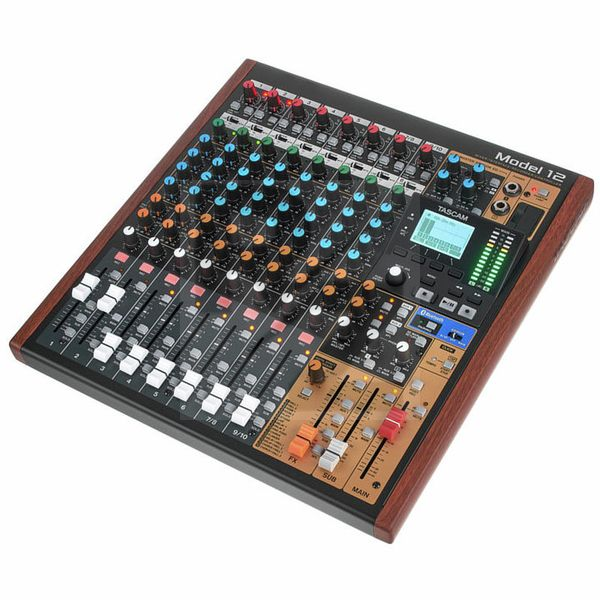
Tascam Model 12
Mixer
Latest User Reviews
Class Compliant Great, But...
I purchased the Model 12 for two big reasons. 1. To use as class compliant gear with my MPC 2. To be a (dawless) home studio mixer and recorder First, the Model 12 works very well with the MPC, being able to create separate tracks from the MPC and then mix each one before recording. I also loved the Tascam's ability to do overdub recording. However, when it came time to mix a couple of hardware synths and vocals for output, the unit's limitations became glaringly obvious. Vocals especially mixed very low, even with gain up to a maximum. In my opinion there is absolutely no way to create a completed recording with the Model 12 without a good deal of time and work in a DAW. While this may not be an issue for some, I personally just don't see the point with owning a mixer with such limitations when it comes to music production. I think this is a good case for 'you get what you pay for', but ask yourself what your expectations and goals are, because apart from natural talent the gear you own and use needs to support where you are trying to get to. And, with that old adage; I did end up switching to an RME audio interface that costs twice as much, but is twice as much and more in superiority. With that said, there are other audio interface options at lower price points that can do the job from manufacturers like Motu, Arturia and SSL to name a few.
Incompetent Windows driver
Seemingly wonderful piece of engineering, being brought down by absolutely incompetent Windows driver which breaks EVERY time the computer goes to sleep, and at least once a day while the computer is actually running. Sometimes crashing the whole computer.
Wow
Couldn't be better, recording machine with soo many options, live band recording, or you can add channel by channel on the same song by yourself vocals guitar etc, then eq and fx, and then save the final mix. or make any combination you can imagine. Save your ideas and send it to other band members or to anyone, Also for other uses that i dont care, like streaming podcast or daw processing/recording . I bought it for use without pc and iam super excited and satisfied!
Nice all-round digital mixer
Nice digital all-round mixer, good for recording (tracking with built-in compressor and EQ), mixing on the mixer or using it as a DAW controller. If it had motorised faders and monitor controller, it would be perfect, but still for the price it is a product currently unmatched in the market so therefore 5/5.
This is amazing!
I absolutely love the Tascam Model 12. I'd been thinking of buying a new audio interface for a while. In looking around I found this. Mixing Desk, Multitrack Recorder, Audio Interface and Daw Controller all in one. I've found it really intuitive to use and all the features are just fantastic. I honestly cannot recommend it highly enough. Really love it. Possibly the best bit of kit ive bought in a very long time.
Good stuff
Good price, good order, came asap thx
Fantastic piece of kit
Great value for money. Not complicated to use. Good instructions
Excellent Recording Equipment
I use this equipment for recording onboard only so I cannot comment on other features such as DAW and live mixing. However, for recording I like the simplicity and the hands on interface. Everything is top quality and very straightforward. I only had to look up a few things in the manual. But as everything, nothing is perfect, so here are a few things I would like improved:
1) The way headphones works for this system is a bit weird, for example, you cannot really use headphones and speakers at the same time.
2) The phantom power is global rather than for individual for each track, so all your recording mics must either support phantom power or not.
3) I find the tempo click works a bit weird.
4) Editing tools is very limited and could be improved a lot.
5) Such a shame volume, pan, Eq etc. each channel isn't saved with the tracls. I know it would be impossible as this mixer use physical knobs and sliders but annoying when you have a many songs recorded.
6) The effect channel is global, so only one effect is available for entire song, would be nice if different effects could be added.
If you can live with the above limitations then this equipment will serve you well. One thing I love is that you can quickly get stuff recorded and if you want it edited you always have the option to transfer it to a computer or simply set it up as a DAW.
Stand-alone recorder and mixer
Bought for both recording and live work, great features and superb sound quality. Have many audio interfaces from Univeral Audio, Audient, Soundcraft and Focusrite but there’s something very tactile and dare I say warm for a digital recorder / mixer.
Good sound for a reasonable price
Good sound for a reasonable price. The only downpoint I could find is that the USB function does not allow you to send all the channels to your DAW.
Technical Data
- Manufactured by Tascam
- Released in 2020
- Average price : $694
- With multi-track recorder, audio interface and DAW control functions
- 10-Channel mixer
- 12-Track recording in WAV/BWF format onto SD/SDHC/SDXC cards up to 128 GB possible
- 44.1 / 48 KHz
- 16 / 24 Bit
- 1-Button compressor for all input channels
- Switchable low-cut
- 3-Band EQ with tunable mids for all mono channels
- Master EQ
- Overdub recording
- Punch-in/out
- Integrated audio interface for 12 channels (10 inputs plus stereo sum)
- LCD display
- 12-Segment LED meter
- Integrated effects processor
- Switchable phantom power +48 V
- Power adapter included
- Dimensions: 343 x 99 x 360 mm (W x H x D)
- Weight : 4.3kg
- 8 x Microphone/Line input combo XLR/jack 6.3 mm (channels 1-6, 7, 9 can be used as instrument inputs)
- 2 x Line output XLR
- 2 x Sub-output 6.3 mm jack
- 2x AUX output: 6.3 mm jack
- 2 x Insert 6.3 mm jack (channel 1 + 2)
- Footswitch input: 6.3 mm jack
- Click output 6.3 mm jack with tap tempo function
- 2x Stereo headphone output: 6.3 mm jack
- MIDI input and output
- USB
You may also like

2023 100%

2023 100%


2023

2023

2023

2023

2023
