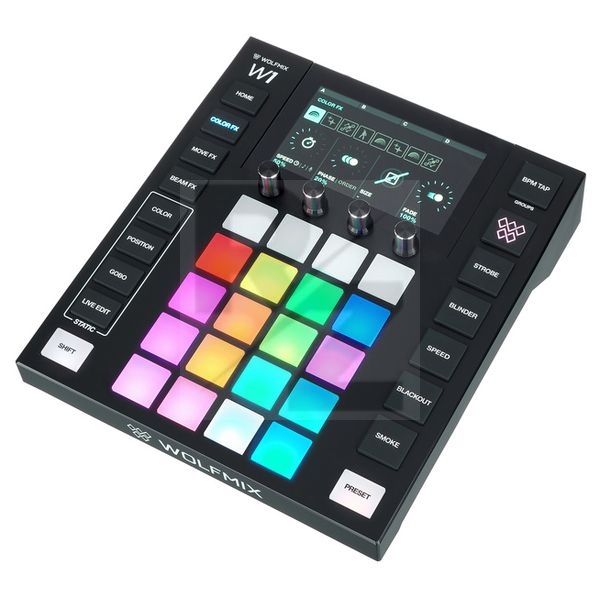
Wolfmix W1
Standalone DMX Controller
Latest User Reviews
wolfmix
leider nicht so alpha wie ich gedacht hatte,
man ist was die Movements der Moving Heads angeht etwas eingeschränkt
(er kann nur hin und her,8, rotieren, und 8 step sequenzer mit der phasing Funktion lässt sich das etwas ausgleichen)
erwarte aber aber auch perfektionistisch perfekte Lightshows.
also Erwartungen etwas runter schrauben.
Verarbeitung (wenn man das gerät auf den kopf stellt hört man und sieht man die Platine 1-2 mm im gerät hoch und runter bewegen - nicht richtig befestigt, was ich erwartet hätte zu dem preis) natürlich tut man das im normalen gebrauch nicht aber trotzdem.
potis hätten auch etwas strapazierfähiger sein können.
hier hat man sich natürlich eher auf die software konzentriert, was mit den herunterladbaren fixtures natürlich ein mega plus Punkt ist!
ihr bekommt einen kleinen computer, unboxing ähnelt einem iPhone
sehr fancy alles.
wenn ihr nur lauflichter programmieren wollt/farbwechsel etc mit paar Par Strahlern perfekt
(zum Beispiel ihr seid eine Veranstaltungstechnik Firma die nicht immer bei kleineren aufträgen zb Gebäude aufleuchten lassen; die grandma mitnehmen wollt - go for it)
derbys usw habe ich noch nicht damit gesteuert.
(alles was kompliziertere Funktionen hat als gobos, rgbw, "statische" movements und Dimmer, überfordert unseren kleinen freund hier)
würde sagen die Idee ist noch nicht zu Ende gedacht
auch die mk2 die bald erscheint hat diese dinge noch nicht verinnerlicht.
was ihr auch bedenken müsst ist dass es ein Performance Controller ist - auflegen und währenddessen hinter euch die Lightshow ein Feuerwerk machen lassen ist nicht leider
ihr müsst jedes mal drücken bevor sich etwas ändert,
was bei der abnormal kurzen Aufmerksamkeits spanne unserer jüngsten Generation kein Vorteil ist.
wer hohe Ansprüche an sein licht hat (und während dessen zu tun hat) sollte lieber auf eine Lösung mit pc und interface zurückgreifen
Light weight well built Wolfmix
It took me a while to understand its workflow From a couple of groups on Facebook it was so simple and with Live edit you can get your lights moving and dancing to your tunes. Ableton link from your DJ controller simply triggers the music and light
Love it!
It was a little tricky to get used to at first, but once I got the hang of this, it's very easy to control and make some seriously wild lighting shows. I'm an amateur still so I never got to use more than one universe at a time, and never tried the super high end consoles, but this is a definite step up from using the simpler fader based dmx controllers.
It's marketed for DJs mostly, but I don't see why you cant use it as a primary controller for any type of show. I only wish there was a way to control it remotely via ipad/laptop.
Quite useful little gaget.
I use it at a venue, where we have permanently installed fixtures and it really does its job well. Super easy to use and almost anyone can set up lights for their event with this controller. It has also saved a couple of shows where the ''real'' lighting desk crashed so the light engineer did a whole concert with this real fella and it looked amazing.
I have 2 small issues with it as well.
1. If you're using a hazer and some fog or CO2 jets, then you don't have dedicated controls for the hazer. Only option is the smoke button which is primarily used for short bursts. I've tried to work around it and save a ''live edit'' button with different intensity of haze but it doesn't work very consistently.
2. If you have more then 8 types of different fixtures ( or you've placed your same type of fixtures to 2 different places i.e same moving head on the stage and up hanging from the truss. then your options will be quite limited, since the controller only has 8 groups that you can assign fx to.
You can always create some static ''live edit'' buttons for any extra fixture groups as well but it's kind of annoying.
Great controller
Very happy with controller, ideal choice for band or mobile djs,one of the simplest controllers to program and perfect for Rental
Just in time a simple and good controller
Ok, i gotta say i'm impressed.
First of all, it arrived a few days before a party i had to do lightings on. Pretty simple setup 4 beams, 2 wash, and around 12 par rgbw.
Well here my toughts:
1. Simple create a new devices
2. Easy effects for beam, moves, colors
3. Easy to create presets and live edits.
4. Ready buttons like strobe, blackout and speed makes all simple.
5. Boot speed is 2 sec.
Cons:
1. Only 10 gobos, colors, positions can be solved by live editings
2. Only 8 groups in total can be assigned
3. Focus on some devices works poorly
4. Lack of "clear" button that sends all to init.
Overall, awesome device. For small gigs, parties it does the job even quicker than ma2.
Very much impressed
I am used to traditional lighting consoles so the wolfmix was a big change for me. But overall it turned out very user friendly (also thanks to the youtube tutorial videos). I programmed in some presets and for DJ sets this works fine. For live performances I have now purchased a separate controller with faders to link with the Wolfmix.
Technical Data
- Manufactured by Wolfmix
- Released in 2021
- Average price : $767
- No computer required
- Compatible with any DMX device
- Up to 4 DMX universes (2048 channels, add-on required for U3+4)
- Up to 680 fixtures and beams
- Up to 50 fixture types
- Up to 5000 fixture properties (colour/gobo etc...)
- 8 Fixture groups
- 6 Projects
- 15000+ available fixtures (3500+ on the controller)
- DMX address
- Fixture order and group settings
- Use as DMX splitter with DMX universe mapping
- Colour FX module with 8 effect types and 16 definable colours
- Move FX module with 8 effect types
- Beam FX module with 8 effect types
- 6 Flash buttons for controlling Special FX, Strobe, Blinder, Speed, Blackout and Smoke
- Static colour palette with 10 user-defined colours per group and gradient control
- Static position palette with 5 user-defined positions per group with fade and fanning
- Gobo palette with 5 user-definable gobos per group
- 20 Nameable live edit buttons with flash trigger mode and 'park' function
- 100 Nameable presets for storing snapshots with hold and fade timings
- Preset playback cue list - all presets or per page of 20 presets
- Group and master dimming with encoder acceleration
- Group FLASH
- FULL and Blackout
- 16-Bit pan/tilt control:multi-beam LED bar control
- FX music pulse synchronisation from microphone or line-in
- FX BPM sync with Ableton Link
- OS2L or BPM Tap effect speed
- Phase, sequence, size, fade, fan and flick
- Live control of Move FX registration point
- Global FX speed and freeze control
- Map DMX IN with group dimmer and patch to output channels (add-on required)
- WLINK sync with another Wolfmix controller (add-on required)
- Fixture Builder
- Fixture calibration tool to limit the range of moving fixtures
- X-Y touch controlled positioning grid
- RGBW touch controlled colour picker
- 8-Step real-time sequencer to create beam and move FX
- Live view of DMX levels with override of default values and DMX channel tester
- Beam editor for overriding min and max values for created effects
- Calibration and RGB, white, amber, UV mixing with automatic translation of fixed colour wheel
- Automatic matching of similar gobos across different fixture types
- Time-controlled triggering of flash and preset buttons
- Fixture FLIP function for beam order reversal
- Fixture SPLIT function for splitting multi-FX bars
- Project and fixture backup with the WTOOLS app
- Offline 3D visualisation with Easy View & WTOOLS via USB (add-on required)
- Automatic restoration of the active project (no manual saving necessary)
- Import different fixture setups into the same project
- Housing: ABS plastic
- Powder-coated steel base plate with 100mm VESA
- Powder-coated, steel-reinforced back plate
- Screen: 4.3" colour TFT with tinted glass
- Capacitive touch
- Hardware: 220 Mhz CPU with ARM core, 8 MB RAM, 16 MB Flash
- Audio: Omnidirectional electret microphone
- 3.5 mm Jack line-in
- DMX: 2 x 3pin DMX OUT XLR connectors
- 1 x 5pin DMX OUT XLR connector
- 1 x 5pin DMX IN/OUT XLR connector with WLINK
- USB-B connector - 900ma required (USB3 rating)
- Dimensions : 195mm x 220mm x 62mm
- Weight : 1070g
You may also like

2023 100%

2023 80%

2023


2023

2023


