GE 200 : I love this thing
If you are buying this multi fx, update the firmware straight away. The update will give you a backup feature, trails for reverb and delay, and a few more fixes. Updating will remove any new presets you created.
My old multi fx started malfunctioning so I had to look for a new one. I came across this and I was pretty much convinced to buy this as soon as I learned that I can load my own IRs (Impulse Responses) onto the unit.
Pros:
Sounds great
Very flexible
Easy to use (both on computer and on the unit itself)
You can upload your own IRs
Build quality is solid
Expression pedal is fully programmable
Cons:
Option paralysis if you don't know what you are doing
Switching between presets takes about 10ms which is noticable in certain situations. (Not a big deal though) ((EDIT:Updating it made it pretty much unnoticable))
Flexibility
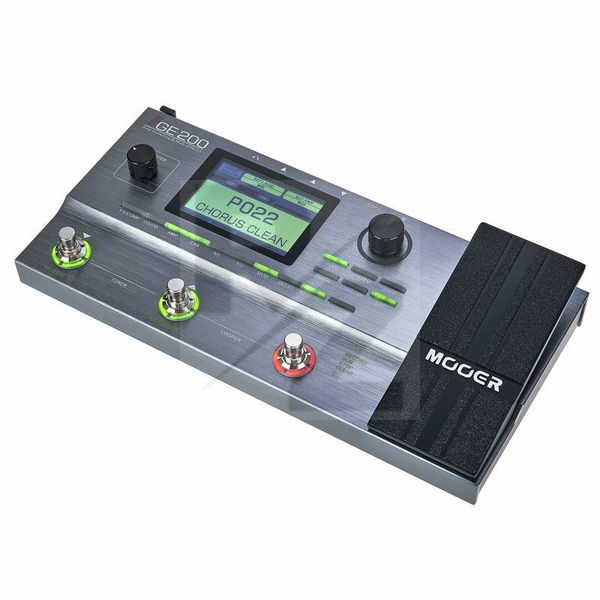
I was surprised by how flexible this thing is. You can even adjust the screen brightness! So how it works is that there are different blocks such as amp, cab, distortion, delay, eq, etc... and in those there are multiple options. There are a lot of amps you can choose from, many different sounding distortion effects and so much more. You can then move these blocks anywhere in the signal chain. You want the echo to be before the amp and you want the wah to be last? Can be done. The only limit is that you can only have one thing from the block activated, so you can't have 2 distortion pedals or two amps on at the same time. Not too big of an issue. The ONLY time where this bothered me is when I tried to have a wah and a compressor on at the same time. That cannot be done because the wahs and the compressors (yes there are multiple different wahs and compressors) are in the same block so I can only have one of them selected. Not the end of the world really.
CTRL and Expression pedal
My favorite thing about this unit is how programmable it is. You have this footswitch called CTRL which allows you to toggle on or off any of the effect blocks (amp, reverb, modulation etc...) as you want. I use it to toggle delay and distortion on or off most of the time.
Now the expression pedal is magical. You can use it for its standard functions such as volume pedal or wah... but you can program it to adjust any parameter! You can use it to control the gain on the distortion, the speed on the tremolo, the room size in the reverb. ANYTHING. You can even program it to control multiple things at the same time! Control any parameter with your foot, it is so much fun. And you can also add a second expression pedal. I have not tried that though so I cannot comment on that.
Impulse Responses
So if you don't know what IRs are, a short summary would be a sound signature that computers can use to recreate the timbre or sound of an instrument.
One of the effect blocks in this unit is dedicated to cabs, and that is where you find the Impulse Responses. Their stock ones are really good. You can adjust the mic distance, and the type of mic is well. BUT if you want to experiment then you can upload any other impulse response you please. I uploaded a few Metallica patches and I managed to get a pretty decent Black Album tone that I love using. The possibilities are endless, you can get any sound you want as long as you can get your hands on an impulse response.
Overall Sound
This little multi fx is as good as you make it. There are so many different options that you can build any kind of tone that you desire. If you know what you are doing then you should have no trouble recognising amps, cabs and such and easily selecting just the parts that you need to make up your tone. However if you don't really know what you are looking for then it might take a bit of experimenting to get a tone you are happy with. Its the downside to having so many possible combination of amps, cabs, mics, and such.
It took me about 5 minutes to learn the controls and make a patch that I was happy with. Now it is not a Kemper, keep that in mind, this won't sound 100% just like your favorite tube amp, but it will do a pretty good job at replicating most amps and such. And even if you are unhappy with those, you can upload your own IR, even apply some programmable EQ to it to make it even more accurate... Basically if you cannot get a good sound out of it then you are doing something wrong.
Other
There are 200 preset slots, that's about 180 more than I think I will ever need. Can't complain though... Might be handy for some people
There is no off switch. If you want to turn it off you will have to unplug it. OR if you are smart you will get one of those extension chords with the switch on it. Makes life so much easier.
The acoustic guitar simulation is pretty good on this. It's not 100% realistic, it depends on your pickups. It sounds great with my Harley Benton Dynamic but not as good with my Epiphone Les Paul Studio. I think lower output pickups are the best but results may vary.
The looper is pretty good but you need to do some serious dancing to use the stop function. I feel like it would have been soooo much more intuitive to replace the Half Speed or Reverse options with a dedicated Stop and Resume playback functions. To stop the loop you need to double press the CTRL switch which is just tricky when you are trying to play guitar the same time. I practically never use the Half Speed and Reverse anyways, but the Stop/Resume are pretty important in my opinion. Not a big deal, the function is still there, I just feel like it could have been made much better.
Overall
I can highly recommend the Mooer GE 200. It is easy and fun to use. Well built and it is feature packed. It beats all of its competitors in this price range.
Technical Data
- Manufactured by Mooer
- Released in 2017
- Average price : $284
- Weight : 1.4kg
You may also like

2023 100%

2023 100%

2023 100%

2023 100%

2023 100%

2023 100%

2023 100%

2023 100%


2023 100%