DriveRack PA2 : One of The Tools to make your speakers play nice with each other!
This is what makes my speakers play nice at home, and someone else's speakers play nice elsewhere when setting up PA in smallish venues. If you bother learning some of the science behind what this device is for, it'll pay you back in sound quality. The best results are achieved when you have multiple amplifiers and speakers to be driven and spend the extra time to configure the crossover and phase alignment delays before AutoEQing. Also, as usual for dbx rack gear, this one lacks a power switch as well.
This unit has a single stereo/mono input with three stereo outputs of which the LOW output can be configured mono for single subwoofer use. I suggest reading the manual to find out more about the features. (Yes, RTFM before buying!) Some special cases will need a bit more manual tinkering, eg. setting up a PA with three subwoofers. (Yes, one of the setups I did had a full-range stereo pair from HIGH outputs, stereo subwoofers from MID outputs, and a third mono subwoofer in the middle in front of the stage from the LOW output, and it was awesome!)
Originally I was looking for just an analog stereo EQ to overcome some of the acoustic problems at home but started looking at digital speaker management systems instead as the entry level devices weren't that much more expensive and came with a lot of other features which would need a bunch more separate devices in the analog world. The dbx DriveRack® PA2 ended up being my choice with the matching RTA microphone as the cheaper option had (luckily!) just run out of stock. And then it also found use where it's at its best, smaller scale live sound reinforcement.
So far the PA2 (firmware version 1.2.0.1) has locked up only when starting some Wizard features. External app connections will drop when this happens. This eats one of the quality stars, because setting up is one of the times when you want your tools to work. However, it's never done anything stupid after setting up and in production use, so I'll live with the occasional Wizard crash. The Mac software interface follows the layout of the iOS app and is slightly less responsive but does work. The iOS app has proved to be useful to tweak EQ, compressor, and such on the fly while the rack unit itself is somewhere out of reach.
The first A/B comparisons I did with a single stereo output, just with AutoEQ and nothing else, blew my mind with the improvement to the previous EQ-less setup. Later on I tried bi-amping a pair of passive speakers that offered the option. I set up the crossover with the speaker specs and finetuned it by ear, then used the output delay to phase match the tweeters with the full range drivers before AutoEQing. The improved clarity around the crossover range just... I don't have words for it. Let's say it just made an already great pair of speakers sound even better, and there's no going back to a single-amp setup!
The AutoEQ has proved to be great to set the baseline EQ for whatever acoustics the venue happens to have. Sometimes the larger corrections need to be dialed back a little by hand, but that's never been much of a hassle compared to doing the whole EQ setup from scratch. The apps offer you a calculated dynamically updating frequency response result graph when doing AutoEQ fine tunes by hand. The graphic EQ isn't used much by me, but I sometimes use it to make small fine tunes at select troublesome frequencies that resonate in some particular spots of a venue.
Configuring which outputs are enabled can only be done through the Wizard, which takes away half of the handling stars. When setting up special setups you will need to think which wizard choices enable what you need and then set up the crossover manually. I'd prefer a possibility to just enable and configure each output freely instead.
When doing output phase matching, I've used my iPhone and iPad at the same time because the phase inversion button and the alignment delay slider aren't on the same view in the app. This chews another half of a handling star since access to both are often needed at the same time! At the front panel this works fine as switching back and forth between the pre-selected settings happens with separate buttons, but you most likely don't have your PA2 installed in the middle of the venue at the sweet spot where you listen while setting up.
I have also used the PA2's RTA to set up separate EQs, eg. for monitors which are completely separate from the main PA. Just play pink noise through the system you're tuning and use the PA2's analyser to measure the frequency response, just like it used to be done before fancy AutoEQs. This method also works while setting up the crossover to make sure you have an even response around the crossover frequencies. PA2 has a noise generator for this purpose.
The compressor is a nice touch in this thing. So far I haven't needed it to make the PA louder, but I've used it a lot as a soft limiter with 2.4:1 ratio and the OverEasy setting around 4-6, just to keep peak volume in control when playing loud.
The feedback suppressor has been a great trouble solver for what little use I've had for it. The subharmonic synth has been mostly useless for me.
I haven't really used the output side parametric EQs but I've thought of a situation where I'd use the PA2 as a splitter and AutoEQ each output pair separately as needed, then manually transfer the AutoEQ settings to the output PEQs. I haven't used the limiters yet as the amplifiers and active speakers I've used have had them built in, but I'm sure a properly tuned PA2 would do limiting better and more transparently as well.
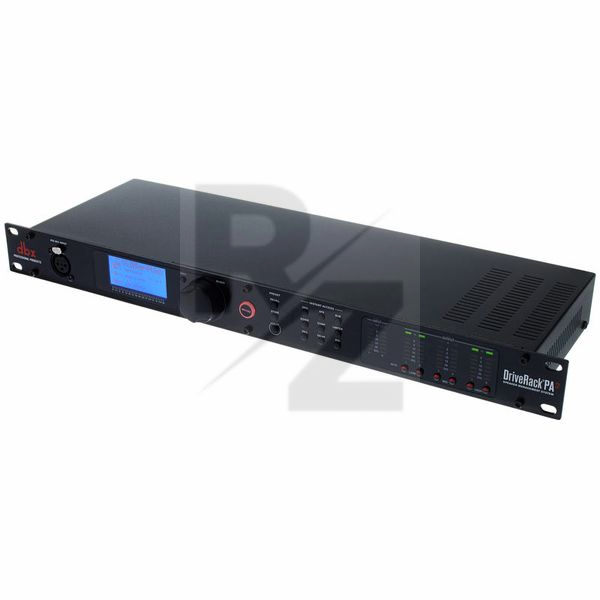
Technical Data
- Manufactured by DBX
- Released in 2014
- Average price : $510
You may also like

2022

2022

2022

2022

2022


2021 80%

2021

2020 100%