Best Elgato Stream Deck+ Alternatives
We found 10 alternatives to Elgato Stream Deck+ based on experts and consumers reviews.
Mackie Control XT Pro
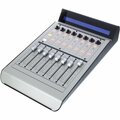
Based on 2 reviews
The control XT Pro allows you to add extra channel controls to your existing MCU Pro, and if you are anything like me you will definitely want to do that! I love having hands on control of all my equipment and the MCU gives a more analogue feel to your DAW - unfortunately it only has 8 channels. I got 2 of these Control XT Pros - and I'm glad I did as I can now control 24 channels in my DAW - and I can still add one more allowing me 32 channel control! The build on these units, like the MCU Pro, is fantastic, super strong and sturdy!
Novation Launchpad Mini MK3

Based on 9 reviews
This is a very powerful device for the price, I highly recommend it! The build quality feels great and I have had no problems so far. Initially I bought it mostly to launch clips, since I also have a nanoPAD for rhythms. However after finding the "Launchpad95" extension scripts I'm amazed what it can do! I love the sequencer modes, but I'm going to need some practice. ;-) If you want more native controls or just a bigger control surface, it's probably worth getting the Launchpad X.
SSL UF8

Based on 8 reviews
I use this DAW controller in my home studio. I use it mainly to mix songs in Logic Pro, not so much to record. The initial setup and configuration of the software layer was pretty straight-forward. No complains at all. The default setup, even if it can be altered completely, is simple and useful enough to start working right out-of-the-box. For the basic stuff (faders, pans, solo, mute...) the unit is very useful and works as smoothly as expected from an SSL product. A minor complain is that the resolution of the faders is "larger" on the UF8 so, even if you move the fader "a lot", at lower volumes, it takes a bit to reflect on the Logic fader. Nothing to worry about, though. Dealing with sends is a delight, either using the VPOTS or the faders in flip mode. Nothing...
Novation Launch Control XL MK2

Based on 19 reviews
I use this device in REAPER. The reasons I wanted this is that I wanted to save time with mixing, by preserving creativity without using the mouse too much or doing repetitive tasks. I also wanted more buttons for VST/send control and a motivation to apply more automation into my music. The build quality is pretty good for this price. It has rubber on the bottom to avoid slipping, which is nice. The machine is very easy to comprehend at first use. The only con I have (because I use REAPER) is that panning doesn't work in the first factory template (which has 99% of the functionality) because of the HUI intergration. But this minor issue can be worked around by assigning the pan knobs in the other factory templates or user templates.
AKAI Professional Fire Controller Only

Based on 7 reviews
If you use an M1 Mac, this thing will currently not work at all even though it's recognised, but if you run FL using Rosetta it works perfectly. Some people say it's aimed towards beginners and while I'd agree, I know and use all of FL shortcuts and still found this controller to be very useful for some tasks. However I probably wouldn't buy this if you have perfect pitch, an insane knowledge of music theory and already own a sequencer. If you don't and you use FL, get this. As a matter of fact I wish this was the first controller I ever bought because as much as other controllers have their use, this one would have saved me a lot of time. I feel like a lot of the reviews and content created around this controller barely scratches the surface.
Novation Launchpad X

Based on 13 reviews
I'm a guitarist, bassist and a little bit into live looping and I'll tell you this is the best ableton and keyboard controller I've ever seen! 64 dynamic keys are more than enough for finger drumming and sample triggering, and if you're a guitarist, it's easy to make friends with local synth controls! just like in a guitar one step - one semitone and they are also arranged in groups of 5, just like on your fretboard! the desired notes of the scale are highlighted, you can select the key, scale, give it to your non-musical friend and jam with him! Yes, it's much easier to play ))) 4 octaves of any instrument in the form factor of a small tablet! and of course I can't help but mention the mixer control - novation has singled out the most important functions and put them on...
Elgato Stream Deck XL

Based on 11 reviews
This is proving far more useful than I had initially conceived (even after all the research I did on it before purchase). Other review here and elsewhere will talk about its functionality, so let me address some points you may not get elsewhere. I'm using it on my Mac Mini (running Big Sur) and haven't encountered any incompatiblities or problems. It's been absolutely fantastic for my teaching online as it effortlessly allows me to control not only OBS and my Atem Mini but also PowerPoint (for slides) and VLC (for various media clips) *in the background* while Zoom takes centre-stage - which is absolutely fantastic. Using Bitfocus Companion, my Elgato can do quite complex things with OBS, Atem Mini (via Software Control) and Reaper. Finally: yes, a lot of its functionality (if not all...
SSL UC1

Based on 4 reviews
UC1 is a plugin controller. It works perfectly with SSL Channel Strip 2 and Bus Compressor 2 plugins. All you have to do is insert the channel strip plugin in every channel on your DAW and then you can mix your track by using the controller. No need to use the mouse at all. If you want a visual feedback of what you do, you have the 360 software that runs in parallel with your DAW giving you a real console mixing feel. Combining UC1 with UF8 you get everything in your hands and your mixing workflow will get really fast. The only con is that it supports only two plugins by now. It would be nice to see more plugins in the future and why not API and Neve emulations.
Ableton Push 2

Based on 47 reviews
The Push 2 is an excellent controller for the Ableton user. Since it was purpose built for Ableton, integration with the software is practically flawless. I use it for breakcore, acid, and trance production and it adapts exceptionally well to each production context. It is quick and easy to get up and running, but the device has many advanced features if you are willing to put in the time. You can expect to make your first beats within minutes of plugging the device in! Sample slicing, mangling, and sequencing with the controller is a game-changer for me and the high-res display is excellent. Menu navigation is a breeze and very intuitively organised. The pads are touch sensitive and a joy to play. The encoders are smooth and much more accurate than I expected, and they feel good to work...
Expressive E Touché SE

Based on 13 reviews
I got the Touche for controlling orchestral and ethnic instruments, specifically for mapping dynamics, vibrato and expression to the different axes of the Touche. I'm very pleased with the results: smooth expression, much more detailed than what a slider can get you! The best feature is that you can use two CC's at once (example: vibrato and expression) and have them flawlessly combined into each other. You can even set up your own custom CC curves (like exponential or linear or even draw one). It might take a few days to get used to controlling the Touche on one hand, while playing your keyboard with the other - but it's worth the practice! An extra good feature is that you can control the sensitivity of the Touche (how responsive it is to your movements). It is a physical instrument...