Mackie Onyx Producer 2x2 Reviews
I bought mackie for home practice with iphone. It works fine for me.
Great value with a few shortcomings
Pros:
+ Good feature-wise for the price
+ Sturdy case without any wobble in the knobs
+ USB Class-compliant
+ Small footprint, useful for a cramped workspace
+ An actually useful manual (the one available on Mackie's homepage that is, not the quickstart in the box).
Cons
- Gain knobs have non-linear behavior, which means up to 80-90% of the of the knob can be just silence and all of the usable range adjustment is compressed into the last few degrees of turning if you have a low sensitivity mic.
- Phantom power and line/instrument buttons don't remain in their "pressed" state between USB disconnects, which is a minor annoyance e.g. if you frequently connect/disconnect a laptop to an otherwise fixed setup.
Impressive quality for a cheap interface
Pros
It's a perfect interface for a basic home studio set up. All necessary controls at the front. Monitor, Mix, headphone jack and gain knobs for individual channell.
The hi-z function to record instrument does enhance the quality quite a bit when you plug a regular 1/4 jack instead of XLR. The phantom power activates both channells at once, that could be a problem only if you are combining a ribbon mic with a condenser....but for a regular set up such as guitar + 1 condenser mic it is not a problem whatsoever as phantom power will not feed the guitar
The midi in and midi is very good too, no latency, no lag. It works quite well. After my usb connection on my controller broke, I opted for this option which I find to be a lot better.
Cons
When I bought the mackie offered a 'free license for pro tools first'. But if you go on avid website, pro tools first is free anyway. Maybe when the interface was launched pro tools first wasn't free.... I found that was a bit deceiving. The freebies were free anyway
If you are looking to play guitar live, the latency is quite perceivable for live performance, so that wouldn't be a good investment. But for general recording of guitars, mic and midi control you can't go wrong. Recommended
Small, cheap, versatile, and Linux-compatible
I keep recommending this.
It's built tough, it has all the features a growing musician needs, and it's class-compliant so it Just Works on Linux. It's versatile, and its sound quality is great for the price.
Balanced outputs are a good feature at this price-level; just be aware that they're jack sockets, not XLR. This is a good design decision, because it works with unbalanced connections as well.
ÐаÑеÑÑво в коÑобоÑке
a pretty good sound card that is not inferior in sound even to the focusrtie 2i2 series. cheaper performance and some lightweight functions do not interfere with work. There are small friezes on large projects, but they do not interfere with life. Recommended for initial recording.
Great sound card, perfect for home recording.
First of all, it's built like a tank. You can't damage it if you tried. Knobs are perfect, inputs and outputs are great. Great for home or on-the-go recordings, really portable. Hasn't failed me since I got it.
Pretty Good
The build quality is great, the knobs feel great. For its price, I have no complaints.
I highly recommend it
Excellent for home use
Easy to use and control
Perfect for small home setup
Had some issues at first getting Reason 11 to pick up the audio in, it appeared to auto install drivers in Windows when I first plugged it in, and mic and line in worked in other applications. Had to grab driver from Mackie (not hard to find), and now works perfectly.
Separate monitor and headphone volume, does exactly what I needed.
Very good price/quality
Nice pre amps, portable and fun!
Worth every penny!
Solid Piece of Kit
I'd do a proper build quality test, but I still need that hammer.
The Onyx Producer isn't particularly fancy, it lacks some of the features included in other interfaces, but it does what it's supposed to do well. And it sure is sturdy. The headphone amp deserves notable mention, it easily drives 250 Ohm cans despite being USB-powered.
Don't let the cost efficiency turn you off. If all you need is a solid 2x2 USB Interface with good amps, this unit is a great choice.
The preamps on this thing are fantastic. The headphone amp is very powerful. I would recommend this to anyone
Great product
I've been using this interface for a month now and I do have some things to say about it.
First of all, it's a pretty good interface for the price. The sound is clear on headphones and the onyx amps are great. I haven't used the main outs for studio montors because I dont have them yet but by the looks of it, the sound is gonna be great aswell on the speakers. The drivers work without a problem and it comes with a nice software package if you wanna record something. It also brings some nice plug-ins.
It has a lot of funcionalities for such a low budget product. the High impedance buttons are pretty usefull for instrument use, aswell as the phantom power button. Buildwise, this little guy has a great feel to it. The texture on the top feels nice and overall it looks really good. The knobs have the perfect amount of resistance and the buttons have have a beautiful clicky feel, also all the lights (signal and hi-z/48V buttons) are bright enough. Overall the interface feels sturdy and well built.
On the other hand, there are two things that bother me a little bit. The knobs have a logarithmic scale, which means that on the first three quarters of the knob, theres not much of the difference (i mean there is but not that strong of an increase in volume/gain) and on the last quarter of the knob, the volume and gain go up a lot more than all the knob until that point. It's a nice concept, I can live with that, but sometimes it isn't that handy.
Now, the last thing that i really hate is that when you turn the mix knob all the way to DAW (so you can hear only your laptop's sound) and you need to turn the headphone volume down, when you get the headphone volume knob close to Minimum, you notice that all the sound starts panning to the right. Also, if you crank the headphone volume up to the max and start turning the Mix knob to Input, when its almost fully monitoring your inputs, you notice the sound coming from the laptop panning to the left. I dont know if theres something wrong with my unit or if it happens to everyone but, since I'm using headphones with an impedance of 250ohms, i probably shouldnt be noticing this all that much.
I don't know if anyone has this problem but I would like to know if someone noticed it aswell.
Besides that, i dont have any complaints. It serves its purpose and for the price it sounds great.
Really good unit
I haven't bought anything like this for a few years so pleasantly surprised with the quality of unit. Powered by USB and thats it your ready to go.
Comes with Tracktion which is actually a very good DAW.
The Mic pres sound excellent.. used it with a Rode Pod mic and sounds like BBC Bias Radio 4.
The headphone amp is also excellent quality and sounds better than any of my PCs. MAC's headphone connectors.
Nice one !
Simple, works
One of my sons uses this to record. He just plugs in a guitar and opens garage band. Super simple, much easier than our big mixing board which he won't use because it's too complicated.
Great interface, low latency, multi-client ASIO support
Really like this interface. I was little worried about a latency, because I wanted to use the interface primarily to play guitar with amp simulator in DAW. I couldn't find anywhere exact numbers and was thinking to buy scarlett 2i2 instead. Eventually I bought this beauty and I'm glad I did. I measured the latency and it is 7 ms (input + output) at 32 samples, 24bit, 44,1 kHz with my old laptop with i5 cpu. You can go as low as 8 samples, but I can't get lower latency, maybe bottleneck somewhere. That is to say the latency isn't really an issue.
Another great thing is multi-client ASIO support. I can have multiple DAW's open and simultaneously listen to youtube, spotify without switching ASIO drivers. I'm really puzzled about the fact that Jonas-N here wrote that it doesn't work for him at all. Maybe a driver update or something.
If you're curious how I've got the latency value. I've just plug a guitar to one input and to another input I've connect output cable from the interface. In DAW I've set to listen guitar input and record both channels simultaneously. This way in one channel is original signal and in other channel is captured signal from interface output. It means the shift between the two recorded signals is output + input latency.
Great interface but CAUTION: No multi-client ASIO
Disclaimer: I've only used this interface for a couple of days and am returning it now. Not that I was dissatisfied with the product; as the other reviews already say, this is a pretty good interface especially for its price. The drivers have worked without fail so far, the sound seems pretty clear (though I'm not one of these people who claim to hear a huge difference between different interfaces), the build quality appears to be very solid, the amplification goes up pretty loud, the input / DAW mixer is a nifty feature etc.
So, why am I returning it then?
Well, it seems there's a fundamental feature that some interfaces have but this one doesn't - that feature is multi-client ASIO support. This interface can run the sound of many applications at once in high-latency (=non-ASIO) mode just like you'd expect, but on ASIO it only supports one application at a time. This means that when I want to work in my DAW with low latency, I have to manually turn the DAW's audio engine off if I quickly want to consult spotify / iTunes / youtube, which is a HUGE hassle and a deal-breaker for me. I had never come across this concept, for some reason neither the specs on this site (or any other site) nor the reviews ever seem to mention whether or not an interface has multi-client ASIO, perhaps I'm the only one who cares about being able to quickly switch between applications and not having to constantly change settings.
So, if you know about multi-client ASIO and can live without it, this is probably a great purchase. If you, like me, were unaware that this is not something that all interfaces are naturally capable of and are the kind of person that likes to quickly check out audio from other applications while making music, I STRONGLY suggest you read this thread which opened my eyes to this issue:
Still giving it five stars since it's not like it was advertised as having multi-client ASIO, it was my fault to expect so, but I will probably go and get an NI interface instead.
TLDR: Good interface but doesn't have multi-client ASIO which means you can't have sound from other applications while you're working in your DAW and you have to manually change drivers all the time.
Very solid
I love this interface. Very simple and usable layout and of course it sounds great. I will be travelling with it and have every confidence in it's build quality to with stand the rigours of baggage handlers. I t had a solid metal housing. The direct monitoring is a good feature but i'm still getting the balance right when recording guitars. In short it's great.
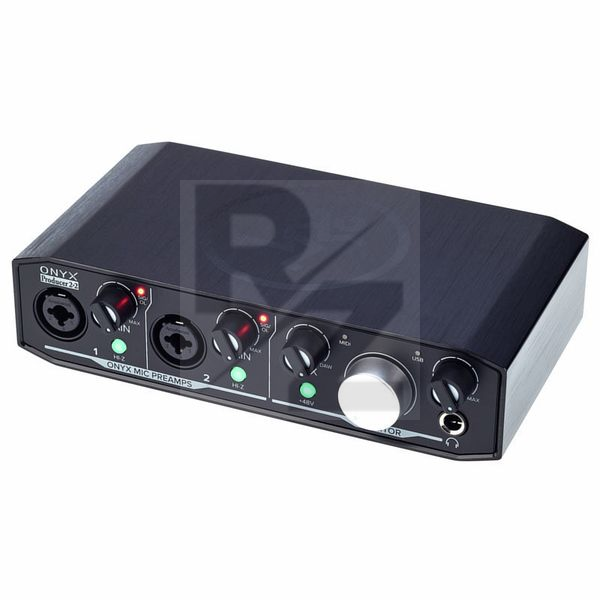
Technical Data
- Manufactured by Mackie
- Released in 2017
- Average price : $116
- Dimensions : 188mm x 114mm x 51mm
- Weight : 0.68kg
You may also like

2023 100%

2023 100%


2023

2023

2023

2023

2023
