Nektar Impact LX49+ Reviews
Very happy with the keyboard. Does the job and more. Would definitely buy again!
I like that product
I bought that midi like 3 years ago, and I have no problems with that product. It works perfectly. I like it
Great for price
I thought it was bigger, but for me it's just the right size.
The manual is pretty good, and I managed to get it to work with cubase, logic and reaper in seconds. Their site has all the drivers ready to download (requires an account)
The pads feel great, and the keys are a bit better than on most midi keyboards. They are still light and don't have a lot of weight to them, but spring up. Overall feels like quality
Perfect keyboard
I have used it many years... at least 8 years and it works fine still. I have used it in Logic, Reason and in Ableton. Just wheels are little bit worn and sticky, but works perfectly.
Great keyboard and controller for a low price.
This keyboard does what it is made for, and easily so.
I just plugged it in, and it worked well. Just find it in the list of controllers in your DAW, and voila!!
I had expected the keyboard to be a bit more plasticky from some reviews, but it feels and looks as solid as any four octave synthesizer I have played on.
This is definitely a keyboard I can recommend to anyone who does not wish to spend hundreds on a MIDI keyboard, but still wants enough sliders, knobs, assignable buttons, AND MIDI pads!!!
This keyboard has just enough of everything. Great for beginners, but definitely also for the professional it is a good budget choice, I think.
Feature packed Controller Keyboard for your DAW
The first thing to bear in mind here is the extremely affordable price of the LX49+ midi controller so this review is in context with the price.
Second is that this is a midi controller keyboard only. It does not have any built in sounds. It is only used for inputting midi notes into your DAW.
Having said that i was quite impressed with the build quality of this keyboard in relation to it's price. I was expecting some cheap lightweight plastic keyboard but surprisingly this keyboard does have some weight and would be sturdy enough sitting on your studio table or desk.
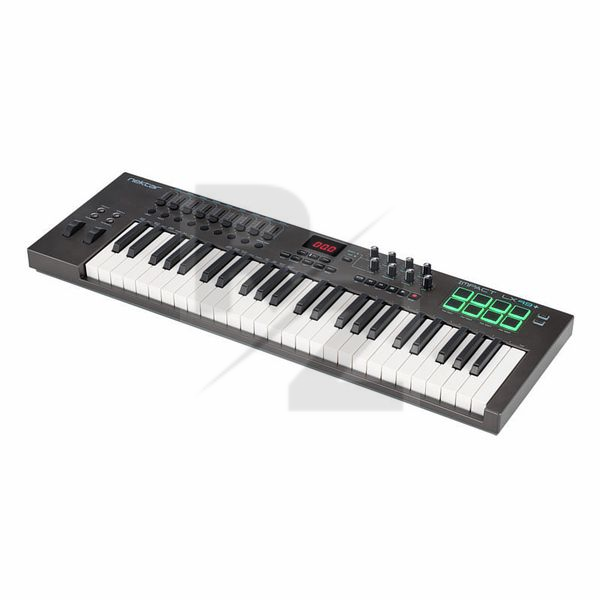
The keyboard is very well equipped and the layout is quite impressive looking. Apart from the standard octave and transpose buttons, pitch bend and modulation wheels, it also has 9 faders including one master fader which is a very nice touch. A lot of keyboard controllers, even more expensive ones, do not give you a separate master fader.
The LX49+ also has 9 assignable buttons under the faders and 8 rotary knobs. Another nice addition are the transport controls, a digital display and even illuminated drum pads to tap out your drum beats. The 49 velocity sensitive keys feel nice enough to the touch with just enough resistance.
Set up was fairly straight forward and there's even an owners manual included to get you started which is a rare thing these days.
In conclusion, this is an excellent and affordable keyboard controller for your DAW. A seasoned keyboardist may want something more upmarket but if your aim is to mainly input midi notes into your DAW, i don't think you can go wrong with the LX49+
Good keyboard
I'm very happy with this purchase, albeit for a specific reason; I mostly use organ emulators and my previous Midi keyboard hurt my fingers when I did arpeggios.
This keyboard, on the other hand, has a similar feel to my vintage combo organ. And the build quality is very good.
I'm sure all the knobs and sliders will be great when I get around to using them :-)
This is AWESOME with Reaper recording
worked perfect ( not a keyboard player buts its handy for the odd bass line ( sacked the Bass player now )& I won't be getting him back.
Brilliant Keyboard
The perfect keyboard for my music production classes in college.
Smooth finish and its easy to use!
Decent low cost midi keyboard
To start with, the 2x4 drum pads are very responsive which is great when writing drum beats. Unfortunately it's only 8 pads, 16 pads would have been great to work with drum machine VSTs, but obviously there isn't much space for 4x4 pad section there.
Keys are ok, not the best feel, but they are quite acceptable for its price.
The control buttons, faders and knobs placed very nicely, I like when the faders are on the left and the transport buttons are on the right side.
It is obviously made of cheap plastic but it is honestly good enough if your budget is not too high, I have been using it at home for a year and it does what it supposed to.
It?s a good keyboard but the keys are really week
Perfect first midi keyboard.
Like the title says, the perfect midi keyboard for beginners!
great functional kit
does exactly what it is supposed to. very solid bit of kit. amazing value for money.
Good quality, minor problems
I use this in my home studio as a midi input device for notes/ drums and for quick mixing of drums and bass, depending on how many tracks I have.
Pros:
Instant integration with Studio One, probably my favourite thing. No mapping of faders or knobs to parameters.
Easy to understand layout and cool visuals (the most important part of course!)
Cons:
Some of the faders are slightly insensitive. For example, I've figured out 0.97 is the fader value for +0.2dB in studio one, and some of the faders are tough to get at that value.
Keys are not exactly grand piano feeling, but for the price, they work really well
Summary:
This is by far the best money I have spent on my home studio. It really made my workflow faster and took as long as the download for the driver did to set up. Very happy with my buy!
Home Studio
Good midi controller with an affordable price! perfect for those initiating they're producing careers!
All-Around Excellent Midi Controller
Made the decision to upgrade from my teeny-tiny controller to a 49 with normal-sized keys for my sausage fingers, and after having looked at some of the other options available, I'm glad I spent those extra pennies on this.
For starters, the actual aesthetics of the keyboard are nice, a lovely matte-finished grey that'll fit right in with any contemporary setup. The LEDs or display aren't too obnoxious either. Everything feels sturdy and well built, can't see anything breaking soon, even with expressive or extensive playing. The keys are "synth action" which despite not being weighted; feel great to play on. The addition of velocity sensitive drum pads is also a nice touch, and are pretty fun to use and easy to program.
The I/O is fairly straight-forward, albeit limited with only a USB port and a 1/4 sustain pedal input. For folks like me it's enough, but having more ports for expression pedals or MIDI output would be nice. Not a deal-breaker though.
The area where this keyboard really shines however, is it's DAW integration and compatibility. Following the easy setup and registration guide, I was able to install the appropriate drivers and manuals for Cubase, and was up and running within a matter of minutes. Being able to use it as a generic controller is all fine and well, but having the option to optimize it for maximum control within your DAW is a very nice touch.
Overall, I'd definitely recommend this controller to any aspiring producers or hobbyists looking to get more mileage out of their VSTs. Despite the lack of weighted keys or I/O ports, there's positively nothing I can fault about this controller. Good job Nektar.
Ten-outta-ten.
Looks and feels a little cheap...works great!
I did a pretty exhaustive search for a full-featured, low-priced controller. This is where I ended up and I am happy with it. These things are obviously built to a certain price point, and with that in mind Nektar have done an excellent job.
I'll start with the negatives...there really aren't that many of them, and they are nitpicky. It would have been nice to have aftertouch and a MIDI out, but those are features that few other controllers in this price range have. They keybed is nice, but not great...it's a little "clicky" and doesn't offer a whole lot of springy resistance. That can make rapidly triggering notes a bit difficult. But otherwise it feels nice, and I preferred it to most other controllers in this price range. Also, something about the look of the new + version bothers me a little...the combination of hard plastics, right angles, and muted colors reminds me of cheap hybrid synths from the '80s. But when you turn it on, the glow of the pads makes things much more exciting...
Speaking of the pads, they are excellent! The best I have used so far. The knobs turn very very smoothly and feel nice, as do the pitch and mod wheels. The sliders and other buttons feel good as well. So, the overall build quality seems great.
Where this thing shines is in "digital integration." Using the Impact LX49+ with software that shows realtime response to knob and slider movement is a real treat...everything is very smooth and precise and looks great. What you see on the screen is exactly what you're doing on the keyboard. For the most part, it's also plug-and-play, and it just works. Nektar have done all of the hard work of mapping things for the most common DAWs, which is a blessing. I will say that I expected configuring the Impact to work with different DAWs to be a little simpler. You have to create a user account and download files from Nektar's website and then run an installer. My first attempt at GarageBand integration didn't work. But I didn't try again, I just moved on with my life and I am confident I will be able to get this controller working with whatever software I need. Things are also reasonably easy to change on the keyboard itself. The display is pretty limited and the system for data entry is a little archaic, but it works well.
So, minus 1 star for the feel of the keyboard and no aftertouch, but high marks in all other categories. If you're looking for a budget-priced controller keyboard, this is an excellent choice. The more I use it, the more I love mine!
Quick update: got the Nektar working with GarageBand. Piece of cake! I realized that I had accidentally registered it as an LX49, not an LX49+ (which was buried further down the list). Once I took care of that and downloaded the right files, it was quick and easy and flawless. Really enjoying using my Nektar Impact LX49+!
Technical Data
- Manufactured by Nektar
- Released in 2016
- Average price : $174
- Weight : 3.2kg
You may also like

2023 100%

2023 96%


2022 100%

2022 100%

2022 100%

2022 100%

2022 93%

2022 92%

2022 80%