Novation Impulse 25
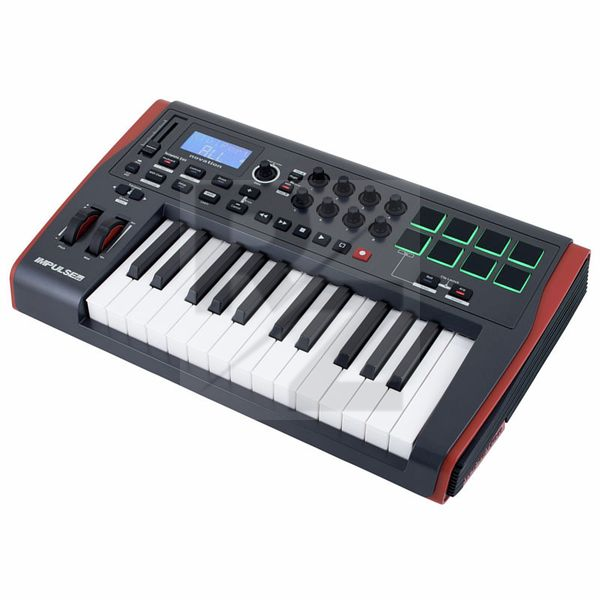
USB MIDI Keyboard with 25 Keys
Latest User Reviews
Novation make good Keyboard/Controllers
The Keys are great. Feel, almost, like Piano. Compared to, most, keyboard/controllers, anyways... A good set of controllers, too. And, The Drum Pad works grand. Works fine with Mac and Logic XII. A small bit of Plastic Smell, on The First Use. It is ok now.
Isto é... Impulse
Novation Impulse 25, a true virtuoso in the realm of MIDI controllers! Let me paint you a picture of this powerhouse instrument that's captured the hearts of musicians worldwide. Imagine a compact yet mighty keyboard, packed with features that ignite your creativity like fireworks on the Fourth of July. The Impulse 25 is like a musical Swiss Army knife, offering not just keys, but pads, faders, and knobs that put total control at your fingertips. Firstly, let's talk about its playability. The semi-weighted keys feel like butter under your fingers, offering a level of expressiveness that breathes life into your performances. Whether you're tickling the ivories or slamming out power chords, the Impulse 25 responds with precision and finesse. But wait, there's more! This controller isn't just about keysâit's a full-fledged production powerhouse. The pads are like a drum machine and sampler rolled into one, giving you the tools to lay down beats and trigger samples with the touch of a finger. And the faders and knobs? They're like having a virtual mixing desk at your disposal, allowing you to tweak and sculpt your sound to perfection. And let's not forget about integration. The Impulse 25 plays nice with all your favorite software, from Ableton Live to Logic Pro X, ensuring a seamless workflow that lets you focus on making music, not fighting with technology. It's like having a backstage pass to the hottest studio in town, with all the tools you need to make your musical dreams a reality. But perhaps the best part? Affordability. You'd expect a controller with this level of performance to break the bank, but the Impulse 25 is surprisingly budget-friendly. It's like getting a sports car for the price of a bicycleâa steal of a deal if you ask me. So, whether you're a seasoned pro or just starting out on your musical journey, the Novation Impulse 25 is the perfect partner to help you unleash your creativity and take your music to new heights. Let's talk about the design. The Impulse 25 is sleeker than a catwalk model at a fashion show. It's got curves in all the right places and a glossy finish that screams, "Look at me, I'm the Beyoncé of MIDI controllers!" I mean, who wouldn't want to be seen with this beauty on stage or in the studio? Now, onto playability. The semi-weighted keys feel like you're playing on clouds made of marshmallows. They're so responsive, it's like the Impulse 25 can read your mind and translate your musical thoughts into notes effortlessly. Whether you're tickling the ivories or banging out power chords, this controller is like having a virtuoso pianist living inside your computer. But wait, there's more! The pads on the Impulse 25 are like having your own personal drum kit at your disposal. They're so sensitive, you could probably play a symphony on them with just a gentle tap. And the faders and knobs? They're like having a team of sound engineers at your beck and call, ready to fine-tune your mix to perfection. And let's talk about integration. The Impulse 25 plays so nicely with all your favorite software, it's like a match made in musical heaven. Whether you're a die-hard Ableton Live fan or a Logic Pro X aficionado, this controller will have you feeling like a kid in a candy store, with endless possibilities at your fingertips. But perhaps the best part? The price. You'd expect a controller of this caliber to cost as much as a small car, but the Impulse 25 is surprisingly affordable. It's like getting a Grammy-winning producer as your personal mentor for the price of a cup of coffeeâa steal of a deal if you ask me. So, whether you're a seasoned pro looking to level up your studio game or a beginner itching to dive into the world of music production, the Novation Impulse 25 is the perfect sidekick to help you unleash your creativity and make some serious musical magic.
A good sturdy MIDI keyboard
This keyboard is very solid. Probably not one to throw into a travel bag, but it will give years of service in the studio. The keys are great quality and the control knobs are all rotary encoders, which is a must. It also has an onboard arpeggiator which is a handy feature.
so many features
Pros:
- So many features, that I still don't know the half of them after using it for 3 years already.
- love the semi-weighted keys, brings natural feel.
- the quality is unquestionable.
- endless knobs
- the play/stop/record buttons are very useful
Cons:
- its quite big and have, so you will need more space for it on your workstation
- the pads are too tight and could've been bigger
To sum up, it looks cool, its convenient to work with, but takes much space.
Very good Keyboard, solid materials and a very nice keys!
I'll recommend
Tricky installation for Win+Cubase users
PRO's: Construction and feeling are good as expected by Novation. There is no equivalent products at the same price.
CON's: installation and sw compliance (I have Windows 10 and Cubase 11).
The sw installation is quite messy:
1) the start guide makes you land on a page where you can download the driver and a support software: "Automap";
2) If you follow the built-in instructions you will not succeed in properly setting up the midi in your Cubase: the Impulse will not work in "DAW" mode but only as a generic midi controller;
3) Then I discovered among Novation's support pages that, in this order:
i) you have to setup Cubase differently from the starting guide to make it recognise Automap (despite of Automap being unable to configure Cubase because is supports till Cubase 9.5 only. Cubase 10 if you find the unofficial beta version);
ii) BUT...you can get rid of Automap with the latest firmware update (you can perform it via Sysex)...and it works but...
iii) if you use it without Automap the product works only partially because the 8 rotary encoders (knobs) cannot be used as volume controller but only as pan+send for the first 8 tracks;
iiii) I went back back to i) configuration (with Automap correctly set in Cubase 11) and corrected the installation guide with pen to avoid struggling once again at next computer change.
Love it
It's all i was looking for, it is increibly volatile and solid at the same time.
I will use it for making soundscapes and all of that in the studio.
I think any kind of producer can use it, cause it also has an awesome drumpad. In my case, I programmed the pads for making the program change while playing live, isn't that great? Just like if it were a guitar pedal or something like that.
It was a difficult choice because i needed something small, but with 20 euros more I could have gotten the one with 49 keys...
Great Choice!
I had very specific requirements: Operability with Ableton Live, full size keys with some weight, aftertouch, bus powered (USB) small/portable keyboard so I can leave this lying around the house away from my workstation and simply plug into my laptop to be instantly running when needed. Novation and Live is pretty much guaranteed to work so it was kind of a no brain, plug and go choice. Even though there are lots of cool new toys on the block, I went for something that has been around for a while. I'm not really into customing all the controls, so I plugged it in, that was it, it just works. The control of Live is not written down anywhere (that I could find) so had to watch a video (It's Shift + Octave to change Live track ;) ). It is a lot bigger and heavier than I expected so the 2nd idea of having something to throw in my travel-on luggage is not going to work. I'd recommend to consider the 49 with the extra faders. The 25 is small/portable as in something you'll leave lying around the house / take to a jam, but not really portable as in something you'd travel with a lot. It's a fantastic, well made product, keys and pads feel great, the whole thing is solid and built better than I imagined given the price.
Great MIDI Key
Absolutely amazing quality, so many features, and a great key touch.
Reading manual will discover more and more....
Apart of all that, novation offers every few months small software gems for free.
The only maybe downside is its size and weight,but that's fine if you think the functions that has.
amazing price/quality relation
i bought this keyboard mostly to play basslines and use the integrated arpeggiator with rack synths,wich is a pretty rare feature. The semi-weighted keys feel great for plastic ones and the aftertouch works quite well, the drum pads are thick and responsive and as an mpc user i can say they dont feel so bad.
The knobs aren't great but they are infinite rotation and work fine,
all the buttons are thick rubber and the mod/pitch wheels are also covered in this sort of textured plastic/rubber, the pitch is a bit slow on the return but i actually like that.
Overall a great buy, honestly my only regret is not buying the 49 keys version. 4/5*
Technical Data
- Manufactured by Novation
- Released in 2011
- Average price : $184
- Semi-weighted with aftertouch
- Full DAW and plug-in control
- 8 Backlit drum-pads
- 1 Fader 55 mm
- 8 Rotating control knob
- 6 Transport buttons
- Pitch and modulation wheel
- 2 Octave keys
- Arpeggiator-, Beat-Roll- and Clip-Launch buttons
- LCS display
- USB port
- Expression and Sustain pedal ports
- MIDI In/Out
- Automap control software
- Including Xcite+ software pack, Ableton Live Lite
- Dimensions: 525 x 332 x 100 mm
- Weight : 3.5kg
You may also like

2023 100%

2023 96%


2022 100%

2022 100%

2022 100%

2022 100%

2022 93%

2022 92%

2022 80%