Novation Impulse 61 Reviews
Excellent
As a media composer and a film music composer this midi device is just excellent!
Nice Midi controller
Very good Ableton Live integration. I believe it is a key benefit.
Works good, no problems ever.
Feels good; looks bad
If I were buying for looks, I'd have got something else. I'm not a fan of the redand grey ribbed end cheek things. But, in terms of playing, it's lovely. All the controls feel solid but smooth and responsive. I gather ther internal processing of controllers is at a higher resolution than MIDI, and they do feel smoother than most controls on master keyboards in this range. The pads are good and the pressure is very controllable; the faders are easy to use for fine parameter control, and the weighting of the keyboard is, for me, nicely balanced between having enough weight to make it possible to control the velocity properly and being light enough to play fast parts without too much physical effort.
I bought it specifically because of the two pedal inputs and the 5-pin DIN MIDI input, which a lot of master keyboards in this range don't seem to have. It means I can use my old stage piano as a second keyboard without having to plug in a separate MIDI-USB box.
Assigning controls is very easy, and the workflow in general seems pretty straightforward. The features do seem a bit limited, and the LCD display is a bit cheap-looking, but if, like me, all you need to do is assign all the controls to whatever note, controller and channel you want and get on with playing it, it's great.
I haven't used the DAW controls yet, because I'm happy using my laptop for that stuff, but, as a performance keyboard, I'm very happy with it.
Disappointed
I recently bought an Impulse 61 and after less than a week it started acting really weird. The keyboard is constantly sending random data to my Daw. I can not assign many controls. The led screen glitches with some random numbers. I do have the newest firmware and together with the customer support we tried to sort it out, but they assured me that I experience an hardware problem. I was impressed with features that Impulse 61 offers and that would have contributed a lot to my workflow but unfortunately I am not lucky and I have a bad unit. Now I have to send it back to the service and wait more than 3 weeks. This is little disaster for me.
Could be better
I ordered this about 5 years ago and I have used it very rarely. Build quality was very good but this was not a midikeyboard that was helping me to explore new sounds.
I like it a lot. It has a good key sensitivity
Plastic
no tutorial for set up.
A lovely keyboard for getting started in digital music
Very easy to set up with ableton. Looks appealing and makes you want to play around with it. Nice features between the faders, buttons and controller knobs. The only issue i found with it was the drum pads felt a bit stiff and hard but overall a very nice keyboard
Great. I'm very happy.
Great!
It's been a few years since I bought this beauty and I must say I am pretty happy with it.
The touch and feel of the keys is amazing! The construction its robust and good looking, really good quality.
About the software, I have nothing to say against it. It only takes a few minutes and it will automaticaly assume all of your plugins so that you can use them with your knobs and keys.
I definitely recomend this midi keyboard, I believe it is the best in this price range!
Good for its price
This is a good build and sturdy Midi-keyboard. I think robust enough for live situations and definately in a homestudio setting.
The only things I don't like is the playability of the keys, they feel 'toyish' , the black keys and white keys don't have the same action, so if you want to learn playing keyboard, this is NOT a good keyboard for you.
The automap software is not ideal either.
If I knew the keys were this bad I would not purchased it.
A good mid-range keyboard
I've got my hands on this after trying out Novation LaunchKey and this one definitely feels better. Half-weighted keys make a huge difference and the rotary encoders feel great.
The keyboard comes with AutoMap software that's supposed to improve the way you control your DAW and plugins but in my experience it causes lots of annoyance and useless fidgeting.
I've tested this keyboard with Ableton (my DAW of choice), Logic and iPhone running GarageBand. Unlike LaunchKey you can't power this one from an iPhone and you'll need a power-passing Apple USB to lightning connector. With it it works just fine.
The keyboard has some annoying design decisions in regards to Ableton, and I've found myself fighting with it more than playing it on some days ? multi-channel setups with kontakt were a huge pain.
Pros:
- great look & feel for the money
- one-button-switch between DAW and plugin encoder modes
Cons:
- issues with Ableton and multi-channel use
- automap (but you can use it without one; with few features missing)
- arpeggiator settings are really cumbersome to tune
Amazing creative tool
If you're looking for a midi controller that can do pretty much everything but you don't want to go bankrupt this is your choice. I'm a beginner and i haven't had any troubles using it and if you're more interested in electronic music or any music that requires wacky sounds, synths or just a simple piano then you'll love it.
There are however some pros and cons
PROS:
So many features - There are so many features in this keyboard that I've had it for almost year and i haven't scratched the surface when it comes to the things it can do.
Build - It has an amazing build. Keys are semi-weighted, 8 knobs that are very intuitive and easy to use, faders, modulation and pitch wheel, 8 drum pads for all your drum needs (also weight sensitive)
Arpeggiator and beat Roll - at first i was sceptical about these because i had never used them before and they seemed complicated but they turned out to be the exact opposite. Fun to use and can create some real cool sounds.
Sound design - This kinda goes hand to hand with the build section but the keyboard interface makes it really easy to control whatever plug-in you might be using and Automap makes that even easier.
CONS:
Learning curve - It can be quite hard to learn all about the keyboard and it can be quite overwhelming, but with time you can get there.
DAW - It comes with Ableton Lite. If you have never used a DAW before this can be really tough to get into. It does have nice tutorials and there are plenty of YouTube videos on the matter but in the beginning you wont be able to take the most out of it. Of course when you do, it will be your most powerful tool. This means that the sounds and the potential of this controller is super dependant on your DAW using skills which can be both a con and a pro (one that comes with most MIDI controllers if not all)
Sound - It is dependent on your set up. If you have nice speakers or nice headphones you're fine but if you don't you might have to sink a bit more money to make it work for you. This can be said about most MIDI controllers if not all but still a con.
Overall if you're looking for a good, creative, music filled time this is an amazing and powerful instrument. If you can dream it it can probably do it (in partnership with your DAW).
Great midrange midi controller!
Great mid-range midi controller! One of the best, if not the best for this price. Really happy with the purchase and product.
If you consider buying something like this - this is your product!
Plenty of control
Great keyboard with novations automap. Using this with CW Sonar and integrates well. I had read reviews that said it didn't, but it does for me, and I am no wizard when it comes to midi.
Great bit of kit
This is a great controller keyboard with some nice features, but I'll try and keep this concise. There are manuals around if you want to know the full extent of this thing's ability!
To start with this kit's only real downfall, it's physically a bit cheap feeling. The lightness may well come to an advantage to many, but personally I would appreciate a bit more weight behind a thicker body.
That aside the various controls are certainly usable and the keys themselves sturdy. As a classically trained pianist I prefer weighted keys, but that's not what this is for. It's actually very reasonably comfortable to play and the controls and touch pads are well positioned for easy use.
Getting a hang of the config for this isn't perfectly intuitive, but with a lot of the sound config going on at the PC that's nothing a bit of playing around won't solve. And that's where it shines, because it linked in with ease to a couple of DAW programs at my disposal-easily enough that half way through configuring it I realised I'd already spent an hour playing with sounds/controls and made arguable little progress on actually setting it up (that said there's not too much setup needed-it interfaces with the DAW software pretty efficiently).
There's a few of these things out there but this one's certainly up there with the better.
Impulse 61
I had an Edirol PCR-M80 61 key controller for years - my daughter prefers the Impulse as it has a semi-weighted synth action - I like it a lot, a good upgrade and superior to the Nektar Impact 61 I tried before
Good for a home studio
- the building quality is not the best. You have to protect very well the unit if you travel a lot with it but for studio purposes it' more than fine.
- If you play piano this keyboard is not the best but if you want to play decent different instruments it's OK.
- Decent quality of the keys and all the buttons except faders who seem to be not very sensitive (for fine mixing adjustments wouldn't be the best).
- Automap is the software which you have to install in order to control the unit in a DAW and it duplicate all you plugins - it's a little bit annoying.
- having transport buttons and the possibility to add an expression pedal is a plus
Overall is a good choice for a beginner home studio.
Impulse 61
This is a great keyboard for general DAW use and the action makes it great to play musically. The only downside is that my DAW is not currently supported by the latest Automap software. I am using Sonar Platinum but can only configure Automap as Sonar X2. It will work for most of the things like the Transport and transposing etc. But the 9th master slider thinks it is operating the first channel and therefore duplicates it's self as slider 1. If you go to learn mode then you can teach it to behave as the Master, but this has to be done every time I start up Sonar Platinum. Also the pads seem to be up an octave from the mapping of Addictive Drums. So do not play the kick etc. I will try to make my own template and see if I can get around these problems. I will post again if I am successful.
connot connect ot Automap 4
this motherboard cannot connect to the Automap 4, in Sonar ! Support is helpful, but they gave up ! thats the main reason I bought it ! so, very dissapointed, but as a keyboard othervice is good and very playable ( edited) Today it works fine with simple use of MIDIlearn, I use CUBASE, but still the kays are a littllte bit hard. I prefer softer key "pushrecistance" more like a piano.
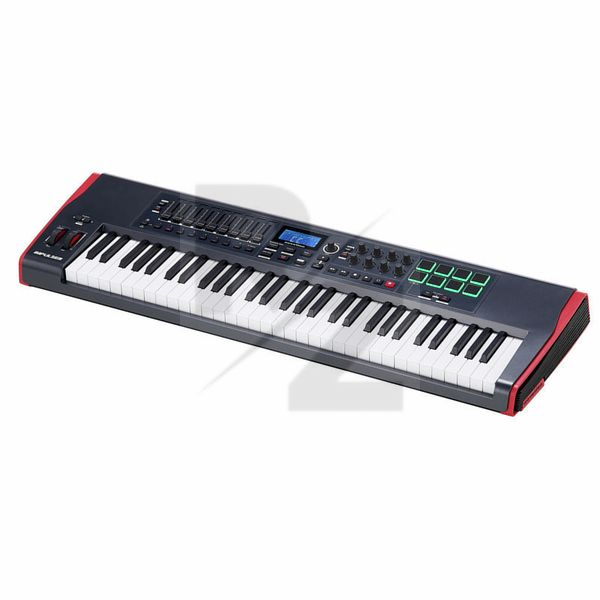
Technical Data
- Manufactured by Novation
- Released in 2011
- Average price : $327
- Dimensions : 1022mm x 332mm x 100mm
- Weight : 6.5kg
You may also like

2023 100%

2023 96%


2022 100%

2022 100%

2022 100%

2022 100%

2022 93%

2022 92%

2022 80%