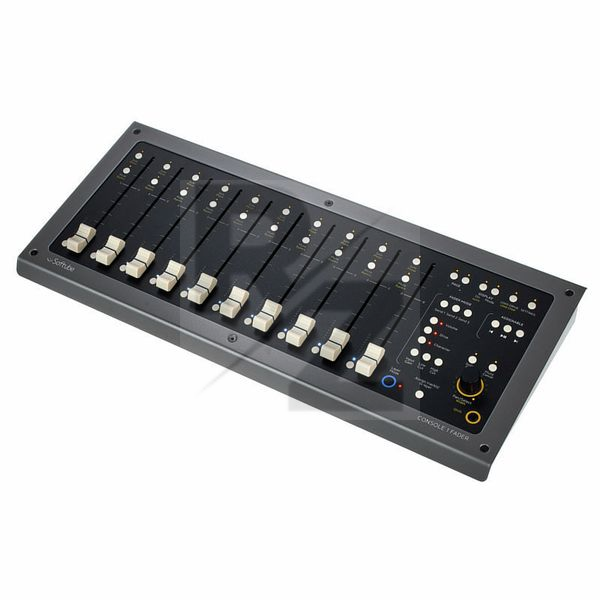
Softube Console 1 Fader
DAW Controller
Latest User Reviews
Best controller by a mile
Been using the Console 1 mk2 since 2017 and finally decided to take the leap and also go for the fader as the perfect add-on and oh what an add on it is. The new update syncs it seamlessly with Logic's basic systems any person at a desk would want. Channel selection, Play, Skip, Fader control (obviously), pan, solo, mute and stereo spread all without opening the console 1 plugin. Completely elevated my day to day workflow without me even realising that is has. Worth it!
Just an Awesome Product!!!
Easy to set up and use. Fantastic Device.!
A nice addition to the original Console 1 with potential to be brilliant, but not a good buy if your DAW doesn't offer full supp
The hardware feels great. Faders are nice and weighty and have a good throw length. I've had mixed results connecting to my original C1, on my main computer they work perfectly but on others I've had to power cycle many a time to get rolling. It's a nice addition, but make no mistake, this is JUST faders for C1, the width control is outrageously mono-incompatible. The big issue is that it's far less forgiving than the original unit when working with DAWs that don't offer full Console 1 compatibility; the original was already a bit of a headache. The lack of scribble strips would be okay if it could synchronise track selection with every DAW, but without them it means you're not only having to select a track twice for mixing purposes but also get thoroughly lost in the sea of faders and occasionally make tweaks on the wrong track. Not a trivial flaw. If you typically create smaller projects you might be fine but it'll still be a chore. That said, in S1, Cubase or any other DAW that works fully with this thing, it's a much smoother experience, and I would definitely recommend it to those users.
it is not a DAW Controller!
This is a remote control for the Console 1 Softube Plugin, that is kind a subsystem for mixing,it is like you have a virtual summing (if this can be called this way),but not a daw controller at all. It has no HUI interface for protools! But, as a second intention, it can control Presonus StudioOne!!! and it has a function that can control the Apollo Console "like" a Fader controller.
it has a clean design, but the buttons are almost invisible! and this, even with the real goal of this equipment, makes the workflow to be slow, unless you develop a "blind operation" and memorize the exact position of every little black button.
if you?re using protools, forget about it!
if you?re using any other daw, be completely shure that you really know how console 1 pluguin(system) works! otherwise, do not spend your money on this.
Compact, very handy, not versatile
This controller works best paired with the original Console 1: focus on one track in Console 1 and balance the overall mix on faders.
Pros:
— a tiny footprint compared to other motorized fader controllers. This is MUCH smaller than the motorized Behringer
— motorized faders work well and are easy to use
— layers of control are very usable and intuitive. With a properly set-up project, you will literally have your hands on this thing at all times during mixing.
— you can control which tracks appear on your controller. If you have a group of 12 tracks that stand for one instrument, you can have it represented as one track.
Main pro: the Console 1 series encourages you to mix by ear, not based on your on-screen readings. This contributes a lot to how you progress as a producer.
Cons:
— Ableton integration is buggy. I couldn't get it transport control to work, track naming is manual.
— Initial setup on project is tedious: you have to insert the Console 1 plug-in onto every track you need mixed, and there is no easy way to do that.
— LED Level meters not bright
Technical Data
- Manufactured by Softube
- Released in 2019
- Average price : $657
- Hybrid hardware controller with software console emulation
- Tube and transistor console emulations, as well as high and low pass filters
- Spatialiser offers channel-by-channel control of the stereo width
- Seamless integration into the Softube Console 1 system
- 10 Touch-sensitive 100 mm motor faders
- 10 Segment LED meters per channel
- Rotary encoder for Pan / Width
- Optimised on-screen display
- Per channel button for track selection as well as mute and solo
- Nine different fader modes
- Three freely assignable buttons for transport functions or DAW shortcuts
- Layer Mode for grouping and resorting tracks
- Several Softube Console 1 fader can be used in parallel
- Dimensions: 430 x 40 x 190 mm
- Weight : 3kg
- Shipping Format: E-Mail
- License validity: perpetual
- Simultaneous Activations: 1
- Windows: from 7 (64-Bit)
- Mac OS (64 Bit): from 10.12
- CPU min.: Dual Core
- RAM min.: 8 GB
- HD Storage min.: 8 GB
- Display: 1280 x 800
- add. System requirements: iLok License Manager
- AAX native 64-Bit
- AU 64-Bit
- VST2 64-Bit
- VST3 64-Bit
You may also like

2023 100%

2023 100%

2023 100%

2023 100%

2023 100%


2023

2023
