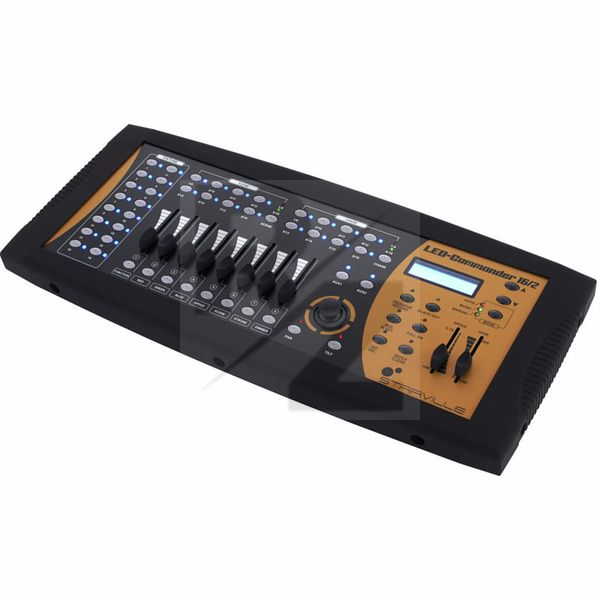
Stairville LED Commander 16/2 4-stars Reviews
Good value for the price
We use it with moving heads and LED parcans.
Pros:
Easy to setup and use.
Handy using the AUX for a fog machine.
Good functionality for the price.
Cons:
Tricky to get the joystick going but good once you do.
Works but not so easy to use
There is just one fade in/out time that is shared with all scenes.
Clicking the buttons is very loud. You can hear the CLICK sound all the way to the audience.
The labels of the buttons are difficult to interpret. It is very difficult to know if the fixture number 7 means the button above number 7 or below number 7.
You need to set up all lamps as multiple of 10.
A small example from our theatre:
Eurolite LED Flood Light 252 RGB 19°
1 - Red
2 - reen
3 - Blue
4 - Dimmer
Stairville LED PAR56 MKII RGBW
11 - Red
12 - Green
13 - Blue
14 - White
18 - Dimmer
Stairville LED PAR56 MKII RGBW
21 - Red
22 - Green
23 - Blue
24 - White
28 - Dimmer
Stairville LED PAR56 MKII RGBW
31 - Red
32 - Green
33 - Blue
34 - White
38 - Dimmer
Stairville LED PAR56 MKII RGBW
41 - Red
42 - Green
43 - Blue
44 - White
48 - Dimmer
Stairville LED PAR56 MKII RGBW
51 - Red
52 - Green
53 - Blue
54 - White
58 - Dimmer
Bulb light Stairville DDS 405 ? 1
61 - Dimmer
Bulb light Stairville DDS 405 ? 2
71 - Dimmer
Bulb light Stairville DDS 405 ? 3
81 - Dimmer
Bulb light Stairville DDS 405 ? 4
91 - Dimmer
Mapping the sliders to DMX channels:
Keep the PATCH button pressed for 3 secs to enter patching mode
Activate the lamp by pressing the button in FIXTURES
Use SPEED and FADE sliders to choose the right DMX channel
Press button under the slider you want to attach to this channel.
When everything has been programmed press PATCH again.
Use for bulbs:
Activate the lamp by pressing the button in FIXTURES
Use Dimmer slider to set the light
Use for Color LED lights:
Activate the lamp by pressing the button in FIXTURES
Use FUN, RED, GREEN, BLUE to set the color (W,R,G,B)
USe Dimmer to set the intensity
Programming SCENEs and CHASEs are well described in the manual.
Conclusion: it works if you have a light man during the show. For a system run by actors it is better to get a much bigger computer based setup with support for running both sound effects and lights by a single button press. This is the way we are heading now after a few years with Stairville LED Commander 16/2.
You may also like

2023 100%

2023 80%

2023


2023

2023


