Studiologic SL88 Studio Reviews
Fabulous Keyboard
It is only for pianists who seriously studied piano
It has a slightly harder keyboard than an acoustic piano. There is nothing more nor less than it needs to be a perfect keyboard. Easy and intuitive internal menu. Sl-editor installed on the PC allows you to set the hardness of the keyboard exactly like a real piano: the heavy keys down and the light ones up, giving you the authentic feel of an acoustic piano. With a fine hand you can reach velocities from 1 to 127. You can play without any problems from Chopin, Bach to pop and modern jazz. After a few hours of singing, you can get your fingers hurt, it has good old heavy keys. It has been connected perfectly both through midi and usb.
Pro.
It's easy
Is built solid metal, like a tank.
Feels like a genuine piano
You can play from pianissimo to fortissimo naturally
Cons
Nothing regarding the SL88 keyboard, just the sustain pedal could be of better quality
Studiologic SL88 Studio - in depth review
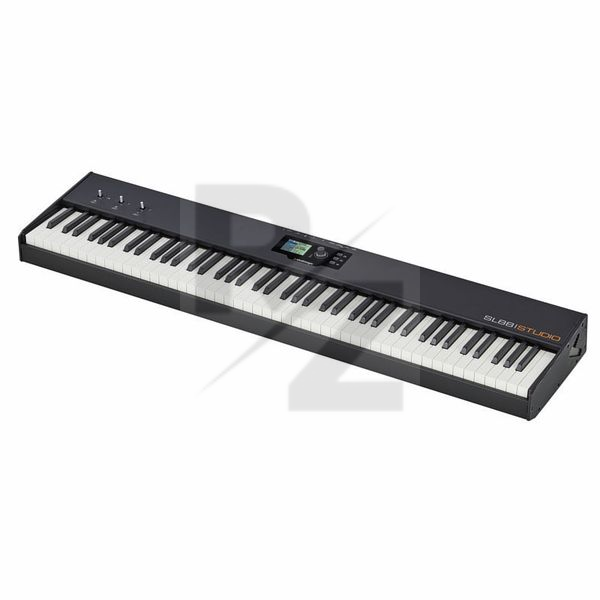
I bought this primarily for home studio use and for the occasional gig to pair with my Nord Electro 5D. It's a relatively light 88 key weighted controller with an uncluttered layout with a bright, clear colour screen. It's unusual because it has very few programmable controls - so there are no faders or programmable knobs and switches. What you get instead are 3 joysticks - more on this later. It has excellent MIDI and USB connectivity and features 4 connections for foot pedals.
The instrument was very well packed and came with a manual on CD, a PS-100 sustain pedal and a universal power adapter with plug attachments for various countries. The SL88 has a clean uncluttered design with a metal chassis, plastic end cheeks and looks great. The keybed is the Fatar TP/100LR with aftertouch which is the same one Nord uses in the Electro HP. Despite reading a few negative reviews of the TP/100 action I have to say that I like the action, it's close enough to a real piano action for me and is a perfect match for the Nord pianos. It's not too heavy or sluggish compared to the Roland RD64 which has the Ivory Feel-G keybed.
In use I was able to get the right keyboard response just using the preset velocity curves. There are another 6 user setups. This is programmed using the SL88 editor which installed and ran with no problems. You can also adjust the key balance of each note independently and the key balance between black and white keys - so you can have a lighter touch on the back keys and heavier on the white. I suspect this might be similar to the software Nord use when setting up their keyboards.
At first the supplied SL88 software seemed the best way to edit the controller but there are some features that need to be improved. On the Global/MIDI setup page you have to manually select the USB port to connect with the SL88 - it does not auto sense that it's there. You then discover there are 2 USB ports for the SL88 and you must connect to port 2, nothing in the manual about this. This setting is not stored and you have to set it up every time you start the editor. It is very quick to program the four zones except for the key zones which can only be changed using the on screen knob. It should be possible to play a key to set upper and lower limits! Syncing your setups could also be improved as you have to transfer and save them to the computer first, then sync them back. You can't simply edit the setups you have copied from the the SL88. You can't even rename your setups - you have to edit them, then drag and drop using organise then re-sync them with the hardware. I gave up with the software and now do everything 'live' on the SL88. So big thumbs down unless they update it.
OK then so what it's like editing the SL88 directly? In a word, counter-intuitive - er that's two words. Even though there are only 3 main buttons I found I was always pressing the wrong one. There is also a button on the entry data entry stick but it is not that obvious what it does at first. Now it might just be me but I have no problems getting around a Nord Electro or even a MOXF. I am pleased to say the having stuck with it for 2 weeks I can program setups very quickly but it was very frustrating at first. It still amazes me that you can't program key zones by pressing a key on the keyboard but the colour screen helps.
The 3 joysticks (which are small) are completely programmable per patch but many players will miss the standard pitch and mod wheels. They have tried to make them as flexible as possible by having fully sprung, half sprung and not sprung at all. However, in practice the fully sprung one is best used like the Roland Bender - which means you can't leave the Mod (Y-axis) in the sweet spot. So you might decide to use Mod (controller 1) on the second joystick but I found as this is sprung along the X-axis and has a tendency to jump back to the centre position unless you are very careful. The unsprung stick is excellent if you need to control an X/Y pad like the vector control on a Wavestation.
And finally, to the connections on the back of the instrument. There are 4 sockets that take a range of foot switches and pedals. The switch inputs are auto sensing but you must plug them in before you switch on. I had no problems with a Yamaha FC-7 and an M-Audio EX-P expression pedals in input 3. Input 4 is universal and can be used for a triple pedal. Each zone can be set up to respond or ignore these inputs. The MIDI setup is interesting as there is a MIDI input which can merge incoming data and send it to one, but only one of the four zones - would have been useful to be able to merge this to 2 or more zones at once. Standard messages such as volume, program and bank changes are easy to setup and each zone can be programmed to output to either USB, MIDI 1 or MIDI 2.
Pros:
Great keyboard action
Only weighs 13Kg and looks great
Good MIDI implementation
Bright TFT colour screen
Setlist option, you can have many setups for different bands/projects
Cons:
Interface is not intuitive
Joysticks don't cut it for me - would prefer Pitch and Mod Wheels as well
Software is not good enough
Manual could be better
Verdict: an excellent controller once you learn how to program it.
EXCELLENT
This keyboard is really highly recommended. Keys are awesome and he is not to much heavy. Only pedal is bad so I recommend to order one extra. All in all if you need midi controler with nice keys and low price this is great opportunity.
Key feels good, nice and clean design.
First impression is very good, feels solid and sturdy with a
nice and clean design. Optional is magnetic shelf were you can add different devices if you want to exploit the empty space on the keyboard. Keys feel good too. I havent dig into the progamming part yet, but the screen looks nice and with the downloadable sl editor software it should be easy enough to understand how to set it up with different software. Its my first 88 keys midi master controller so i need some more time to understand the programming and concept with zones and programs etc. I wish the manual could show an example of how to program it with a software instead of just explaining what the functions are, as it can be a bit confusing at times.
All in all very happy with this controller keyboard and it feels like its gonna suite me for many years to come.
Technical Data
- Manufactured by Studiologic
- Released in 2016
- Average price : $433
- Weight : 13.7kg
You may also like

2023 100%

2023 96%


2022 100%

2022 100%

2022 100%

2022 100%

2022 93%

2022 92%

2022 80%