Zoom G6 5-stars Reviews
Nice!
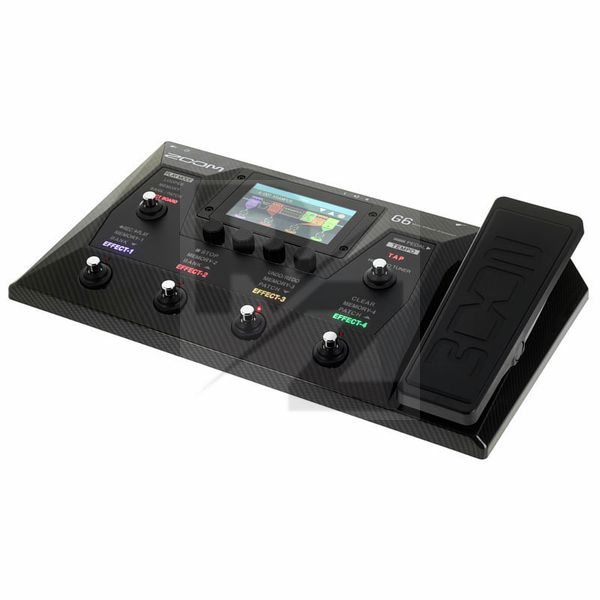
Beautiful multi effect for electric guitar. Nice built and looks great too.
For me this is the best. I know why I chose it. I'm not wrong!
I'm using G6 with Gibson Explorer. I have an HT-Blackfire tube pedal, a Blackstar HT-1R combo, headphones DT 770/80, Fostex T60RP, studio monitors, and a couple of sound cards. Once upon a time I had Zoom 505/2 and Korg AX100G processors.
I also want to say separately about loopers - I have a Flamma FS21 (with digitech fs3x) and it seems that not a single processor will win.
For me there are certain postulates:
1) Almost every processor can be made to sound good, with the right approach.
2) Tube amp, will never outshine any processor or transistor pedal.
But it can be connected to the processor.
(BUT, I created, 2 patches side by side. One of them used a loop with a tube amp and tube overdrive. In the second overload, amplifier and cabinet from the G6. I recorded the guitar sounds on the G6 looper, turned it on and set up a similar sound in the second patch with hands-free headphones from the guitar. I can say it's not 100% similar but the second patch sounds just as good as the first, it's just a slightly different tonal characteristic. Dynamics is observed on both patches. Eyebrows ZOOM.)
3) The effects of space, it is better to look for in the processor, they are all the same, almost all digital.
4) The processor is configured once or rarely.
5) The main difference between processors and limitation is functionality.
6) Each processor needs to be configured for itself.
1) I chose the Zoom G6 because I think it's better to be able to switch from the first to the fourth patch or from the fourth to the second patch than to switch scenes.
For example: in the first patch and the second one, the effects are the same, but in the second patch, the concentration is higher. And in the third, something is reduced and something is turned off.
It's better than scenes.
2) I also definitely need an effects loop, a metronome, drums, a looper with unlimited recording time, impulses. Although native cabinet sound good!
3) I like the sounds that I set up!
4) In the new firmware, it has become convenient to edit effects.
5) I also like that the touch screen icons can be moved in any order.
6) Control via the touch screen, the bottom duplicates the control of the footswitches.
7) It is convenient to adjust the sounds by recording a clean guitar in the looper. This is due to the fact that in the settings you can choose the location of the looper before or after the effects.
8) It has a large color screen that can be seen on the floor.
9) At first I thought about buying something like mg30 , but then I found out that nux does not have a metronome in the drums. But there is a snake game. I'll never understand this weird logic...
10) On the official website, there are all detailed descriptions in PDF.
11) For 357 euros, this is a cool processor. I use. it with and without a loop, it is a very versatile product.
12) In a chain, you can place 9 effects in any order, even if they are the same. Processor power is good.
ps The headphone jack is stereo, the Send output is also stereo.
What I would like from the manufacturer -
1) Lack of leg control! Although there are enough switches!
a) In EFFECT/BOARD mode, pressing and holding the first switch and will jump to the patch on the left. Clamp the second switch and go to the patch on the right.
b) In MEMORY mode, hold down the first switch and move to the bank on the left. We clamp the second switch and go to the bank on the right.
c) You need to add reels to the PLAY_MODE switch. Then they can be opened and closed with your foot.
In reel mode, the first switch turns on the reels, when pressed again, it stops. The second switch activates the previous rhythm pattern. The third switch activates the next rhythm pattern.
2) Looper and drums.
a) If the COUNT=ON value is selected, then the drums should turn on themselves, automatically, when recording starts in the looper.
b) When playing an already recorded looper file, if it was recorded with drums, then the drums should also be automatically activated with the desired tempo and rhythmic pattern (when playback is restarted).
(alternative: you can record drums along with the looper, there should be an option in the looper settings to record drums or not.)
3) In metronomes Metro3, Metro4, Metro5. The first beats (beats) sound louder than others, and in order to hear other beats, you need to make the sound of the drums louder, this is inconvenient. The first beats should be different in tone from the others, but all beats should be at the same volume.
4) Add the ability to connect footswitches for example Digitech FS3X.
a) And in the looper it will be possible to switch files up and down. It is important that if the file plays when the next one is activated, the file should play automatically.
b) footswitch can be configured to turn off/on 3 more effects in EFFECT/BOARD mode.
5) You need to fix the error.
a) The HOLD_VERB effect is not kept enabled.
b) In Guitar_Lab, scrolling the mouse wheel does not adjust effect parameters (but works with the LEVEL parameter).
6) Add complex effects.
a) With 7-9 settings. By using the effects loop, I can save resources and use more space effects. ms70cdr has many nice effects.
reverb/vibrato/chorus/SHIMMER.
b) You can also make an extended version of the Metal Zone, now only the top and bottom are regulated, but in the original there are 2 more middles, lower and upper.
7) Add the ability to edit mid frequencies to impulses.
You may also like

2023 100%

2023 100%

2023 100%

2023 100%

2023 100%

2023 100%

2023 100%

2023 100%


2023 100%