AKAI Professional MPC One Reviews
Superb value for money, some bugs.
Bought this as the center of a small home studio.
Hardware feels good. Software has more bugs than other products i have used. Midi learn mode crashes the MPC often. Some other UI bugs used to be there but were fixed by Akai.
Other annoyances are no free running lfos on any built-in synth and a 5 minute hard limit on audio track recording. I work around this by disabling and enabling again recording in a small moment of silence on the source. Just press Rec twice.
The built-in synths and effects are pretty good. The included drum synth can easily replace a drum machine.
CPU power is plenty to run 4+ synth tracks and dozens of effects. Never used more than 30%.
USB midi hosting in it is solid. It's fun to connect Elektron boxes to it with a simple usb cable. You can hook up many synths at once this way.
Overall, i think it's one of the best boxes but i took a star off of Quality because of bugs and Akai support that almost never reply to my bug reports.
A bit more polish on the software side would be great.
It's also easy, quick and fun to use.
I really like it
I am very happy with my MPC One... It is my first MPC, I always fancied trying one out but back in the day and even upto the the live I couldnt justify the cost as a talentless hobbyist.
Today actually is the first time I set it up with my cheapo volca etc etc setup as an actual MIDI Control Centre and once setup its a total blast. I spend all day making Blipps and Beats then sample into the MPC. I then head for the sofa where I can muck about with them forever!!!
I particularly like taking it with me when working away from home.. It somehow feels more relaxing than sitting there tweaking on a laptop.
(Im not at all anti DAW by the way... I freakin adore BITWIG but I really like starting stuff on the MPC)
I just wish I had some talent but hey ho imy MPC makes me very happy.
Very useful instrument. Needs time to learn it. At the end you awarded.
Absolutely Love It
welll what can i say its a huge step up from the MPC 4000 which i still have but the integration is flawless in my opinion since im an avid Akai equipment consumer i will always put it ahead of other drums machines/ Groovebox.
Quality piece of equipment
Having come from Akai legacy samplers, the form factor of the MPC one was appealing to me. These machines do a whole lot, have great features and have the scope to create a 'sound' as you please. Great quality machine that is also fun to use.
best thing i ever had
thats was absolutely game changing to my music making and everything, i love it. I have made over 4000 beats after i got it, and more is coming all the time. I cant stop anymore! just buy it try it love it.
More than what I need but could be better
I only needed a simple sampler and maybe a sequencer. The MPC 1000 would have been a good choice, but it is very old by now and prices are almost the same as an MPC One anyway.
I wanted the MPC One to be my main device to send and receive MIDI data from my computer. In other words, I wanted it to be the first device out from my computer. MIDI Thru seems to not work out of the box. A workaround that I did was to create several MIDI tracks with the properly assigned MIDI channels and ports to let my other devices receive MIDI data from my computer. I saved this as a template, but this is too much fiddling for such a basic feature on almost every other MIDI device. Then I made the mistake of deleting factory projects. This disabled the start up dialog completely. There was no warning or message of any kind announcing the effects of doing so. I think this is a UI flaw. AKAI support has not responded to any of my inquiries. This means I can't open my MIDI template anymore. I now switched this with an Arturia keyboard as my MIDI out from my computer, making the MPC One strictly only a sampler.
Amazing
This machine is awesome. Comes with full mpc DAW and a packed library. Instruments and templates, effects powerhouse, constantly updated. Not just a sampler. A Midi Production Center workstation
Great compact unit
The only con is missing a dedicated footswitch input. Everything else is great, would be a long read to write all good things about it.
Grate box !
It is a fantastic music-groove-standalone box.
Great standalone music workstation
Excellent device. It is a very powerful and entertaining machine at the same time. You can make music just with this device without the help of anything else, but it is more convenient to connect a MIDI controller to it via USB. Its large touch screen is very useful and best of all is the grid in its sequencer. This far outperforms any other workstation sequencer, for example (it's much friendlier than the Korg Kronos' sequencer). Its operating system is quite stable and it has not given me any problems. I just wish they had included more VST synths for standalone mode. In short, it is a very entertaining machine, easy to learn to use, with many possibilities and promises hours and hours of entertainment.
Feels like arriving at home
This is a good instrument. worth every penny.
Enlighttment
Better than only frickeling with a DAW!!!! million ways more sexy!
MPC ONE : how its like to use a 2020 made MPC
totally changed my rating after 1 year of use.
the learning curve is steep. had lots of headaches. but once you feel at home everything is done super fast.
the 2.10 update turned it into a BEAST. the extra stuff is AMAZING. Lots of synths, new fx and additional stuff there and there. Couldnt believe how much things they added.
i love my MPC. i'll probably never use 30% of what it has to offer.
get one now. cant go wrong.
great machine
fantastic machine, simple to use
A great groovebox
I use it mainly for sequencing my hardware synths and as a drum machine.
It ticks all the boxes in those areas.
The only thing I didn't like was the headphones out. This out doesn't do the unit justice (compared to the main outs it sounds dull, at least with my Audion Technica ATHM50 headphones).
(Much) Better than I thought.
(Much) Better than I thought.
The best but still no xlr input and no battery inside
In terms of workflow and size/weight there's nothing on the market like this. And it's still the BEST.
But is crazy that it has no battery inside and still no xlr input for a microphone.
It could also be perfect with the 16 knobs always auto mapped (just like on his big brother mpc X ) so you can mix everything and modify all the parameters in every window of effects, programs settings etc without the useless q-links (that limits to 4 parameters at the same time your setting up).
About the audio recording : just like in the daws , when u record you can choose your best takes. I dont think is a big problem for akai to put this feature on the next firmwares.
when akai will release what i've described, it will be the best groove box ever. (and also the best all-in-one to make music in a funny /fast way in studio/on the go)
But , at now, no comparison with all the other groove boxes. the touch screen and the portability are the main differences.
Creates nasty ground loop if USB connected to the PC and output is connected with the audio interface. I fix it with USB 1.1 galvanic decouple which adds more cost the product. For instance my Novation Bass Station is used the same way but the company is smart and no ground loops. Not max on features as they decided to remove the sd card transfer via USB.
Hard to work with, but extremely useful
First off: I'm not yet that experienced with the MPC One, as find little free time to actually sit down and work with it. That being said, I have spent some weekends completely enveloped in it.
It's a great drum machine. Playing a set of drums or samples is as easy and intuitive as it can get. I don't have any previous experience with velocity and aftertouch sensitive pads, so I needed some time to "get" them, but once you're over that phase, it feels just like tapping on your table with your finger (which I like to do, play drums sometimes also).
If melodic instruments are more your thing, you probably don't want to use just the pads, even though the MPC has quite a few different note/cord/etc. presets for many many different genres of music, so sometimes you can get a great idea by just slamming random pads. Pair up a MIDI keyboard and you're done. If the "sample your own instruments" vibe doesn't suit you, that's not a problem. You can sample them, but when you're recording your finished project, you can just *boop* change the track from sample-based to MIDI and record the live instrument (if it connects to MIDI anyway). It has millions of features, truly making it a hardware DAW.
There are a lot more good things to say, but you've probably noticed I gave handling a 3/5. The entire workflow is pretty damn weird and unintuitive. Most functions cannot be found where you would expect them to be. Some functions you would expect would be accessible on buttons are hidden in menus. Speaking of menus, every menu where you have to choose between a lot of options opens on only a third of the screen. This makes working with a lot of samples almost impossible, as you can only see the first like 10 characters of the filename (this can be worked around by using certain filenaming conventions). They could just extend the menu to the entire screen, the extra space helps no one (they even blur it out). Akai is pumping out features lately, so maybe they could polish the existing features sometime, which they probably will.
Tl;dr: Feature packed, can do absolutely anything you want it to, but can be finnicky and unintuitive.
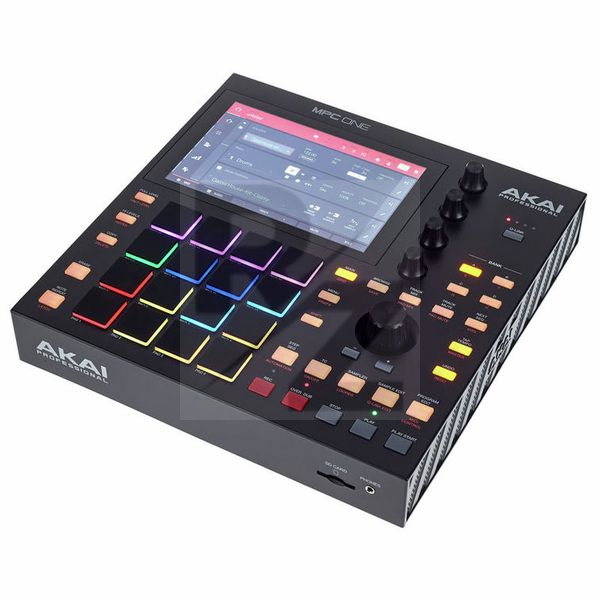
Technical Data
- Manufactured by AKAI Professional
- Released in 2020
- Average price : $778
- Dimensions : 272mm x 272mm x 53mm
- Weight : 2.1kg
You may also like

2023 100%

2023 100%


2023

2022 100%

2022 100%

2022 100%

2022 100%

2022 100%