AKAI Professional MPC One 4-stars Reviews
More than what I need but could be better
I only needed a simple sampler and maybe a sequencer. The MPC 1000 would have been a good choice, but it is very old by now and prices are almost the same as an MPC One anyway.
I wanted the MPC One to be my main device to send and receive MIDI data from my computer. In other words, I wanted it to be the first device out from my computer. MIDI Thru seems to not work out of the box. A workaround that I did was to create several MIDI tracks with the properly assigned MIDI channels and ports to let my other devices receive MIDI data from my computer. I saved this as a template, but this is too much fiddling for such a basic feature on almost every other MIDI device. Then I made the mistake of deleting factory projects. This disabled the start up dialog completely. There was no warning or message of any kind announcing the effects of doing so. I think this is a UI flaw. AKAI support has not responded to any of my inquiries. This means I can't open my MIDI template anymore. I now switched this with an Arturia keyboard as my MIDI out from my computer, making the MPC One strictly only a sampler.
Creates nasty ground loop if USB connected to the PC and output is connected with the audio interface. I fix it with USB 1.1 galvanic decouple which adds more cost the product. For instance my Novation Bass Station is used the same way but the company is smart and no ground loops. Not max on features as they decided to remove the sd card transfer via USB.
Hard to work with, but extremely useful
First off: I'm not yet that experienced with the MPC One, as find little free time to actually sit down and work with it. That being said, I have spent some weekends completely enveloped in it.
It's a great drum machine. Playing a set of drums or samples is as easy and intuitive as it can get. I don't have any previous experience with velocity and aftertouch sensitive pads, so I needed some time to "get" them, but once you're over that phase, it feels just like tapping on your table with your finger (which I like to do, play drums sometimes also).
If melodic instruments are more your thing, you probably don't want to use just the pads, even though the MPC has quite a few different note/cord/etc. presets for many many different genres of music, so sometimes you can get a great idea by just slamming random pads. Pair up a MIDI keyboard and you're done. If the "sample your own instruments" vibe doesn't suit you, that's not a problem. You can sample them, but when you're recording your finished project, you can just *boop* change the track from sample-based to MIDI and record the live instrument (if it connects to MIDI anyway). It has millions of features, truly making it a hardware DAW.
There are a lot more good things to say, but you've probably noticed I gave handling a 3/5. The entire workflow is pretty damn weird and unintuitive. Most functions cannot be found where you would expect them to be. Some functions you would expect would be accessible on buttons are hidden in menus. Speaking of menus, every menu where you have to choose between a lot of options opens on only a third of the screen. This makes working with a lot of samples almost impossible, as you can only see the first like 10 characters of the filename (this can be worked around by using certain filenaming conventions). They could just extend the menu to the entire screen, the extra space helps no one (they even blur it out). Akai is pumping out features lately, so maybe they could polish the existing features sometime, which they probably will.
Tl;dr: Feature packed, can do absolutely anything you want it to, but can be finnicky and unintuitive.
Unbeatable for the price
Pros:
Standalone, compact ,many buttons plus touchscreen, responsive pads ,nice synth engine , sampler . superb integration with the software .
Cons:
-Can’t record audio to clip and loop (like force, or push 2). As a workaround you can use the looper ,but can’t “explode” overdubs to separate clips
-No pitch envelope (for real?)
-No loop end point (it’s tied to sample’s end)
-No loop or sample’s start/end point modulation
-No portamento
-No disk streaming (forget long tracks)
-Bugs on current 2.8.1 firmware
-Terrible content browser
-SD card not showing on PC
Overall ,it’s great piece of gear ,already knew the current limitations (you can download the free MPC Beats software to get an idea, or demo the MPC Software but on hardware navigation is way easier) , hopefully the current bugs would be fixed soon.
a must for standalone
given the fact that this has the same power as it' bigger brothers, Bargin !!!
Good machine
Pro's
-Great sound
-Good workflow
-Standalone
-Usable included library
-Splice integration
-Form factor/weight
Con's
-Bad browser
-No disk streaming
-Internal storage/SD card doesn't mount when connected to a computer.
-Somewhat laggy interface. Needs a modern touch display.
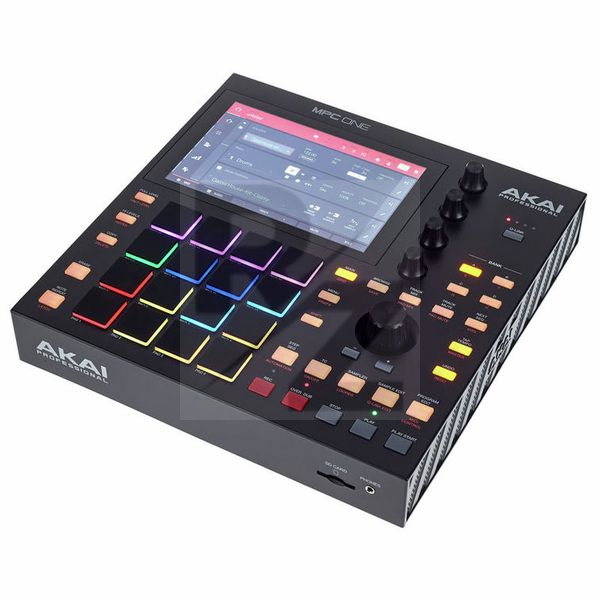
Technical Data
- Manufactured by AKAI Professional
- Released in 2020
- Average price : $778
- Dimensions : 272mm x 272mm x 53mm
- Weight : 2.1kg
You may also like

2023 100%

2023 100%


2023

2022 100%

2022 100%

2022 100%

2022 100%

2022 100%