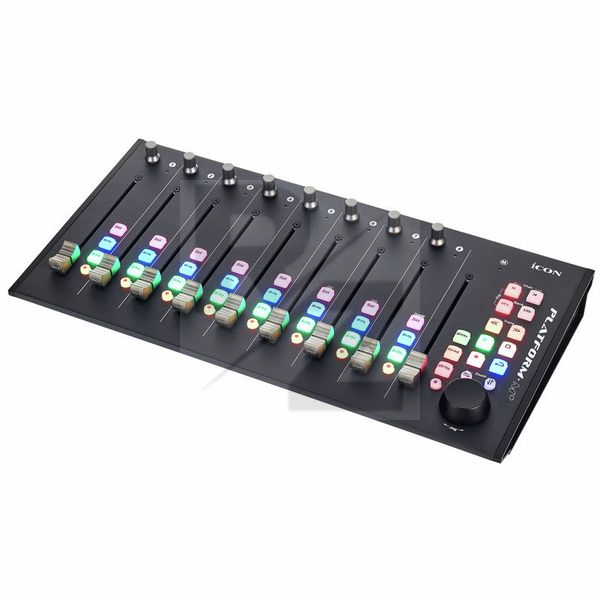
Icon Platform M+
USB DAW-Controller
Latest User Reviews
Lovely Midi Controller
I was looking for something in budget with motorized faders.
Its a great midi tool for using it as a mixer ( Ableton allready has the midi map built in so its just plug n play) I want the faders so i could know anytime where my automations etc are so i don't have to "reset" everytime the faders
The best modular Mackie control surface but let down by implementation and software
Great construction, slim design, debatable led colours, sadly missing encoder led rings. It works great out of the box with no need to install custom software unless you want to remap some control.
The worst part of this product is the fact Icon tried to lock some functionality such as plug in control and sends into the platform b+ as they "forgot" to map the relevant controls to the existing buttons, opting instead for read, write and session buttons (their real functionality changes according to the software being used and its Mackie control implementation)
The mapping software is also not the best in the world, it mostly works as expected but I did find myself mapping a button to a specific function and this would cause the faders to stop responding as expected (mapped function was totally unrelated to faders and mapping same function to another button would just work fine)
Perfect controller
faders feels fantastic, awesome features, it looks really nice, all the buttons feel high quality. Had it for almost a year now and very happy with it
Exponentially speeds up your workflow
I have one of these permanently on my desk. It synchronizes with my DAW (Reaper) almost perfectly. The one issue I have is that I cannot get the zoom buttons to work. That's not really a problem for me, as I have set one of my extra mouse buttons to function as a "ctrl" button so I can zoom both horizontally and vertically with my mouse. I mention it here as it may annoy other users who don't have that mouse configuration. (I've deducted one star on handling to reflect this).
The faders have a really nice quality feel to them, and have just the right amount of sensitivity for me. The rotary encoders have a good feel to them and make it easy to position tracks in a stereo mix or hard-panning duplicate guitar tracks. The record arm / solo / mute / track select buttons are really handy, and backlit so you can quickly see which set of controls relates to an active track. It can get a bit confusing when using 2nd and 3rd banks (I've not needed to go as far as the 4th yet!) so being able to keep track of things is important.
The transport buttons are brilliant, it's really useful to have them at your fingertips. I've recently started taking audio samples from news stories to use in my music, and having these transports has made it much easier to navigate through a sound sample to snip out the exact part I want. The addition of the "mixer" button, whose function depends on your DAW, is really helpful here - in the case of Reaper, the mixer button places down a marker.
The jog wheel has a sturdy feel to it and is useful for scrubbing through tracks. Combined with the mixer button you can easily lay down accurate placement markers.
I've not used the "read" or "write" functions on the unit yet, so I won't comment on those.
My desk setup includes a ShuttlePRO v2 with some common shortcuts assigned to it. Combined with the Platform M+, I have all the common DAW controls under my fingertips. I can definitely recommend the Platform M+ for a mixing desk setup.
Better than I have expected
I like mostly everything about this thing, but I really dislike the plastic faders and knobs.
Pros:
Solid build
Good workflow
Very good quality jog wheel
Cons:
Plastic knobs and faders
Pro looking home studio control surface
I bought this unit to replace my trusty single channel Presonus FaderPort because I thought I needed more faders and it also looked more impressive on my desk.
It's been a mixed bag though and quite frankly although it's a great unit I'm back to using my single channel Faderport mainly because I find it easier and more intuitive to identify which track/channel I'm working on with the single fader than moving around in banks of eight.
Pros:
Its a great looking unit, very well built and inexpensive. It also has a lot of very useful functions. I especially like the soft buttons compared to the harder buttons on some other units.
Cons:
*Sometimes after I use the zoom function I find it difficult to set the jog wheel back to it's default state and it stops scrolling through the song.
*The setup manual was not up to date.
Update (04/09/2021)
I recently bought the single fader Platform Nano and it's a dream come true. I'm no longer using the Faderport. Platform Nano is the one.
ÐÑоблем багаÑо, а пÑдm
Hello! I recently bought your Platform M + instrument. Version I studied the instructions. I have been working in the studio for 30 years and everything is clear to me, but the device does not behave the way it is written in the instructions. I have a MAC Catalina 10.7.7 and Cubase 10.5.
In MCP Mode, all buttons work, but two "Chan" buttons do nothing and write two inscriptions on the display - Left-Right and Front-Rear. What this means is neither in the instructions nor in consumer reviews.
The display shows two lines of text. The second line says “Pan”, “Front-Rear” and “Page 01/02. Why are these inscriptions?
The Mixer button does a different thing.
I wanted to set all controllers to User define Mode. I've done this many times in other controllers, but it doesn't work in Platform M +.
Today, in three days, the Platform D2 screen stopped showing information. The blue screen is on and that's it! Without the display, the device also does not work.
I wanted to buy two more Platform X +, but now I doubt it.
Today, in three days, the Platform D2 screen stopped showing information. The blue screen is on and that's it! Without the display, the device also does not work.
Conclusions: the device is not yet perfect. There are still many disadvantages. I do not recommend buying.
Couldn't even get it to work
Spent over 2 months going back and forth with support and even after several firmware 'fixes' it still didn't do the basic tasks in Logic. Touching a fader automatically brought up plugins which meant I was unable to mix properly with it, not to mention there were several features that they knew didn't work such as the 'mixer' button. The 'fixes' they sent made things even worse. Now support has ignored my emails (and video demonstrations) so I've been left no option but to return it. Unbelievable.
Swings & Roundabouts
The build quality looks impressive, unfortunately it wasn't long before the rubberised buttons started coming out of their slots. Whilst they can be pushed back in they now sit up further that the rest. The software interface needs a drastic update and they seem to change the way the firmware updates work. It took an email to the support desk to figure that out. To be fair the support was quick and got me sorted. The biggest issue is the need to restart the device to change modes. As someone who uses both logic pro and cubase this is a pain.
Good performance, very limited functionality
I was recommended the Platform M+ as a main DAW controller and initially I was impressed by the performance and fader response, but functionality is very limited.
Buttons are somewhat fiddly and setting up a user defined template is a lengthy task. Mapping application seemed to work better on Windows than Mac. Manual is incomplete but instructional videos can easily be found.
Technical Data
- Manufactured by Icon
- Released in 2017
- Average price : $346
- 9 Touch-sensitive motorized channel faders (8 x channel, 1x master)
- 8 Continuous rotary knobs
- Jog wheel
- Illuminated transport buttons
- 2 Illuminated track buttons
- 2 Illuminated bank buttons
- Integrated iCon Quick Setup driver for easy Plug & Play installation in Cubase, Nuendo, Reason and Bitwig
- Mackie Control protocol for almost every DAW
- Mackie HUI protocol for controlling Pro Tools
- iMap software for assigning keys and for firmware updates
- Solid aluminium housing with Kensington lock
- Class-compliant with Windows XP, Vista (32 bit), Windows 7 (32 and 64 bit), Windows 10 (64 bit) and Mac OS X (Intel Mac)
- Includes power supply (12V/2.5A) and USB cable
You may also like

2023 100%


2022 100%

2022 100%

2022 100%

2022 96%

2022 90%

2022 80%

2022