Icon Platform M+ 4-stars Reviews
The best modular Mackie control surface but let down by implementation and software
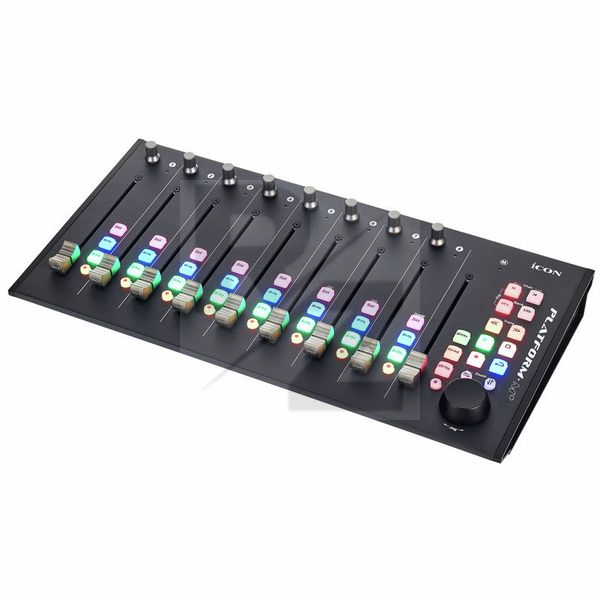
Great construction, slim design, debatable led colours, sadly missing encoder led rings. It works great out of the box with no need to install custom software unless you want to remap some control.
The worst part of this product is the fact Icon tried to lock some functionality such as plug in control and sends into the platform b+ as they "forgot" to map the relevant controls to the existing buttons, opting instead for read, write and session buttons (their real functionality changes according to the software being used and its Mackie control implementation)
The mapping software is also not the best in the world, it mostly works as expected but I did find myself mapping a button to a specific function and this would cause the faders to stop responding as expected (mapped function was totally unrelated to faders and mapping same function to another button would just work fine)
Pro looking home studio control surface
I bought this unit to replace my trusty single channel Presonus FaderPort because I thought I needed more faders and it also looked more impressive on my desk.
It's been a mixed bag though and quite frankly although it's a great unit I'm back to using my single channel Faderport mainly because I find it easier and more intuitive to identify which track/channel I'm working on with the single fader than moving around in banks of eight.
Pros:
Its a great looking unit, very well built and inexpensive. It also has a lot of very useful functions. I especially like the soft buttons compared to the harder buttons on some other units.
Cons:
*Sometimes after I use the zoom function I find it difficult to set the jog wheel back to it's default state and it stops scrolling through the song.
*The setup manual was not up to date.
Update (04/09/2021)
I recently bought the single fader Platform Nano and it's a dream come true. I'm no longer using the Faderport. Platform Nano is the one.
Nice, Good for price, but with some niggles.
I bought this for using with Cubase and Logic ProX as a volume controller for balancing tracks and writing some automation.
The setup with either program was simple and worked nicely. I did not want to control plugin or EQs with this soI did not test how that works with the knobs.
I really liked the unit, the rubber feel of the buttons and the fader action was ok, but not as good as the Presonous Faderport in my view.
Also, despite calibrating the fader speed and sensitivity I still had to fight with the fader sometimes when adjusting levels. This was on tracks that sis not have automation, so there really was no reason for this to happen!
Also, sometimes when the faders were turned all the way down, there would be some fader chattering going on. I tried to make sure the device was level, but the noise persisted on and off.
Pros:
+ Cheap,
+ Looks great
+ Feels Solid
+ Lots of features and nice buttons
+ Easy setup with DAW and easy fader calibration process
Cons:
- Some unexplained fader resistance and
- occasional fader chattering noise when idle.
Good "multi-fader" controller for the price.
This review is base on Pro Tools scenario.
Pros
- Compact Size with ?eight? 10-bit motorised fader.
- Useful transport control.
- Motorised Fader not too noisy.
- Colourful backlight knobs, you won?t misunderstanding which knob is activated.
Cons
- Manual is lacking lots of informations.
- You?d better NOT connect to USB hub might cause MIDI latency.
- Can?t use encoder to control plugin?s parameter with Pro Tools.
- The ninth Master fader do NOT support Pro Tools.
- Flip mode do NOT support Pro Tools.
- Automation Read&Write knobs do NOT support Pro Tools.
- Can?t use User Defined Mode with Pro Tools. ( It?s not HUI protocol )
- No ?0db? labelling with faders.
///
Actually, I do a lots research for Icon Platform M+ before I buy it.
So I know Its functions are NOT fully supported with Pro Tools due to HUI protocol?s limitation.
Luckily, I running it without any issue.?But first, the manual is really unhelpful.
Any important informations you need, just google it.
Such as how to calibrate the faders.
Also you should plug it directly to your computer.
Probably the USB hub will cause MIDI latency, the latency will affect fader moving laggy.
(But now I?m using a thunderbolt dock without any problem.)
Next, The fader?s sensitivity is tricky.
You should press with a little bit pressure when you push it,
or it will pull you finger back.
Not like Avid Artist Mix & S3,?you can push the fader as you want, even a sightly movement.
(I?m calibrated the faders most sensitive & slowing with Icon?s tutorial video at youtube.)
Overall,
although it has limitation with Pro Tools,
?it still a good fader controller for the price.
But if you have enough budget, just go for Avid Artist Mix.
Need a motoried fader mixer that doent cost the earth
Amazed, it works with most daws out of the box
i use it with bitwig studio, iv not stopped playing with it since i got it
no more mouse clicking to adjust settings for me
nice unit well built i would recomend this without hesitation
another good product from Icon
You may also like

2023 100%


2022 100%

2022 100%

2022 100%

2022 96%

2022 90%

2022 80%

2022