Best Strymon Conduit MIDI Hub Alternatives
We found 10 alternatives to Strymon Conduit MIDI Hub based on experts and consumers reviews.
Swissonic MidiConnect 2

Based on 8 reviews
I use this to connect a laptop to a General MIDI sound module, and for that it works well. The interface is detected straight away by Windows 10 with no intervention and the outputs/inputs presented themselves in Cakewalk with no problems. There was no detectable latency between operations on the laptop and sound coming out of the GM module. Both plugs can function as input or output so you can technically have two outputs and it shows as two different devices - very versatile. Quality looks OK, there's not much to it at the end of the day. It's an inexpensive item, cheap enough to buy two and have a spare. Couldn't find anything to dislike about this simple but effective interface.
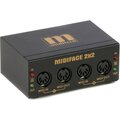
Miditech MIDIface 2x2
Based on 5 reviews
We installed this interface on our teacher's computers in a college setting, where we are teaching hardware MIDI routing and demonstrating physical MIDI connections. We'd tried using the USB - MIDI cable based interfaces for a long time, but the labelling on them isn't as clear and we found we were getting through a lot of them as they weren't as robust being plugged and unplugged. It's completely class compliant on OSX and just appears as In / Out 1&2 in your software without any need for additional drivers or installations. It has activity lights on the input & output that the cable based adaptors don't have which helps with the demonstrations and understanding as well. Rock solid little box you'd really struggle to damage it if you wanted to.
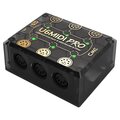
CME U6 MIDI Pro
Based on 4 reviews
So I have a Motu midi XT for years. This does all that does, but is easier to set up and actually a fair bit more flexible. The software is very easy to use, and I much prefer it to Motu's unstable, inflexible oldschool editor. I don't use the USB interface(s, as there are actually 3 USB interfaces in each U6), but they work fine and are very flexible in how data is routed to/from them. I needed a merge box. Was contemplating another big interface, maybe something like the iConnectivity battleship... but even if you own one or more of these big interfaces, it really makes much more sense to do specific merging/splitting locally in close vicinity to the actual target machine, instead of routing midi from multiple sources all the way back to the battleship for simple merging or...
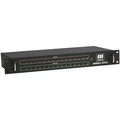
Miditech Midiface 16x16
Based on 3 reviews
As usual, Miditech provides a solid product that does exactly what it says on the box, no questions asked. This solved all my midi issues, caused by having way to much stuff. Since it's a midi interface, and not a midi router, it requires me to have the computer started to play my rack synths, but the alternatives are more expensive, *and* has less ports. One nitpick: The channels are numbered left to right on the front, as expected, but the actual outputs and inputs on the back go from right to left, as seen from the front. This means that the midicable position and the lights on the front do not match up. Which sometimes is confusing. Also, this unit is an unusual 1.5 units high, so if you are planning to put it into a rack you might want to buy a 1/2U blank panel to avoid having an...
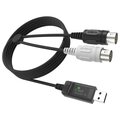
CME U2 MIDI Pro
Based on 2 reviews
Reason for buying this: I want to record midi so I can see what i have been improvising (guitar) in e.g. rosegarden or musescore.... I noticed that my quite expensive (700 eur) GR55 midi guitar synthesizer was not producing accurate output over the USB midi interface. I never noticed that because midi out is OFF by default and I did not use midi until recently. But, when starting to use midi to record it.. I noticed that I could not quite recognize what I had just been playing.... Timing is off, and lots of notes missing. Of course, I checked the realtime config of my DAW etc etc. but no issues there. Even worse, using it with the excellent GR55-floorboard software that allows you to easily configure / create patches on the GR55, I had to turn off the midi-out, because it was making the...
ESI MidiMate eX

Based on 19 reviews
On my macOS, it just worked, no problems. The cable is high quality, too. The only negative feedback I have is that the two MIDI ports are labeled "1" and "2", but in a very tiny font that is hard to see. When you're using both ports on the computer, sometimes you have to select "1" or "2" in your software, and finding the tiny number physically on the cable is a little difficult. But this is just an aesthetic complaint. Operationally it works perfectly.
Roland UM-One MkII
Based on 14 reviews
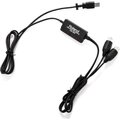
The 'issue' with the Roland was that there is a COMputer/TABlet switch on the side of it to differentiate between whether it is connected to a computer or tablet respectively. The problem I had was that I couldn't effect the switch with a thumb pressure. I contacted Roland UK, and was advised that the switch is recessed below the surface and that a small tool would be necessary to effect a switching. I used a plastic coated paperclip, and that exercise was then successful. They also advised that the switch is recessed to prevent accidental resetting e.g. during a gig.
Miditech MIDIface 8x8
Based on 6 reviews
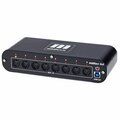
I purchased this one in order to test Linux compatibility. I am happy to report that it works out-of-the-box with several modern Linux distributions that i tried, including the two-three most popular of them. I am also happy with the build quality of this item (metal housing and all), and i only expect it to keep on performing for several years. Feature-wise, it is a simple midi interface. There is no additional fancy software for peculiar routings or anything similar. Totally recommended.
M-Audio USB Uno

Based on 21 reviews
Bought to connect various Roland and Peavey devices to my laptop, I thought I'd pay a bit more this time and get a reputable make of interface as I have been disappointed in the past by flimsy construction and limited compatibilty. Worth the extra cost as it works with all my devices and is of a more durable construction, having no corners it is unlikely to suffer impact damage from dropping it, but had it been of metal construction it would have received 5 stars for quality as it would most likely have been crush proof too,
Bome BomeBox

Based on 5 reviews
This device solves so many problems that it's almost impossible to list all the uses. If you have any kind of MIDI signal that needs to be converted, re-routed, or re-channelized on the fly, this will do it. I highly recommend getting a powered USB hub because this will allow you to connect an almost unlimited number of USB MIDI devices, and get them communicating with each other without the need for any other hardware. If you want to be really crazy, you can even get *two* BomeBoxes and have them communicate with each other wirelessly - so you can sequence hardware devices that aren't even physically connected. I'm doing just that, and I've even got it programmed (via Bome's MIDI Translator Pro) so that when I play a note on a hardware synthesizer, it automatically arms the...