Behringer X-Touch 4-stars Reviews
Good
Good Device.
Above average built quality of its kind,
More options but may take bit more time to be friendly.
Inexpensive but not so great when it comes to quality
I am using Behringer X-Touch to control my Ableton Live sessions.
Although I was delighted with the price, I should mention that the build quality is not excellent. You can feel the flimsiness of the faders.
Easy installation in Logic pro. Works very intuitive. Not very well documented, some youtube explanation available.
Works well, gets pretty warm to the touch
Does what it says it will on the box, but doesn’t come with any overlays for different daws, so I had to spend hours finding out what each button did and making new labels for them for use with Ableton. Also, the top right corner gets very warm when it is turned on, this is where the power cable goes in so I assume it has something to do with a transformer or something. Good unit but could be better
Great quality, and good wheel function, however, no instructions.
This is a great product for easier DAW use. I am using Logic Pro X and have no issues with this device. Love feel of faders, wheel, and play, pause buttons. The quality is really good, and the device feels heavy.
Mostly I use this device for:
1. When searching the web - Splice samples and playing my DAW (by clicking the play/pause button on X - Touch) without switching window.
2. When doing the final mix/master which contains couple group buses, to adjust the volume on faders, mute, or solo.
3. Use it to press record while standing up and doing my vocals.
4. Using pan functions.
5. Wheel scrubbing through track.
Things I did not expect:
1. No Manual. Only YT tutorials, and the most basic ones for LPX.
2. Using this device for automation is not so easy as it seems. You will definitely do a 4 times faster job with your keyboard & mouse.
3. Using this device for plugin control, is a NO, NO. Like, if you want to spend 50 times slower job by using faders and knobs which are weirdly assigned to each plugin, then be my guest.
4. Chanel strip screen is badly designed. It is really hard to read letters on the screen if you put your X touch after the keyboard from you. my advice is to put something beneath the controller, since this way you will create a more readable angle.
Almost perfect
Great control surface, if it had a raw and/or assignable MIDI mode then it would be perfect but it works great in Mackie/HUI modes and with Behringer's own X-Touch protocols.
ok
in logic pro is user-friendly
in pro tools, I just use the faders and knob.
nice experience.
the pictures do not do this justice, surprisingly heavy, bulky and made from metal. Very affordable price. The only downside is it's interaction with pro tools which i use, but that's really more to do Avid. Very satisfied but if you use pro tools you won't be able to use all of its features.
Works.
The hardware seems to work fine. So far, no problems, nothing's bothering me. I like it.
However, the software side: While it's definitely usable and mostly works, I'm using it for Reaper and support for reaper is a bit limited. Whose responsibility is it to provide support for popular DAWs? I think Behringer should deal with it.
You need it.
I use x-touch along with Logic Pro X. I connect it with my iMac through the MOTU midi interface by two 5-pin midi cables. Everything works great. However, there are questions about the quality of assembly and parts, for example, the potentiometer of Jog/Shuttle Wheel is installed with a small angle of bias, due to which, at a certain angle of rotation, jamming is felt. Nevertheless, this does not interfere much with the work.
heats up a bit but nothing to be concerned.
in ableton live some buttons are not very logical
great for everything except for plug-ins (logic pro x user)
the machine itself is of good quality. the knobs, faders, and jog wheel all have a good touch n feel and gives sense of precision. basic use is good (i.e. moving fader banks, adjusting track zooms, automation, etc.), however when it comes to plug-ins i give it a 2.5-3 stars. bkz it assigns the knobs of the plug in to the rotary dials (or faders) but its difficult to find the knob u r looking for. they are not grouped together properly, and thus u end of moving banks of knobs back n forth to set the levels. much much easier to use a mouse. if u tweak alot of plug-ins this is not the machine for you, if you are in surgery mode with eq's and plug-ins, this is not the machine for you. this gives you the real fader touch/effect which is great, but unfortunately not enough. overal total rating i would rate is a 3.5 stars but i rounded up to 4 bkz of the cost, very affordable for a certain amount of work flow relief and the opportunity to work with real faders. overall, one of the better made products by behringer.
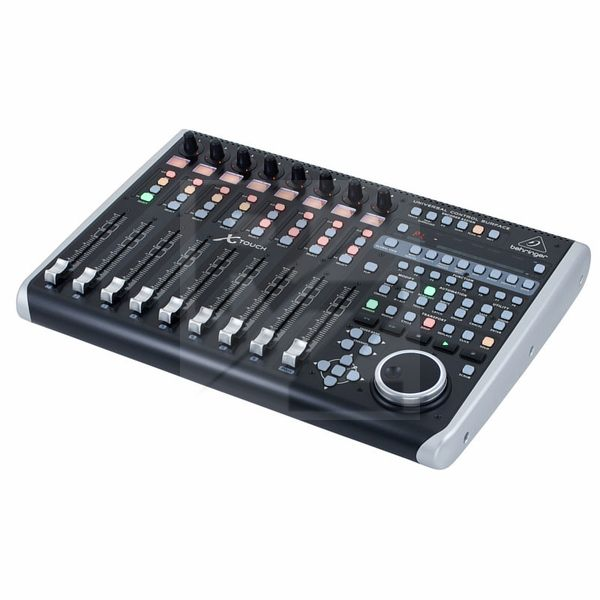
Technical Data
- Manufactured by Behringer
- Released in 2015
- Average price : $576
You may also like

2023 100%


2022 100%

2022 100%

2022 100%

2022 96%

2022 90%

2022 80%

2022