Behringer X-Touch 5-stars Reviews
Good value
Nice controller for mixers, lights, DAWs and so on.
Does the job
Great controller. So usefull. Love it!
5-Star DAW Controller
The Behringer X-Touch deserves its five-star rating as it has revolutionized my music production workflow.
Its rugged build, seamless DAW integration (I use Logic Pro, Ableton & Pro Tools), and touch-sensitive motorized faders make mixing a breeze.
The X-Touch's versatile controls and compatibility with various software applications have elevated both my studio work and live performances.
Highly recommended for any musician or producer seeking an intuitive and powerful control surface.
Works well with Logic Pro and Reaper
Used it on both Logic Pro and Reaper.
I use it with default config in Logic, and it works flawlessly. No disconnections, no issues - it does the job.
In Reaper, I reconfigured it completely to be the ultimate "no mouse" machine. I kept all buttons as is, but then mapped new functions when combined with Shift/Ctrl/Alt/Option. For instance, with the function buttons, this trick allowed me to have 5x 8 buttons assigned to load plugins (one button and its 4 modifiers for several pianos, another one for synths, another one for various compressors, ... ).
Wish Logic would allow that same level of customization, but oh well ...
Behringer X-Touch Universal DAW Remote Controller
This is the best piece of equipment i have ever bought makes my life so much handier with my daw ableton and along with the Behringer xr18 easy to set up loads of you tube videos on both units would recommend
Improved My Work Flow
I have been using the X Touch with Cakewalk, and once I'd got used to the layout and whereabouts of the buttons, I haven't looked back. The big advantage, for me, is being able to mix and adjust various things like EQ, Compression and other VST settings by feel and listening, rather than looking at a screen to navigate a mouse, and then being led by the visual prompts, rather than with is coming from the speakers.
Added to this, I tried out Harrison Mixbus, and the Mackie integration with the X Touch is 100%
Works awesome with MR18
It gets some getting used to and getting the remote to communicate with your mixer may be bit of an hassle yet it'll be wirth it in the end.
You'll want to keep your computer or phone nearby for little adjustments though. Easier and prettier there.
Awesome Controller for a lot of equipment
A perfect Controller for the X32. Very satisfied with the purchase
Great daw controller
Works perfectly with Ableton Live. I used it to control the daw and individual tracks. I'm totally satisfied with this investment.
Pros:
Good quality faders and different colour lights in the buttons. The small screens makes it easy to see which track you are tweaking.
Cons:
You need to tilt it a bit more to actually see what's on the screens, but it can quickly be fixed. The controller itself is heavy, but also a bit too big and clumsy on the desk in my opinion.
5 stars for X-Touch
Very good and solid construction and meets what it promises. Good value for money
Perfect mixer
Received it 2 days ago, and just want to say it is so amazing.
So many features and it works flawlessly in Reaper. It just started working at once, just switched connection from BCF2000 (i use Mankie Control driver by Klinke).
Don't forget to choose MC and respective connection option in boot menu if you changed firmware.
x touch
Super controller!
I use it with Reaper.
With the standard MCU settings in Reaper, most used functions work out of the box.
If you want to dig a little deeper into the possibilities of the x touch with Reaper I suggest installing the CSI plugin.
It took some time reading and, trial and error to understand the "programming language", but it is really not as hard as it seems.
There is a lot of information online about this, and when you know how to use it the possibilities are endless.
Not only for your DAW controls but also for your plugin controls.
Plus for me as an "old skool" engineer, the way of working with faders and controls, instead of only a mouse, provides me with a lot more creative ideas and options.
So I don't use it as a mouse replacement. But it absolutely provides me a more creative and faster workflow.
Best generic DAW controller
Easy to set up, it allows you to work via USB, via Ethernet or both.
I use it to control ProTools smoothly, as it supports Mackie HUI mode.
The only flaw is the displays that (although they work excellently) on Pro Tools do not use channel colors, and the master fader is not used (it makes sense in a daw). While using it via USB with any DAW, any Behringer (X32 or Xair series) or Midas (M32 series) digital mixer can be controlled via Ethernet.
The motorized faders work excellently without delay. Furthermore, the faders are sensitive to the electrostatic current of the fingers, and only move by themselves while not touching them. Recommended!
Great for the price
I use it for my Logic Pro X. Works great, easy to use. Great value for money.
Impressive hardware considering the price asked.
I actually wanted the Mackie Control Universal Pro, but because it costs almost three times as much as the X-Touch I had to resign myself to the fact that I'm in the wrong income bracket presently.
It has a very sturdy build, built like a tank. Picking it up the first time and feeling its weight immediately communicated good quality. Good response in the buttons, soft ones and hard ones. Jog wheel is pleasant to operate. The motorized faders are very smooth and I can't hear any anomalies when they track my automation. I wipe the surfaces down at least once a day to keep things nice and tight.
I use it with Presonus Studio One 5 and setup was a breeze.
Full transparency, I don't use nearly all the functionality. I bought it because I want to adjust levels and pans and fast forward to any position in a tactile way, but you can do so much more than that. It's just that I'm way faster with my keyboard for most things. For example, I could adjust FX parameters, but reading the tiny channel displays and menu diving is far too complicated and whimsical.
If you want to create custom setups it is apparently possible to write scripts, but I couldn't be bothered. You can find videos on this topic on YouTube if that's your bag.
On a purely superficial note, it looks really cool on my desk and I take idiotic pleasure in watching the faders move in accordance with my music. No regrets after many months of use.
Great DAW controller! And great for XR18!
Bought this to control my Behringer XR18 and it works beautifully - with full colours and maximum control. It can also be used simultaneously as a DAW controller!
using it with Ableton
I'm happy with it because I get the feel of a mixer so I'm enjoying the process a lot more than before (when I was only using the mouse). It is working better than expected with Ableton Live and, although there's no proper user manual, you can find info on youtube thanks to some users' walkthrough videos. In Ableton you'll find some of the X-Touch buttoms do another function rather than the labeled one but I think you can easily fix it (by re-labelling the controller yourself or changing the function by mapping another one in Ableton). I think that if you mix ITB the X-Touch will improve your workflow!
Great for the money
I've been a amateur musician for around 25 years and have seen technology progress around me and while some of it doesn't always seem necessary I sort of understand it's value in the world of creativity. This isn't one of those.
This thing is brilliant for workflow and speeding up my creative process and I wish I'd bought it sooner. I primarily use the transport buttons as puling out my keyboard drawer to find the R or * key and then throwing the drawer back to it's closed position and then finding my place on the guitar or keyboard often saw me either pressing the wrong key or making a mistake during the beginning of the take.
The buttons on this thing are lovely and large and illuminated so you always know where you are, programming the function keys is a breeze and the touch sensitive faders are a great way to quickly get around the arrange window and adjust monitoring volume while recording. I've not actually used it for mixing "properly" yet but the little rough mixes I've done in my projects with this are great fun to undertake and feel more tactile not using a mouse to do the majority of the work. If you can afford this and are serious about your creativity, buy it.
Great product
Great work with great quality and working perfect with Logic.
Inexpensive DAW controller from Behringer
I bought this to use with Cubase 10.5
The basics work fine for mixing. It works via Mackie Control Protocol so not all features and buttons work but its good enough if you want to mix and monitor tracks in your DAW
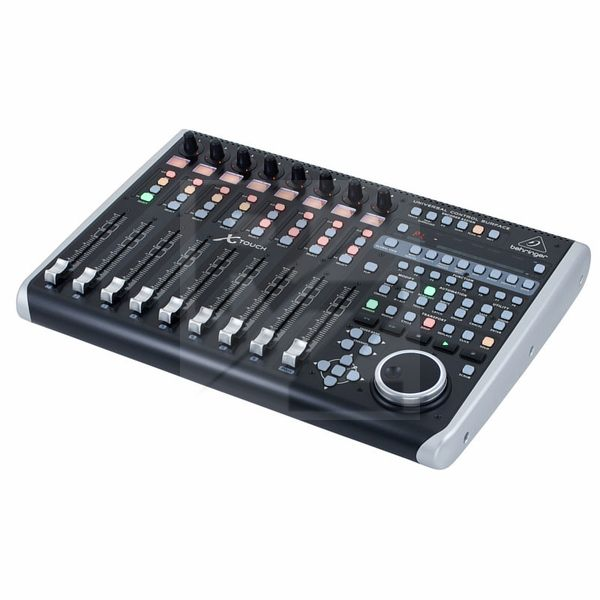
Technical Data
- Manufactured by Behringer
- Released in 2015
- Average price : $576
You may also like

2023 100%


2022 100%

2022 100%

2022 100%

2022 96%

2022 90%

2022 80%

2022