Icon QCon Pro X 1-star Reviews
Take car with protools
Here are the biggest bug that I have identified with pro tools:
- When you selects one of the these buttons " : Send A, B, C, D, E , fader flip , read , write , cmd, shift, The pro XS extension didn't follow the qcon prox . It always stay in Pan Mode …
- The first led of the peakmeters (-22dB) remain lit on some tracks randomly while there is absolutely no sound in this track.
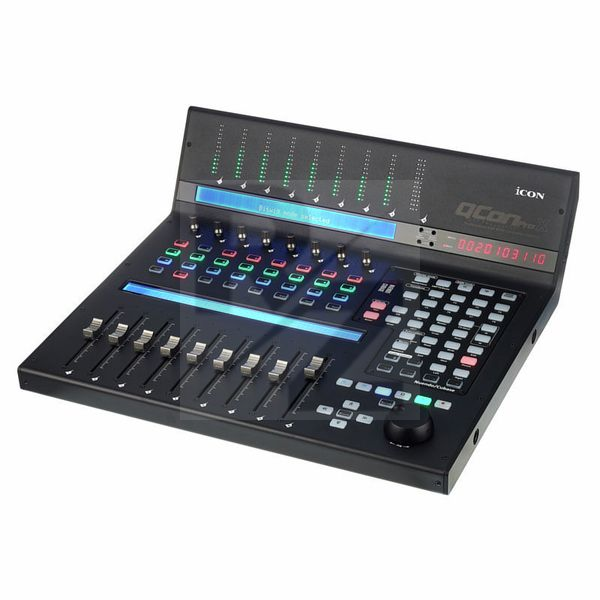
- The screen below is useless because the indications are fixed with channel numbers. But these channel numbers are not the chanel numbers of protools, they are just chanel numbers determined based on the selection of the Icon Pro XS expansion number on power up. Problem in addition: if you install in the following order your machines from left to right (2 extensions Icon pro XS then an Icon pro X and then one more extension Icon pro XS , exactly as on the photo of your site) You can not display channel numbers from 25 to 32 on the last extension. So on the one hand the screen is useless but in addition the few indications on it is wrong.
- The faders , when there are on nominal volume (0 db) on protools , are juste between two bars on the icon pro . It’s really strange.
- There are no access to the send F, G, H, I, J .
- In Fader Flip mode , when you selects Send A,B,C,D,E … , names of the tracks disappears. It's really ridiculus , because as you see nothing, you can't send in the "sends" without knowing the name of the track.
- The master fader and master peak meters doesn’t work with protools. I know it’s because of the HUI protocol but I’m surprise that nobody can do a script to fix it ?
No More Icon Stuff
I ordered Icon Qcon Pro X a little bit more than a year ago after watching several videos and reviews. It looked really great 'cause of its features and price. I got it fast, packed well with manual, driver, cables and some templates for different DAWs.
The first impressions was awesome. Icon Qcon Pro X was well-built, heavy (in a good way) and made of steel. It had three displays - one with a timecode/bars/seconds, one with the number of tracks and the most useful one with everything you need from titles of tracks to EQ settings. I could easily update software and connect it to Logic Pro. Fader were quite noisy but worked well enough for the price.
Unfortunately, after half a year of using (not even often) Qcon Pro X started to behave strange. The first thing was that the master fader stopped working at all. Sometimes the fader thought that my finger is on (blue light was always on) and didn't let me change the volume neither in DAW nor by fader (it just got off sync with DAW). Sometimes it just didn't move. But that was OK 'cause I decided just not to use it at all (used an output volume on my sound interface instead). After a year it started to freeze every 5 minutes. The only decision is to close and re-open DAW and reboot Icon. You can't do it every five mins!
Unfortunately, there's no service center in Russia. The Icon's help center didn't answer and forums never helped. Though, as I realise now, the problem is not rare at all. Now my Icon Qcon Pro X is completely unusable.
I would recommend to look for maybe more expensive but reliable brand and DAW controllers.
You may also like

2023 100%


2022 100%

2022 100%

2022 100%

2022 96%

2022 90%

2022 80%

2022