Behringer U-Phoria UMC22 Reviews
Great Interface for that price
I've bought it to connect my Electric Guitar to my pc and use it for recording and overall practice using a virtual amp simulator that allows me to use various different sounds without the need to buy expensive Amps or Pedals.
It is made out of Metal so it looks sturdy and can probably withstand some abuse.
The sound is as great as it can be for a 40 Euro Interface but theres nothing to worry about regarding noice levels and connectivity, i've had no problem connecting it to my Windows 10 machine and my DAW.
I would really recommend this Interface if you are on a pretty tight budget like i am
An alright and cheap interface
the only issue that I have with it is unsupported drivers, and sometimes just out of nowhere you can hear some static, unplugging and replugging the device seems to fix that.
Great value for the price
Incredible product for its price-tag.
Great build quality,
I definitely recommend it!
For this price there are no negative points.
This is my first interface and its great
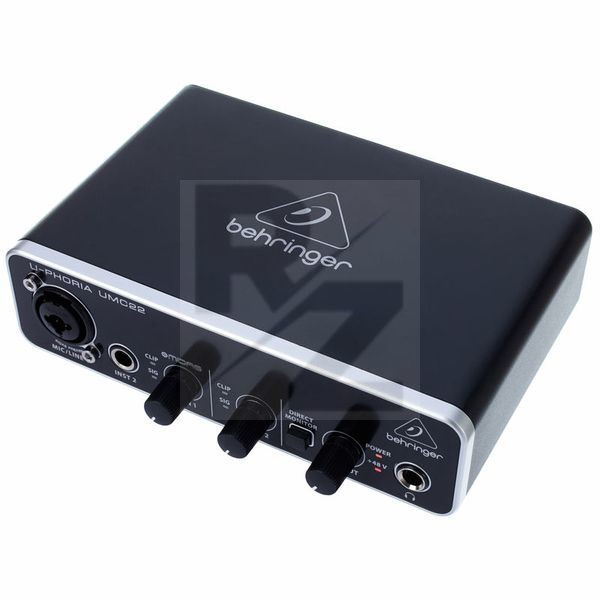
Its great for the price, offers one xlr input, one 1/4 inch for instruments and one 1/4 inch for headphones, and has a button for direct monitoring. It doesnt have a 3.5 mm port, but you can buy a cheap adapter for that. Overall: a great interface for this price, does its job good. Only slight problem is that you have to set the volume of your microphone in windows at 70% for it to work correctly...but this may vary.
Great quality for the price
I bought it for my second home studio for my second space and I want it to try because the price was great.
It's plastic so it's sturdy but if you drop you break it.
Sound is great not one that is going to drop you from your sit but it does perfectly the job. and it's cheap
Latency while overdubbing
Useless when used with DAW (Audacity) for overdubbing.
Playing along with the existing tracks, while recording thrue this device.
Resulting in substential latency of the recorded channel when listening to the result.
Can't get best at this price
I've been using it for about a week, and it's been working pretty well.
It does get the job done, and the design looks very nice and premium.
But in Windows, you will spend some time setting everything up with the drivers.
Simple, easy and with great sound
Great piece of gear to use. If you need a sound interface with a great sound, easy to use, this one is for you!
Just plug and play!
Preamp is quite and sounds amazing!
Headphones amp has a great sound also! Direct monitoring is very useful!
It does the job well
Works just fine as an interface for practicing electric guitar and recording, covers my needs at a great price. Haven't used it with a microphone yet though, just my guitar. Can't find anything wrong with it.
Good, usable interface!
The last interface I bought was more than 10 years ago, a firewire one... I don't know if my expectations were too high for this, but I really found it underwhelming...
I expected zero latency on plug and play, for what computers and these devices evolved in the last 10 years, but still had some tweaking to do.
I expected full compatibility imediately, for those same reasons, these protocols have evolved so much, but still had to make manual adjustments on various DAW's.
But the product worked fine, once ready... just "meh"!
Midas preamp works great in it, very nice for small home recording. Yet lack of dedicated drivers and working on basic ASIO drivers make it sometimes hard to use, and some settings may cause unexpected distortions in sound which may be troublesome during this one great take, when your guitar suddelny sounds like radio from 1960's. If you prepare everything well it will work great, but it is a lot of hassle to do so.
Excelente product and price
I already knew this interface, so I already knew its quality. It is excellent for your propost, small jobs and home studio. And the price is great, 1/3 of the amount charged in my country, Brazil
Not recommended if you also use it as a sound card.
I just bought this thing last week. I needed something cheap and simple to double as both an audio interface and as a sound card.
Recording wise, it does exactly what it says on the tin. Nothing more and nothing less. That works fine for me since I have no need for more high end equipment to record my bass guitar. And although driver support is absolutely worthless, I did manage to set it up, using the suggested older Behringer drivers. But using it as a sound card, is more than horrible. When I listen to stuff on Youtube and then switch to whatever mp3 player I use on my computer, the sound is slowed down to rather annoying levels. I have to troubleshoot/reinstall the device and/or drivers every time I make that switch, which is incredibly frustrating. Then I decided to completely remove all Behringer drivers and for some reason, my computer still recognised it as the primary sound device, which I found rather strange. Needless to say I will be returning this device and opt for another interface. One that DOES have it's own drivers. I have never had this kind of problem with any of the interfaces (same price range, same quality range) I used to own.
Great for the buck
I bought this to be able to record my Microphone and Guitar digitaly with better quality without spending too much money.
It's great quality both in sound quality and material quality.
Only flaw I can point out is that I can't really manage to find a use to the instrument inport, since whenever I plug my guitar there and have the microphone plugged in by XLR it has no use at all, which is a shame because I want to be record my guitar while being able to use my microphone. But maybe that's just me that am not very experienced with this yet.
Anyway, It's a great product for the buck.
Simple yet efficient
Using the U-Phoria is quite straight forward. There aren't that many options, but honestly this is expected. This is a super cheap product with great quality overall.
Does the job,doesn't feel cheap to the touch.
Very good!
it is really good for it's price and very easy to use. There is also no latency on direct monitoring, so you can hear what you're playing while recording.
U-Phoria UMC22
Great little interface that does its job and does it well.
For the money, the best interface you can get. If you don't mind the driver support.
Got this interface a while back to use with my Rode NT1-A for streaming, recording and filmmaking. For about 40 bucks you get what you expect.
2 mono channels, one mic/6,3mm combo jack and one only 6,3mm, direct monitoring, headphone out and monitor out. It's aluminium chassis is well build and does add a little weight to it. The knobs are perfect to use and overall the usb jack is well build. Only issue i had was the Asio4All driver which i had experiences in the past and choose to avoid at all cost. But after some digging i found specific drivers made for this interface by Behringer which have been discontiunued, but still work fairly well. The fast preset has a latency of around 2ms which is more than enough for me. Only issue is that all the audio that doesn't come out of the asio will be either pitched down or completly muted. Also it has the tendency to not work after unplugging and plugging it back in a few times, but a restart fixes it.
Overall, for the price. It is a well build interface that gets the job done without additional noise.
Well made design, but many problems with the drivers and hardware
PROS: I love that its made from metal, feels very good in your hands and provides a sense of confidence. XLR mount is very stable and the knobs feel secure and rigid. Features give yout everything for small studio work. 10 points for design and overal exterior build. Thats all for the PROS.
CONS: For WIN users: what I hate, as many other people, is that Behringer doesn't provide their own dedicated WIN drivers for UMC22 and you're left with Asio4all which is outrageous! Asio4all is not even working correctly on WIN10 after certain update some time ago. If you want small buffer size, Asio4all is going to crash on you or make bad noises eventualy. Thats a shame, because I know that some time ago UMC22 worked flawlesly with Asio4all and provided very small latency. Anyways there are many recommendations to use older Behringer drivers from other users (BEHRINGER_2902_X64_2.8.40), which you can google. It works for many with less issues Asio4all (with the "rapid" option selected in the Behringer drivers settings), but Behringer themselves don't recommend it anymore for some reason.
I should point out, that I had my unit returned for money back. One of the reason is the driver issues, mentioned above, which leaves your very well built unit practicaly unusable. Another reason lies with white noise levels on MIDAS preamp. It was very audible, when I cranked the mic gain pass 70 percent, but I only got minus 20 dB (or less) on my DAW, so in the end you are left with bad noise on your recording after final mixing. I'm not sure if it was drivers' problem or a hardware fault. This may not occure on every Behringer unit, because I also tested another UMC22 unit of my friend with no issues whatsoever, but I've read a lot that the same problems as mine are very common.
That said, I think it could still be usable for beginners and you could get good results from the interface on the condition that you got a working unit (with no noise issues). Also, I should note that UMC22 is better to be used with MAC and not WIN systems, because of the serious driver issues (lack of them) with WIN10.
Technical Data
- Manufactured by Behringer
- Released in 2013
- Average price : $63
You may also like

2023 100%

2023 100%


2023

2023

2023

2023

2023
