Behringer X-Touch Reviews
using it with Ableton
I'm happy with it because I get the feel of a mixer so I'm enjoying the process a lot more than before (when I was only using the mouse). It is working better than expected with Ableton Live and, although there's no proper user manual, you can find info on youtube thanks to some users' walkthrough videos. In Ableton you'll find some of the X-Touch buttoms do another function rather than the labeled one but I think you can easily fix it (by re-labelling the controller yourself or changing the function by mapping another one in Ableton). I think that if you mix ITB the X-Touch will improve your workflow!
Works well, gets pretty warm to the touch
Does what it says it will on the box, but doesn’t come with any overlays for different daws, so I had to spend hours finding out what each button did and making new labels for them for use with Ableton. Also, the top right corner gets very warm when it is turned on, this is where the power cable goes in so I assume it has something to do with a transformer or something. Good unit but could be better
Great for the money
I've been a amateur musician for around 25 years and have seen technology progress around me and while some of it doesn't always seem necessary I sort of understand it's value in the world of creativity. This isn't one of those.
This thing is brilliant for workflow and speeding up my creative process and I wish I'd bought it sooner. I primarily use the transport buttons as puling out my keyboard drawer to find the R or * key and then throwing the drawer back to it's closed position and then finding my place on the guitar or keyboard often saw me either pressing the wrong key or making a mistake during the beginning of the take.
The buttons on this thing are lovely and large and illuminated so you always know where you are, programming the function keys is a breeze and the touch sensitive faders are a great way to quickly get around the arrange window and adjust monitoring volume while recording. I've not actually used it for mixing "properly" yet but the little rough mixes I've done in my projects with this are great fun to undertake and feel more tactile not using a mouse to do the majority of the work. If you can afford this and are serious about your creativity, buy it.
Great product
Great work with great quality and working perfect with Logic.
Great quality, and good wheel function, however, no instructions.
This is a great product for easier DAW use. I am using Logic Pro X and have no issues with this device. Love feel of faders, wheel, and play, pause buttons. The quality is really good, and the device feels heavy.
Mostly I use this device for:
1. When searching the web - Splice samples and playing my DAW (by clicking the play/pause button on X - Touch) without switching window.
2. When doing the final mix/master which contains couple group buses, to adjust the volume on faders, mute, or solo.
3. Use it to press record while standing up and doing my vocals.
4. Using pan functions.
5. Wheel scrubbing through track.
Things I did not expect:
1. No Manual. Only YT tutorials, and the most basic ones for LPX.
2. Using this device for automation is not so easy as it seems. You will definitely do a 4 times faster job with your keyboard & mouse.
3. Using this device for plugin control, is a NO, NO. Like, if you want to spend 50 times slower job by using faders and knobs which are weirdly assigned to each plugin, then be my guest.
4. Chanel strip screen is badly designed. It is really hard to read letters on the screen if you put your X touch after the keyboard from you. my advice is to put something beneath the controller, since this way you will create a more readable angle.
Inexpensive DAW controller from Behringer
I bought this to use with Cubase 10.5
The basics work fine for mixing. It works via Mackie Control Protocol so not all features and buttons work but its good enough if you want to mix and monitor tracks in your DAW
I am using the behringer X-touch as a DAW with Adobe premiere pro to control audio. Buttons are not fully utilised, but can be mapped accordingly through Premiere. It minimizes alot of tedious work using mouse and works fine. I have also used it with adobe audition and works like a charm.
wow,,
working with Magix Samplitude music studio 2021 an amazing robust controller for the price and great to work with fingers and buttons and automated faders again.
So far so good easy setup
Compact but spacious around buttons and controls
Good illumination
I have had some glitchs (freezing) but that may be to do with my setup as I am new to this tech and have lots to learn still
Perhaps a better manuel/guide for initial setup however I know that may be impossible due to the number of possible applications it may be working in.
While it is amazing personally I do not enjoy trawling through the internet and miss personal support of the old days.
Enjoy this powerful pleasing essential tool to take back the tactile creative engagement with daw computer work
Time will tell
Almost perfect
Great control surface, if it had a raw and/or assignable MIDI mode then it would be perfect but it works great in Mackie/HUI modes and with Behringer's own X-Touch protocols.
Life is easier with a mouse
Too many glitches working with Logic for me. Not really that intuitive to just pick up and use it either. In any case some of the plug ins I use have multiple controls that spread over many banks so it's much easier and quicker for me just to use the mouse!
Great build and quality
Hooked up with XR18 and it Rocks
very good product. My work stay easy with this DAW controller.
Thank you for your work!
ok
in logic pro is user-friendly
in pro tools, I just use the faders and knob.
nice experience.
Once you've got it talking to your DAW...
This has been very useful - I prefer to have hands on rather than trying to fiddle with a mouse pointer to change volume, pan, etc.
Transport controls are very useful and are probably the most used.
I have mounted my console at an approximate angle of 30-40 degrees which allows the viewing of the scribble strips with greater ease; the displays are not the best and only show a few characters, so you have to get creative naming your tracks.
Had issues with USB vs MIDI to control the unit - have needed up using old fashioned DIN MIDI cables to talk to the DAW. USB didn't seem to work.
Used the USB hub facility and that seemed to work ok.
Overall, I am glad I bought it and added it to my studio and I will continue to try to use the features that are as yet undiscovered.
Improves workflow no end
Have been using this for the past month of so with Cubase and so far have been delighted with it. Very easy to set up and once the various controls have been sorted out and configured to your liking it really does make a difference to the workflow.
It's not a replacement for keyboard and mouse - there are a lot of things that are simply quicker to do with keystrokes and clicks - but with all three things working together it has made my Cubase sessions more enjoyable and productive. I wish I'd bought one before!
General purpose controller.
In combination with Bome Midi Translator Pro, only fantasy is a limit.
the pictures do not do this justice, surprisingly heavy, bulky and made from metal. Very affordable price. The only downside is it's interaction with pro tools which i use, but that's really more to do Avid. Very satisfied but if you use pro tools you won't be able to use all of its features.
Noisey but practical
The faders feel a bit cheap and as if they could snap if not within a proper case, but the user functions all are very practical and it has made working with an XAir or automation in DAW more fun
Works.
The hardware seems to work fine. So far, no problems, nothing's bothering me. I like it.
However, the software side: While it's definitely usable and mostly works, I'm using it for Reaper and support for reaper is a bit limited. Whose responsibility is it to provide support for popular DAWs? I think Behringer should deal with it.
Logic Pro X Daw Controller
In my opinion the best controller for Logic Pro X.
The unit looks great and knobs and buttons feel pretty nice. Works really well with logic pro x, i haven't got any issues so far.
only con is that the slides feel a bit cheap but it doesn't affect my workflow at all
Recommended!
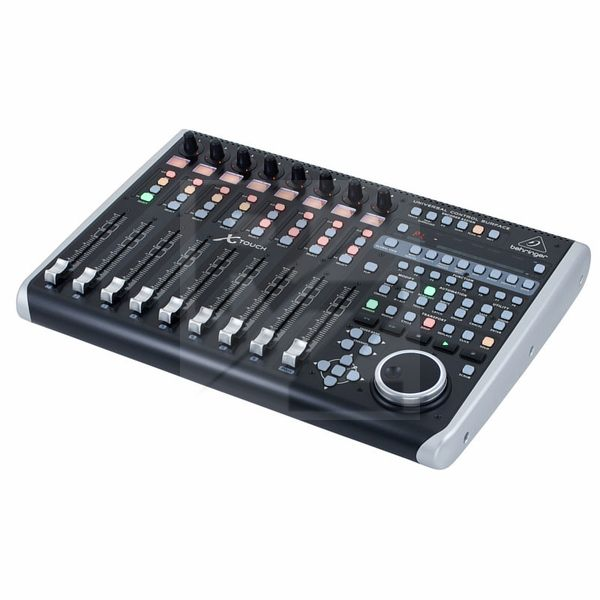
Technical Data
- Manufactured by Behringer
- Released in 2015
- Average price : $576
You may also like

2023 100%


2022 100%

2022 100%

2022 100%

2022 96%

2022 90%

2022 80%

2022