Behringer X-Touch Reviews
You need it.
I use x-touch along with Logic Pro X. I connect it with my iMac through the MOTU midi interface by two 5-pin midi cables. Everything works great. However, there are questions about the quality of assembly and parts, for example, the potentiometer of Jog/Shuttle Wheel is installed with a small angle of bias, due to which, at a certain angle of rotation, jamming is felt. Nevertheless, this does not interfere much with the work.
Great with Ableton
This has really helped with speeding up the workflow, very happy with the purchase.
heats up a bit but nothing to be concerned.
in ableton live some buttons are not very logical
Nice addition to X32Rack
Bought this unit for controlling my X32Rack and ocasionally using it with DAW. It's possibility of controlling X32 is quite good - I didn't expect that it's even possible to configure FXes! You can't select them though… you can change already selected FXes.
There are multiple controlling modes in this (MCU, MIDI or Xctl - which is protocol strictly created for X32 remote control) and many DAWs and X32 uses buttons differently. At first I thought about buying or - at least - printing overlays for it. But after spending 30 minutes with unit I get used to "what is where" on buttons and I feel like I don't need overlay anymore. Everything is intiutive - altough scribble strips are strange cause looking at them at high angle makes them look like displaying colors inverted.
The only sad thing about X32 control is missing "GEQ on Faders" :(
Since I'm IT guy with some programming skills I was playing with MIDI/SysEx messages too, and all I can tell - you can do more with this unit than you think. If you do web search enough, you'll find how to change labels on scribble strips and colors manually from your computer and maybe write some custom implementation for it! Quite handy and nice. Just remember to use MIDI mode for that!
Almost great
On a physical level this is great. The quality is very high, the motorized faders work perfectly etc. But, and I'm cutting to the chase, there's a major issue with the compatibility (at least with Cubase) and that is that the channels buttons don't work as expected. Instead of scrolling the channel assignment over the faders by one track, they instead change page settings (?). I assume this is fixable with a firmware update and I'm pretty sure Behringer knows about this, but unfortunately an update does not seem to be on the way... Until this is fixed, navigating sessions only using the banks (move fader groups by 8 tracks at a time) is not the best. Sometimes you're bound to end up with the faders you want to control being on different banks and having to constantly jump between them... Until this is fixed I can't ginve this otherwise good product five stars.
works great with logic x
works out of the box with logic x, using mackie protocol.
makes you feel the mix, automate parameters, qucikly edit in the arrangement, and also control the plugins parameters in each selected channel. only issue I came across are rare freeze which is fixed by restart the x-touch. (it takes a second).
I'd highly recommend it to anyone who mixes with logic x. there is a reason they called it x-touch.
Bought this unit for Live use with X32 rack and for studio work controlling some DAWs. Its great, feels great is not too big. Just ordered the Thon case for use it live.
practical vs. knowing how to use it
this console looks very nice and rigid. however settings and routing to the x32 rack mixer was very difficult and couldn't get a clear instructions/manual on how to connect and configure it .. still i need to do more youtube searches in order to have it working properly and customized to my needs.
great for work with logic
east set up, great workflow. really enjoying this product.
Quickly became an indispensable tool for me
My use case for the X-Touch is as a DAW controller for Cubase in a home studio. I use it for transport control, setting markers, volume and panning, and other DAW control (e.g. arming tracks, metronome toggle (custom shortcut), monitor toggle (custom shortcut))
I don't use the faders and knobs for plugin control etc., I use my master keyboard for those since that allows me to change the CC numbers more easily.
The positive:
- Since I started using this in Cubase, I can't work well without it anymore. It speeds up my mixing workflow so much compared to just using mouse+keyboard. It's also much easier to control the recording process with the X-Touch when I'm playing guitar or keyboard. Need to record DI + wet signal to separate tracks? Just press both 'rec/arm' buttons on the X-Touch at the same time.
- Build quality feels very solid, faders feel sturdy.
- Reliable, no issues in operation yet after 4 months of intensive use.
- The touch sensitive faders are useful for automatically selecting channels, no need to press a button first. However, that option does exist as well, if you want to select a channel without touching the fader and risking a volume change. It's great to have both options!
- Great integration with Cubase, the customizable shortcuts open up a world of possibility.
- Has 2 pass-through USB ports, which I use to connect some other music-related gear, allowing me to turn all of it on/off with a single switch - the X-Touch power button.
- Uses a standard power cord which is therefore easily replaceable.
- Motorized faders just look awesome in general.
- Much cheaper than an actual Mackie yet I don't really see a reason why that would be better. In fact, I prefer the X-Touch' separate track displays to the Mackie's combined track display. The X-Touch also shows the volume per channel during playback with a typical volume 'bar', which looks great in the total channel overview, while the Mackie just shows it using a single LED.
The negative (X-Touch specific):
- The track displays are not readable under an angle, but I solved that by tilting the whole X-Touch, which somehow feels more natural to control that way for me as well.
- Toggling between parameter names and parameter values in the track displays is a non-sticky option. I prefer to see the values, but the default is to show the parameter name. Every time I switch fader banks (or restart the device), I have to re-set that option if I want to see values instead.
The negative (Mackie-protocol limitations):
- The track display hardware supports different colors for the backlights, which would be an awesome feature to even more quickly correlate the channels to the ones in my DAW. However, this does not work with a DAW due to limitations in the Mackie protocol. This is NOT actually a limitation in the X-Touch itself; the much more expensive Mackie controllers have the same limitation. It only works over ethernet when connected to a Behringer X32 (have not been in a position to try that, so I cannot verify it)
- Buttons can have different functions in different DAWs and applications, so you may have to find and print a template to put on it for easier use. The standard names don't map well to Cubase, which I'm using.
- Faders sometimes do not appear to go very smoothly. This is not a hardware issue, but it is because some DAWs send Mackie updates with a relatively low frequency (so instead of a 'diagonal line' when increasing volume, the controller receives a 'staircase' from the DAW). Luckily there is a free tool floating around online that can intercept and interpolate these updates, which improves smoothness.
Useful note:
- The protocol is MIDI-based, which makes it universally compatible with many things. However, if you only plan to use the faders and knobs for volume/panning, like me, you may want to disable this device in your DAW's regular MIDI inputs to prevent unintentional changes to your virtual instruments when pushing buttons and moving faders/knobs :)
Bought to control X Air Series mixers wirelessly
Bought to control X Air Series mixers wirelessly.
A little tricky to set up. Required a firmware update and some IP addressing to get it to talk to the X Air. I used an old TP Link router in Client mode to make the X Touch "wireless".
Once I got it set up properly, it was cable free heaven....
Now the X Air is on stage with the band cabled into it. I am at the rear of the venue mixing FOH wirelessly. I have had no issues with drop out so far with a range of 50m. No more derigging multicore.
It's not a £100K+ Studer or Calrec in terms of motor quality, but very happy so far....
great for everything except for plug-ins (logic pro x user)
the machine itself is of good quality. the knobs, faders, and jog wheel all have a good touch n feel and gives sense of precision. basic use is good (i.e. moving fader banks, adjusting track zooms, automation, etc.), however when it comes to plug-ins i give it a 2.5-3 stars. bkz it assigns the knobs of the plug in to the rotary dials (or faders) but its difficult to find the knob u r looking for. they are not grouped together properly, and thus u end of moving banks of knobs back n forth to set the levels. much much easier to use a mouse. if u tweak alot of plug-ins this is not the machine for you, if you are in surgery mode with eq's and plug-ins, this is not the machine for you. this gives you the real fader touch/effect which is great, but unfortunately not enough. overal total rating i would rate is a 3.5 stars but i rounded up to 4 bkz of the cost, very affordable for a certain amount of work flow relief and the opportunity to work with real faders. overall, one of the better made products by behringer.
Very good controller for 370 EUR
I am very satisfied with this controller!
I am using it for my XR18 Air, and they are very compact tools together.
The handling is fast and clear. With a router, I can use several devices simultaneously to control the mixer.
A nice and useful tool for live mixing and in a studio.
My only complaint is the poor documentation, and the fact I have to install MIDI-OX software and send MIDI SysEx file to upgrade the firmware, which is not the simplest way for a firmware update, but acceptable.
Nice touch Behringers X-touch
The Behringer X-touch was primarily bought as a controller for the X32 Rack after a quick firmware update to both I was up and running in no time at all.
I use this either FOH with a pair off iPads for screens or/and have used X-touch as monitor desk once while mixing FOH with both iPads. Seriously versatile and great to not have to run Xedit and lug a laptop around ??
My setup may seem a bit ... magoo but works flawlessly for me and the security of having the system hard wired gives peace of mind not that my iPads have ever failed.
The X-touch is also and possibly more importantly a DAW controller a whole host of features that would be best suited to logic. For me I shall not use it for its main intended purpose.
Highly recommend it does exactly what it says it does :).
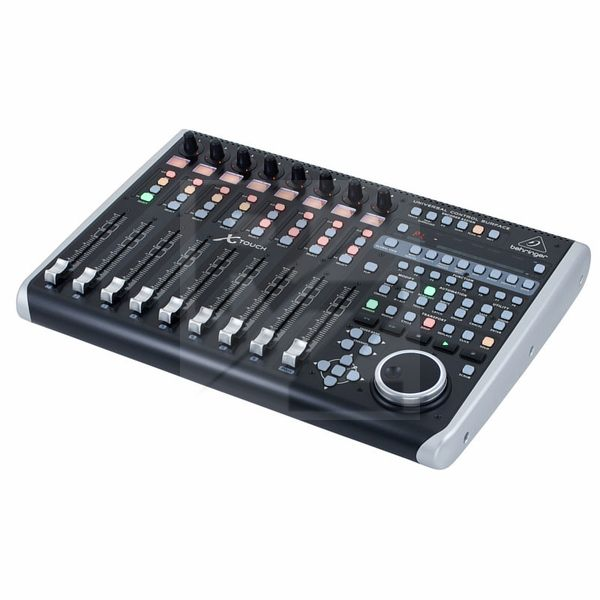
Technical Data
- Manufactured by Behringer
- Released in 2015
- Average price : $576
You may also like

2023 100%


2022 100%

2022 100%

2022 100%

2022 96%

2022 90%

2022 80%

2022